Participant
November 28, 2015
解決済み

The smudge tool disappeared from my toolbar and I can't find it\use it

  • November 28, 2015
  • 返信数 2.
  • 33278 ビュー

I am using photoshop CC latest version November 2015 on a windows and it suddenly disappeared on me

    このトピックへの返信は締め切られました。
    解決に役立った回答 sarsaxen

    Actually the tool is hidden in the group so  could you please right click (windows) or Ctrl+ click (Mac) on the tool which is highlighted in the below image.
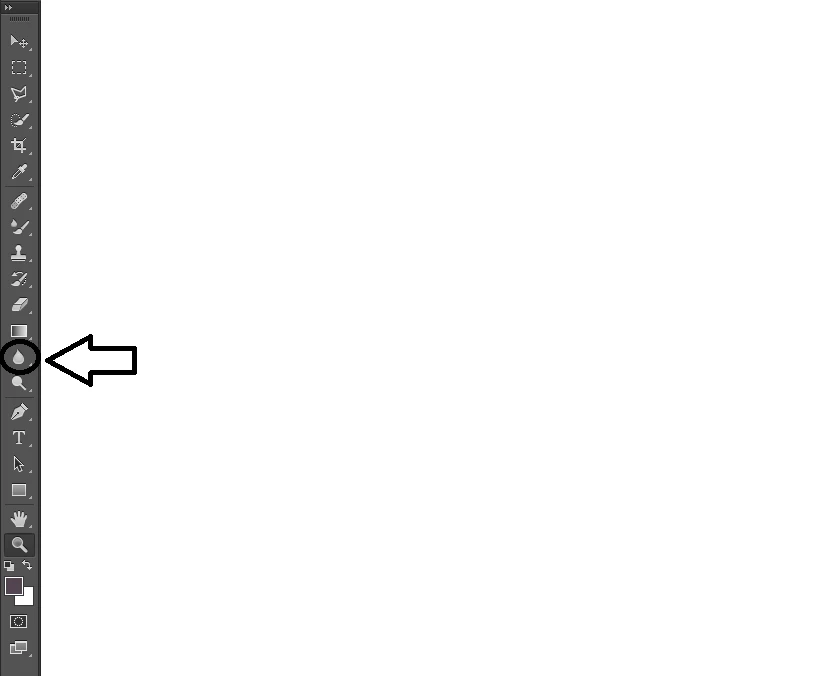
    ~ Sarika

    返信数 2

    jstrawn
    Community Manager
    Community Manager
    October 25, 2019

    I'm not liking all the hidden tools down under that ... menu item. I use blur and smudge a lot and I also have to clear my prefs a lot so it's really hard to get to the tools since I don't have the shortcuts memorized.

    sarsaxen
    Community Manager
    Community Manager
    November 28, 2015

    Hi Idanl,

    Could you please check the the toolbar again and click on the the tool I have selected to get the Smudge tool back.

    Let us know if it helps.

    Regards

    Sarika

    idanl34778774作成者
    Participant
    November 28, 2015

    this is how my toolbar looks like

    gener7
    Community Expert
    Community Expert
    April 7, 2016


    ditto .smudge tool missing. [cursing removed] I'm so frustrated. I've been using photoshop for 10 freaking years. Where is the smudge took. I mage attached. Help ASAP.


    Click on the three dots. It will bring up the Edit Toolbox dialog. Click on Reset or Defaults.