
Answered
too small fontsize in the interface of photoshop CS
- January 19, 2022
- 5 replies
- 915 views
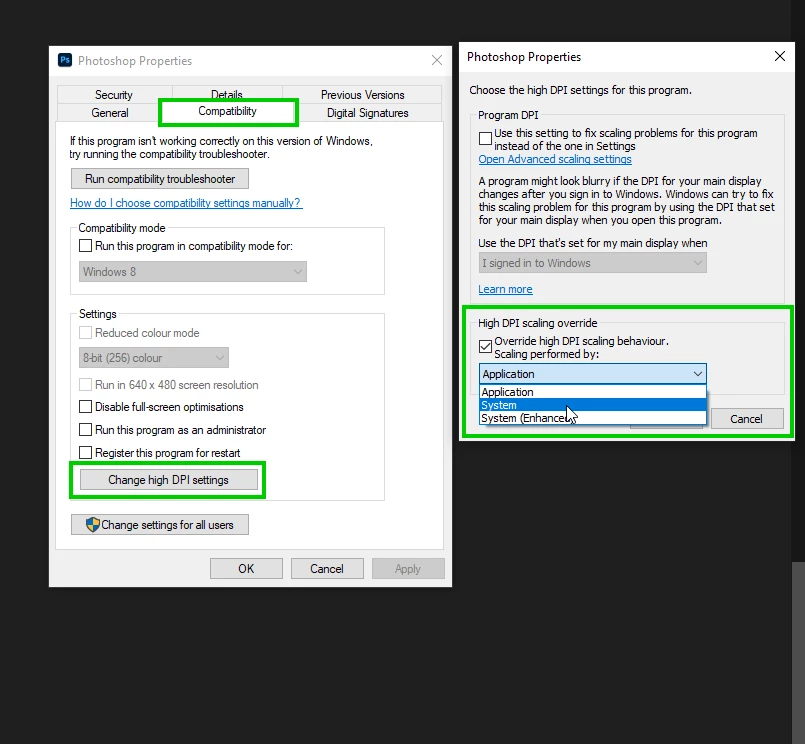
I have still an old version of Photoshop CS5, installed from disk. When installed on Windows 10 the interface of Photoshop is difficult to read because all menus show a very small fontsize in the top bar.
Also the pictograms of the tools are very little. In the dropdown menu the font is ok.
Does some on know if I can change this? I dont see any possibilities in preferences.
It is the 64-bit version. The Indesign & Illustrator & Acrobat Reader in the same package don't have this problem & have a nice readable fontsizes in all menus & for all pictograms . I don not intend to upgrade to the Cloudservice because I don not use the programs often enough to choose for a monthly cost.
Thanks for all tips.


 AdChoices