Inspiring
April 25, 2019
해결됨

Top of texture isn't transparent

  • April 25, 2019
  • 2 답변들
  • 704 조회

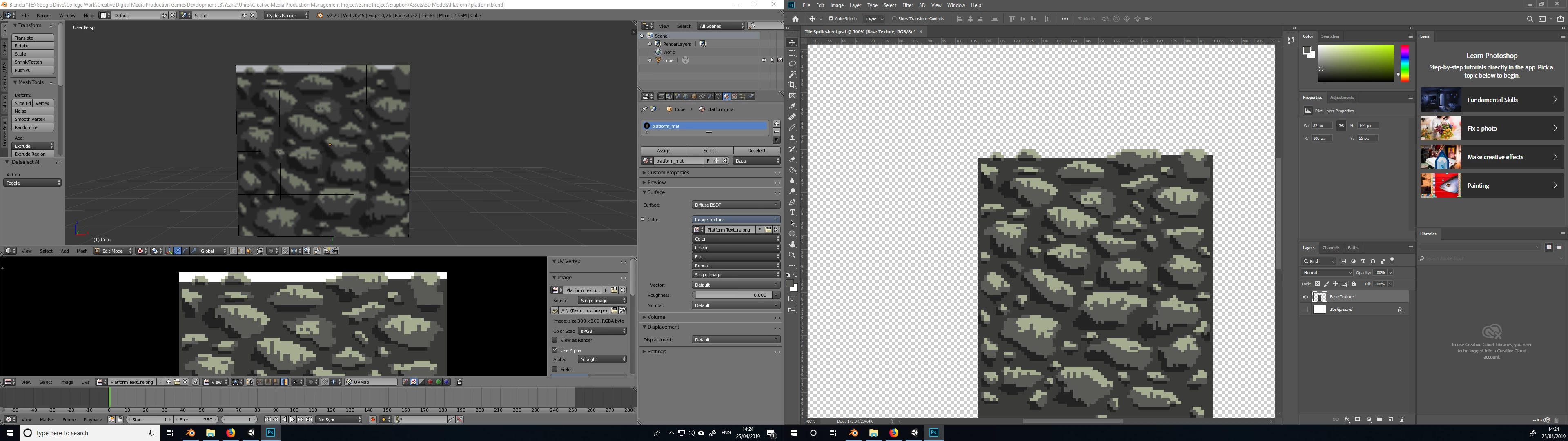
I've just finished a pixel texture for a simple platform I've made in Blender. For some weird reason, the top of the texture is showing white in Blender, and yet it was exported out as a PNG against a transparent background where it doesn't show. I'm guessing one of the layers I merged it with is responsible, but I'm not sure how I could fix it. Any suggestions?

Thanks
이 주제는 답변이 닫혔습니다.
최고의 답변: davescm

Hi

There is nothing wrong with your file.

In Blender click on the Image window and set "Channels to draw" to "Colour and Alpha" (you currently have "Colour" selected.

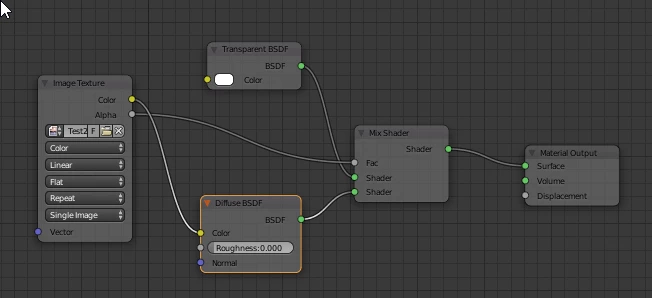
In the viewport the transparent areas will show the default grey on those transparent areas whilst you have "Texture" selected. Switching to "Rendered" will turn them black. If you actually want those areas transparent on render then use transparent BSDF and mix shader nodes as shown below.

Dave

2 답변

davescm
Community Expert
davescmCommunity Expert답변
Community Expert
April 25, 2019

Hi

There is nothing wrong with your file.

In Blender click on the Image window and set "Channels to draw" to "Colour and Alpha" (you currently have "Colour" selected.

In the viewport the transparent areas will show the default grey on those transparent areas whilst you have "Texture" selected. Switching to "Rendered" will turn them black. If you actually want those areas transparent on render then use transparent BSDF and mix shader nodes as shown below.

Dave

Inspiring
April 25, 2019

Thank you. I had selected Colour and Alpha, it just wasn't showing in the 3D window/editor. My purpose wasn't to render it or anything, but to use the model and texture in Unity. This solution seems to have done the job though.

c.pfaffenbichler
Community Expert
Community Expert
April 25, 2019

png-8 or png-24?

Can you post the file?

If Blender can import psd files, maybe try one of those.