


- Home
- Photoshop ecosystem
- Discussions
- Re: Transparency problem with multiple layers
- Re: Transparency problem with multiple layers
Transparency problem with multiple layers

Copy link to clipboard
Copied
I'm not sure what I am doing wrong but every time I paste or try to clone to one section of my image that has multiple layers I keep getting a strange transparency problem. I'm sure it's something silly I'm doing but I can't figure it out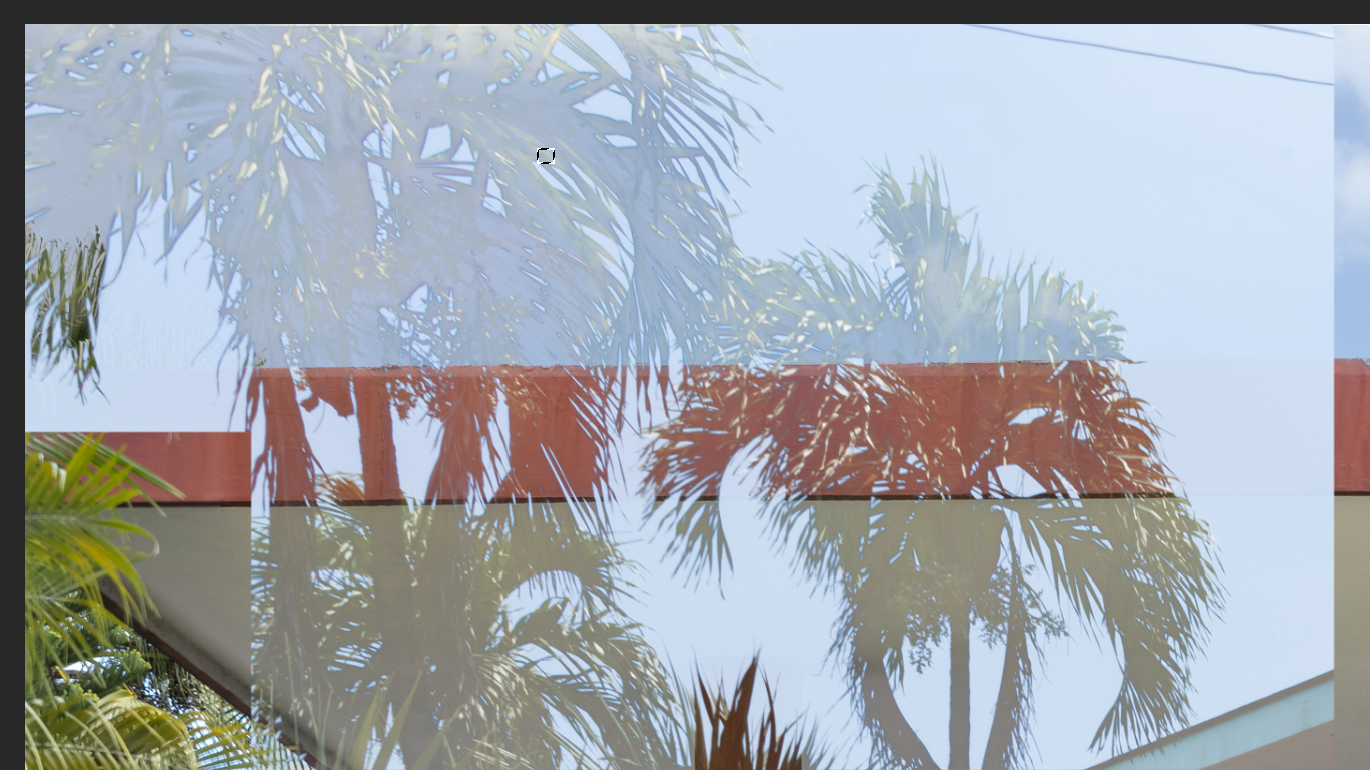



Explore related tutorials & articles
 15
Replies
15
15
Replies
15


Copy link to clipboard
Copied
We surly can't tell what you are doing for you do not show Photoshop UI with all it palettes. From what you did post it like you have several layer with various opacity settings or some layer masking. you may have some tool active if there is an active selection the used Ctrl+h to hide extras.
Supply pertinent information for quicker answers
- The more information you supply about your situation, the better equipped other community members will be to answer. Consider including the following in your question:
- Adobe product and version number
- Operating system and version number
- The full text of any error message(s)
- What you were doing when the problem occurred
- Screenshots of the problem Photoshop UI and all its palettes
- Computer hardware, such as CPU; GPU; amount of RAM; etc.
Copy link to clipboard
Copied
PS CC 20.0.6
mac Mojave 10.14.6
No error message
I do have a variety of layers and layer masks but anytime I copy a part of this image or another image onto that area that does have a layer and layer mask it comes out with a strange transparency. All layer modes are set to normal. I even did a layer stamp and tried to paste in that area and it still comes out the same.
Copy link to clipboard
Copied
How would we know if anything in the image you posted is strange You have layers and layer mask that create that compost. Layers and layer mask create a composite image. That is normal operation not strange. Only you know the contents of you layers and layers masks you used to crate that composite. Is Photoshop rendering the compost incorrectly? What is the problem
Copy link to clipboard
Copied
Yes, it is rendering it incorrectly. They should look like regular palm trees. I'm not sure what other information I could give you. I though thought it might just be a common problem.
Copy link to clipboard
Copied
It is a common user problem when they do not blend layers together well. We have no idea of what you document layer structure is like what the content of you layer are, How you have edited layers content what you a done. You state Photoshop is doing it wrong. That could be true it could be false you may have done something wrong. We did not see what you saw when you were using Photoshop UI. You stated you use paste and were pasting between documents. Paste add layer some where in the layer stack Where in the stack depends on what layer was the current target when you used paste. What is in the layer is what is in the clipboard. Will the be visible in the composite perhaps.
Copy link to clipboard
Copied
I DID NOT SAY PS WAS DOING IT WRONG. In fact I said I was doing something silly. No need to get angry.
Copy link to clipboard
Copied
No one is angry you not posting useful information we can use to be able to help you.

Copy link to clipboard
Copied
JJMack is correct.
None of us can help you as you are not providing sufficient information for us to see the problem. The issue could be layer blending modes, layer masks, layer opacity or other issues.
As a bare minimum - please show, full screen, screenshots just before and just after pasting, with the layers panel visible and the target layer selected.
Dave

Copy link to clipboard
Copied
Hi Silvia,
Check your Channels panel. Here I am on the RGB channel with the Rectangle channel visible. If this isn't it, we need to see screen shots.
Jane

Copy link to clipboard
Copied
silvia1169 wrote
I'm not sure what I am doing wrong ... I'm sure it's something silly I'm doing but I can't figure it out
Silvia, if you can post the image through Dropbox or Creative Cloud or another file sharing service, I’d be happy to take a look at it.
~ Jane
Copy link to clipboard
Copied
Thank you Jane. How do I get it to you?
Copy link to clipboard
Copied
Hi Silvia,
Use Dropbox or Creative Cloud or another file sharing service.
~ Jane
Copy link to clipboard
Copied
Yes, but to what email?
Copy link to clipboard
Copied
You can message me. Click my name, then click the button that says “Message”. It has blue letters.
Copy link to clipboard
Copied
silvia1169 wrote
Hi Silvia,
I could see nothing wrong in the file you sent, even when I copied and pasted into your file.
It may be the palm trees file (that I didn't see) that is causing the issue, or it may be something else.
- Try pasting the palm trees into a different image. Does it still happen?
- Try pasting a different image into your current file. Does it still happen?
If trying these two things does not help, then we need a screen shot that includes your Layers and Channels panel as the next step in troubleshooting.
~ Jane


Get ready! An upgraded Adobe Community experience is coming in January.
Learn more
 AdChoices