
Copy link to clipboard
Copied
Hi
Hope you enjoyed your holidays!
In Photoshop, how ho I put an image on a different colored background? Example, I have a logo that has a transparent background, how do I now make that transparent background a color, blue?
I suppose I need layers. One layer for blue, and the other for the logo? I just can't figure out how to do it. Can anyone walk me through? It is Adobe Photoshop CC.
Thanks very much
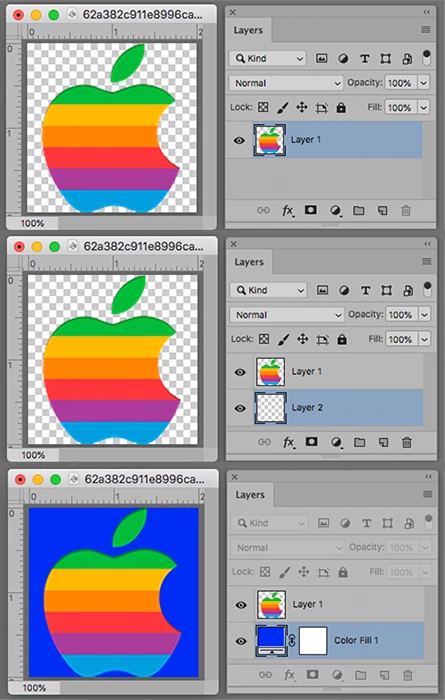
Make the chosen Blue the Foreground color in the Tools panel
Cmd click on the New Layer symbol to the left of the Trash at the bottom of the Layers panel
Choose Layer > New Fill Layer > Solid Color. OK. OK,
Copy link to clipboard
Copied
You need to have your logo on a non background layer that has transparency.

Then add a color fill layer below your logo. Pretty simple, unless your logo doesn't have transparency and you have to remove whatever the background color it.

Copy link to clipboard
Copied

Make the chosen Blue the Foreground color in the Tools panel
Cmd click on the New Layer symbol to the left of the Trash at the bottom of the Layers panel
Choose Layer > New Fill Layer > Solid Color. OK. OK,
Get ready! An upgraded Adobe Community experience is coming in January.
Learn more