Copiar vínculo al Portapapeles
Copiado
I want to design a 8.5x11 size printable with identical designs on each half of the document. When complete, the document can be printed, folded and cut in half (landscape orientation) to create two of the same identical designs. How do I set this up in Photoshop?
Copiar vínculo al Portapapeles
Copiado
If I'm understanding, you want to end up with two designs on a single 8.5 x 11 paper.
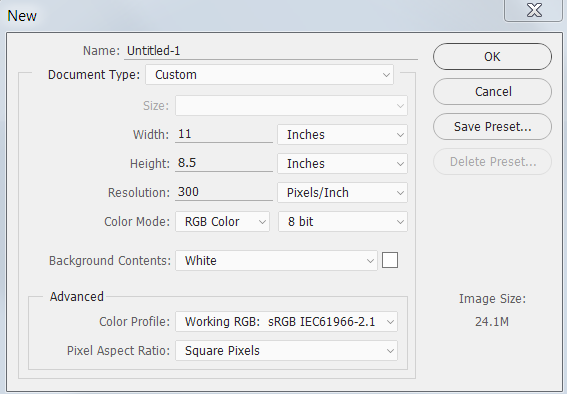
File > New. Since you want a landscape 8.5 x 11, for Document Type choose Custom and type 11 for Width and 8.5 for Height.
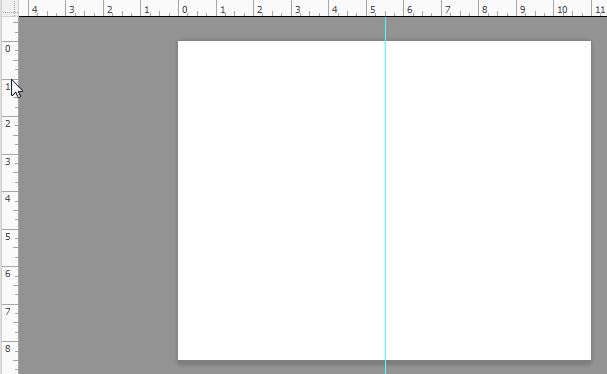
To make it easier to lay out your design if the top and left rulers are not showing, choose View > Rulers. Press and hold your cursor inside the vertical ruler and drag over to the 5.5 inch mark on the horizontal ruler. This will give you a non-printing guide.

Copiar vínculo al Portapapeles
Copiado
Thank you! And then if I want to find the center point on each half, create new guides?
Copiar vínculo al Portapapeles
Copiado
Yes, you could create guides for the center points on each half to help with aligning.
Encuentra más inspiración, eventos y recursos en la nueva comunidad de Adobe
Explorar ahora
