


Participant
August 5, 2013
해결됨

Type cursor covers several lines of text. Photoshop CS6

  • August 5, 2013
  • 7 답변들
  • 22364 조회

In Photoshop CS6 the flashing type cursor cuts through several lines of text (see image). 
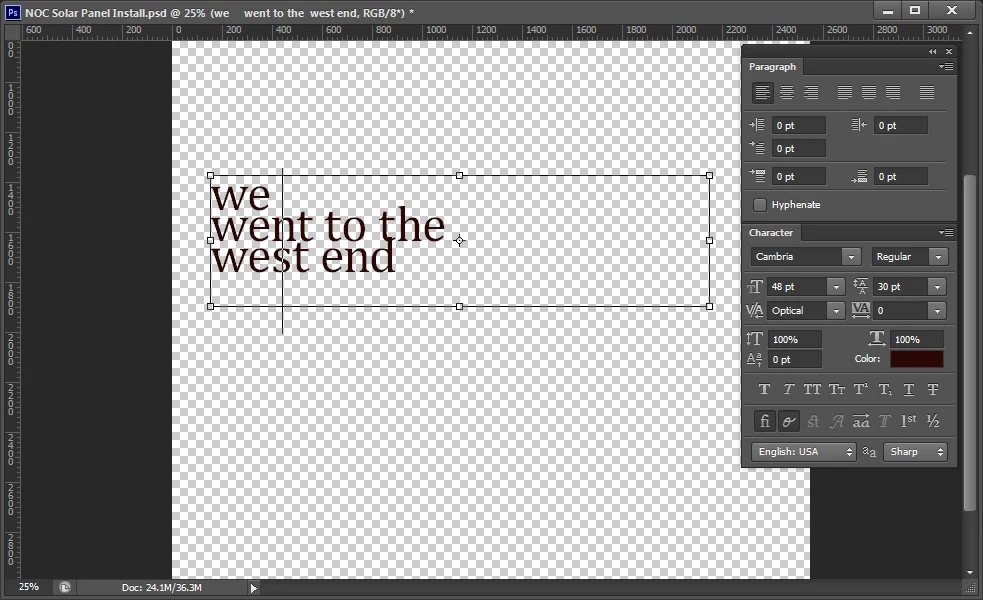
This makes it hard to select text since it is hard to tell which line the cursor will select (see image). 
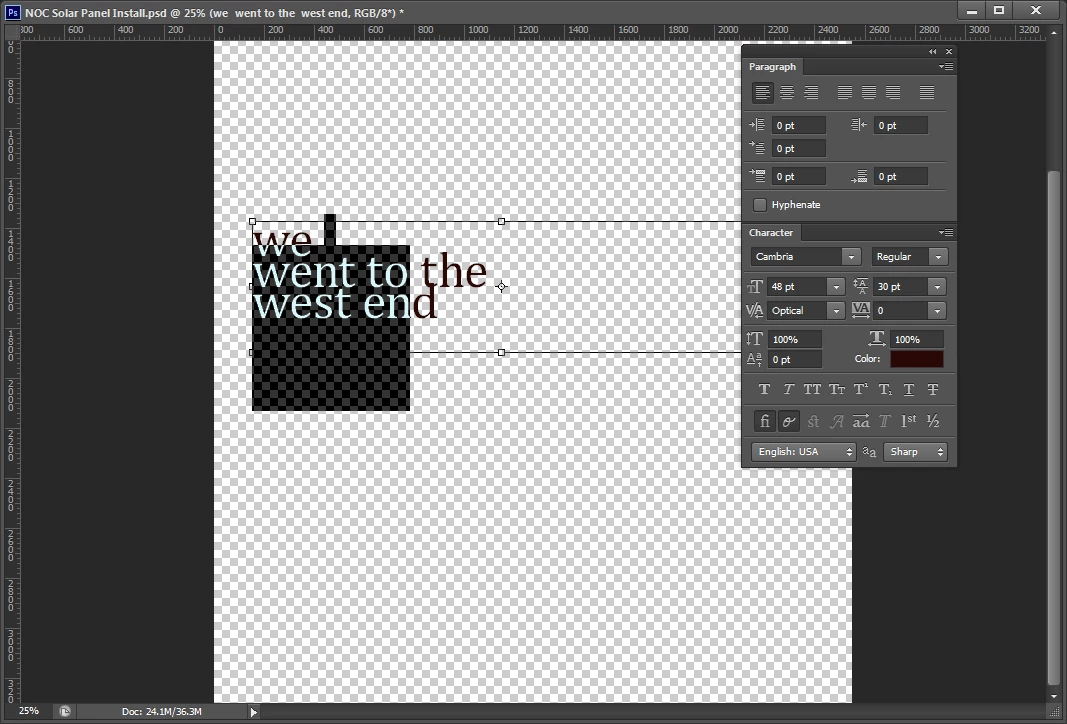
Can the text cursor be resized?  This happens no matter what type size is used or what paragraph settings are selected.  Is anyone else experiencing this problem?  I am using Windows 7 professional, service pack 1 on a Dell Precision T3500 with 8.0 GB RAM.

최고의 답변: Pakticha98A4

Okay.. In 2021 I find the way to fix this problem too.

and After I find it by myself. I'll leave how I fix this here.


Please Try this.

- Click [Type tool] 

- One click on page

- Press [Shift] + then press [Alt]

- Tap tap +++ [ ↓ arrow down key] until text cursor is fine.

7 답변

Participant
March 2, 2025

Steps to Resolve the Issue:

  1. Open the Type Tool.
  2. Go to the top-left corner, where you'll find a dropdown menu next to the "T" icon.
  3. Hover over the dropdown menu to see the options.
  4. In the top-right corner of the box, you'll find the Settings icon. Click on it.
  5. Select "Reset All Tools" to reset the settings.
  6. This should resolve your issue.

Participant
September 6, 2021

Okay.. In 2021 I find the way to fix this problem too.

and After I find it by myself. I'll leave how I fix this here.


Please Try this.

- Click [Type tool] 

- One click on page

- Press [Shift] + then press [Alt]

- Tap tap +++ [ ↓ arrow down key] until text cursor is fine.

Participant
July 1, 2022

THANK YOU Pakticha98A4

I Was ready to disown Photoshop! This was maddening!


farrukh_venominal
Participant
January 1, 2019

dude,

confirm solution is as follows.

1. click on the icon " toggle the character and paragraph panels"

2. set the baseline shift as “ 0 pt”

problem solved

Participant
September 20, 2019
this solved my problem thanks alot ! i was looking for the solution for weeks
Participant
August 28, 2016

I think it is not an issue with the certain fonts!
I just use the general fonts such like Arial, Arial Black, American Typewriter... and my photoshop is the latest version.
If there is any solution for this pleas let me know.
Thanks!

Participant
March 3, 2015

I have this issue with every font, as well, Mario. The cursor is much longer than the descenders, but lines up with the top of the ascenders just fine.

I thought the baseline shift may have been a factor, but it didn't improve when I set that back to zero.

Any ideas?

Participant
March 2, 2016

While there may be a font with Cambria (I've never used it in PS), the size of your type tool is also influenced by you setting of the baseline shift (aka the superscript setting). I set mine to zero, and my text cursor returned to normal size.

Participant
June 14, 2017

Set baseline to zero a couple of times and BAM!!! I'm back! YES! YES! YES!

station_two
Inspiring
August 5, 2013

Well, you seem to have the font size at 48 pt while your leading is 30 pt. 

The cursor is bound to be larger and overlap lines of text because your font size is larger than your leading.

Try working with a larger leading and reduce that to suit your needs once you are done edting and have no need to select any of text.

gener7
Community Expert
Community Expert
August 5, 2013

Set the Leading in the Character panel from 30% to Auto and try again. Let me know how that works.

Gene

station_two
Inspiring
August 5, 2013

gener7 wrote:

Set the Leading in the Character panel from 30%…

I thought the screen shot shows the leading at 30 pt, not 30% ?

gener7
Community Expert
Community Expert
August 5, 2013

Yes, that's correct Station. However going to Auto does not fix the problem for the Cambria font. For some unknown reason it the cursor stays the same.

It's a problem with the font file and not with Photoshop. He'll have to try some other font.

http://graphicdesign.stackexchange.com/questions/13031/what-is-wrong-with-the-type-tool-with-cambria-in-photoshop