
Inspiring
April 13, 2020
Question

UI Script Remember Last User Value Entered

  • April 13, 2020
  • 5 replies
  • 3186 views
The UI has 4 radio buttons and 4 editable text input fields. The editable fields have a default value "Edit Text". The objective is that the user enters a custom value in the text input field and runs the script.  
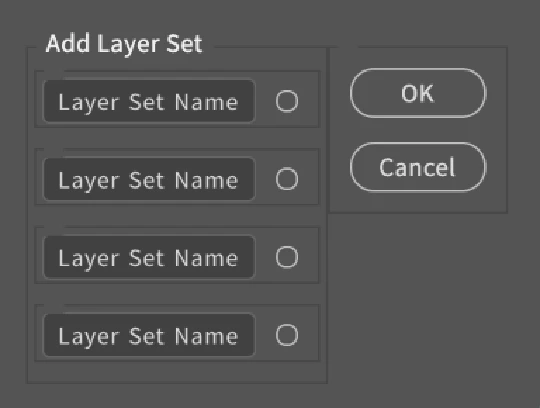


1)  Can a jsx script remember the last text input value used so that the next time the UI dialog runs the value appears in the text input field?
2) Allow the user to reset the dialog text input field to the default value.
3) What are the jsx functions that allow this behavior?


The idea is:
if the text input value is not equal to the default value,
the new text input value becomes a temporary variable,
the temporary variable becomes the default text input value,
then the user clears the temporary variable,
if the temporary variable is empty,
the script returns to the default text input value
This topic has been closed for replies.

5 replies

Legend
June 24, 2020

I do this by saving an XML file with settings, that way I can store whatever I want. Defaults are hard-coded.

PECourtejoie
Community Expert
Community Expert
April 13, 2020

Hello, I'm not sure if the file info part of Photoshop is a JSX found somewhere, but they implemented the same function recently.


Legend
April 13, 2020

//input variables
var settingsNameUniqueString = 'your script name',
text1 = 'sample text 1',
text2 = 'sample text 2',
text3 = 'sample text 3'

//saving settings
var d = new ActionDescriptor
d.putString (s2t('t1'), text1)
d.putString (s2t('t2'), text2)
d.putString (s2t('t3'), text3)
app.putCustomOptions (settingsNameUniqueString, d)

//reading settings
var d = app.getCustomOptions (settingsNameUniqueString)
alert (d.getString (s2t('t1')))
alert (d.getString (s2t('t2')))
alert (d.getString (s2t('t3')))

function s2t(s) { return app.stringIDToTypeID(s) }

ajabon grinsmith
Community Expert
Community Expert
April 13, 2020

This will remain even if you restart InDesign.

//save
app.insertLabel("foo", myString);
//load
var myString = app.extractLabel("foo");
Kukurykus
Legend
April 13, 2020

That's the same that customOptions does in Photoshop.

LG ludwig
Inspiring
June 24, 2020

Hello Kukurykus,

I have a similar question. I'm entering a value manually in the Median filter with DisplayAllDialog True: lets say 12. Then I accept this value. The second time around i want to repeat this action with the same value entered by the user but this time with DisplayNoDialog. How would one query the last entered value with descriptors? I'm doing this in Python but a js equivalent would help me figure this out.

def apply_median(median_value, open_dialog=False):
    action_name = apply_median.__name__
    action_manager = ActionManager(action_name)
    with action_manager as am:
        s2t = am.convert_id
        app = Dispatch("Photoshop.Application")
        desc_13 = am.gen('descriptor', 'desc_13')
        dialog = None
        if open_dialog:
            dialog = am.dialog_mode_all
        else:
            dialog = am.dialog_mode
        desc_13.PutUnitDouble(s2t('radius'), s2t('pixelUnit'), median_value)
        app.ExecuteAction(s2t('median'), desc_13, dialog)
    print(f'{action_name=} executed')
Kukurykus
Legend
April 13, 2020

Play with putCustomOptions(), getCustomOptions() and eraseCustomOptions().

Inspiring
April 13, 2020

Thank you for providing the functions. Can the getCustomOptions() get the name of an action Set and action from the Actions Pallet?

Legend
April 13, 2020

Look at the scripts that come with Photoshop. Getting list of actions is well written in the image processor.jsx