



dragantomas
Inspiring
August 15, 2019
질문

unable to select the layer mask of applied tool (motion blur) in smart object

  • August 15, 2019
  • 1 답변
  • 1084 조회

Hi all,

I Have applied a motion blur to an smart object. Wanted to select the layer mask of the motion blur so I can apply a gradient on it. But am not able to. When I click on the layer mask it doesn't select it. Only smart object is selected. My mouse only recognises the smart object.

See the attached picture.

Anyone knows how to fix this?

Thanks
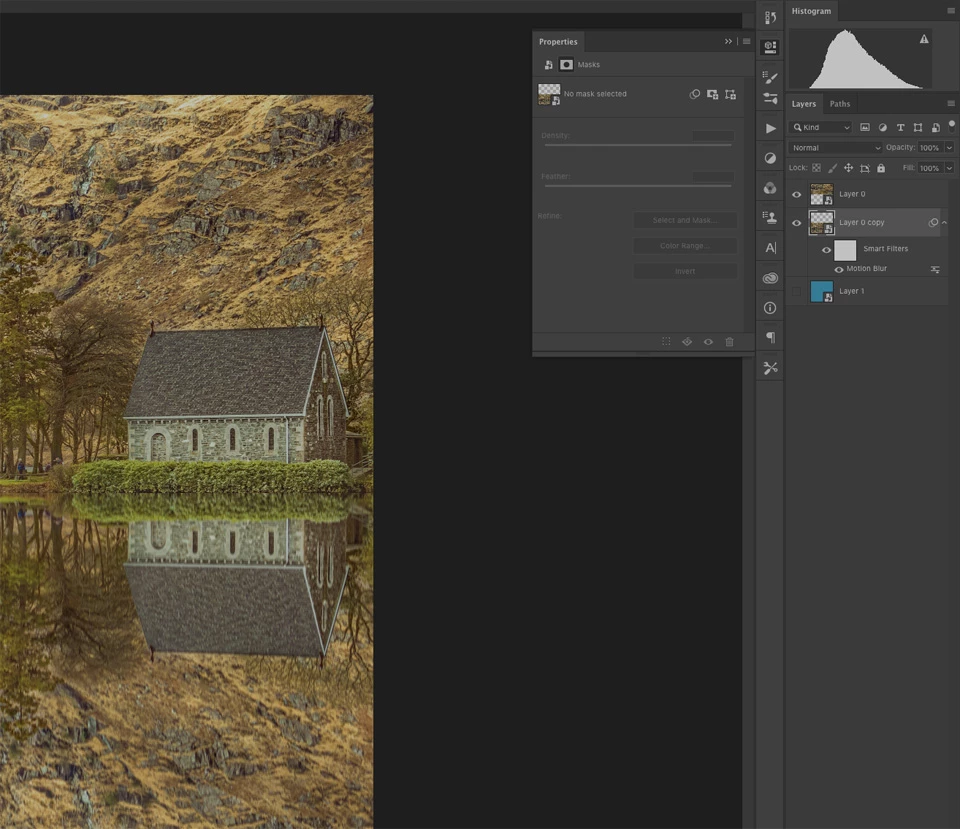
    이 주제는 답변이 닫혔습니다.

    1 답변

    zenginejulia
    Participating Frequently
    August 15, 2019

    Did you click on the layer named "Layer 0 Copy" or did you click on the white square?

    You have to click on the white square in order to select the layer mask.

    Let me know if this worked for you.

    dragantomas
    dragantomas작성자
    Inspiring
    August 15, 2019

    Thats exactly the problem, yes I did clicked on white square, and when I click on it nothing happens, I cant work on it. Only the smart object remains selected and not the white square.

    zenginejulia
    Participating Frequently
    August 15, 2019

    Can you try to click on this little icon, while you have your layer "Layer 0 Copy" selected and tell us if this worked or not?