
Participant
January 8, 2017
Answered

Unwanted orange hue!

  • January 8, 2017
  • 1 reply
  • 517 views

Help! I've been using CS6 on my pc for a few years now without a problem. However now after editing my Nef file in the basic photoshop and opening it into the main work area, it changes to an orange hue. I have no idea how this came to be! Every Nef file I try to open turns orange or in the past, pink. Does anyone have any pointers as to how to reset it? Permanently?

This topic has been closed for replies.
Correct answer Per Berntsen

Most likely, you have a defective monitor profile.

You seem to be on Windows 10, which is known to install low quality profiles when installing updates.

As troubleshooting and as a (temporary) fix, try setting the monitor profile to sRGB (or Adobe RGB if you have a wide gamut monitor)

If this fixes the problem, you should ideally calibrate the monitor with a hardware calibrator.

Press the Windows key+R, type colorcpl in the box, and hit Enter.

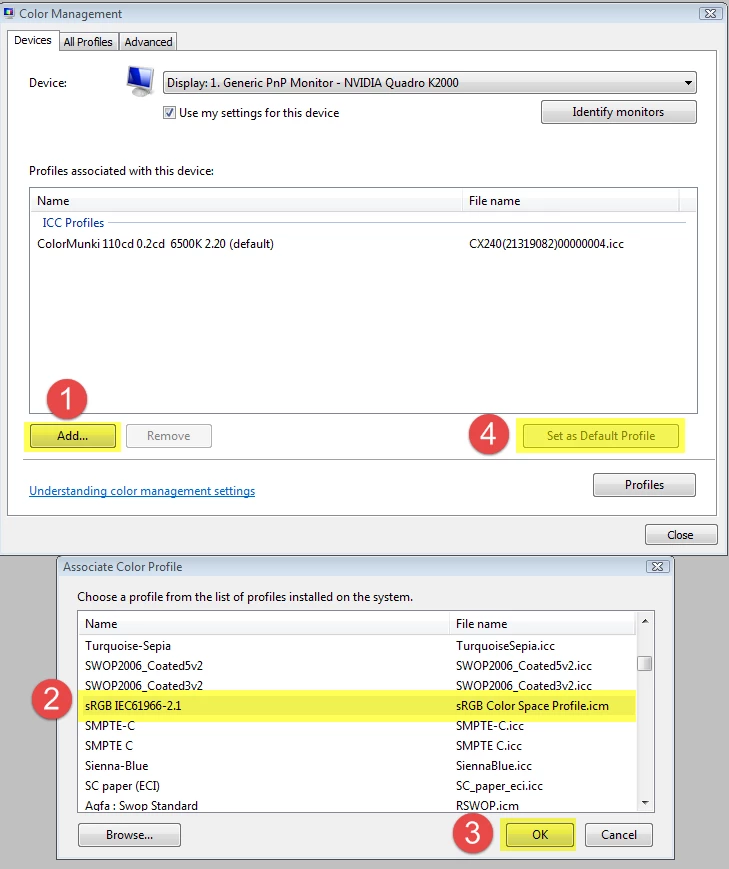
Add the sRGB profile, then set it as Default profile. See screenshot (from Windows 7) below.

Make sure that Use my settings for this device is checked.

1 reply

Per Berntsen
Community Expert
Per BerntsenCommunity ExpertCorrect answer
Community Expert
January 8, 2017

Most likely, you have a defective monitor profile.

You seem to be on Windows 10, which is known to install low quality profiles when installing updates.

As troubleshooting and as a (temporary) fix, try setting the monitor profile to sRGB (or Adobe RGB if you have a wide gamut monitor)

If this fixes the problem, you should ideally calibrate the monitor with a hardware calibrator.

Press the Windows key+R, type colorcpl in the box, and hit Enter.

Add the sRGB profile, then set it as Default profile. See screenshot (from Windows 7) below.

Make sure that Use my settings for this device is checked.

Participant
January 8, 2017

Thank you, Per Berntsen! I'm very grateful for your quick accurate response