
Inspiring
April 1, 2022
Answered

Using 'Place Linked' doesn't keep file size down. Shouldn't it work like after effects?

  • April 1, 2022
  • 3 replies
  • 2845 views

In the past, i have using 'after effects' to grade all of my render passes using 32bit flexibility. More recently i have started using photoshop, as it gives a bit more flexility. The problem is, in comparison to AE, the file sizes are ridiculoulsy large!!

When you link an image in after effects, it seems to treat it as a proxy/xref, and it simply refers to the original layer -- keeping file size to a minimum. Photoshop on the other hand, when i 'place-link' a file as a smart object, it seems to embed the image into the image rather than simply reference it?? The layer icon shows a chain - so its defintely not a pixelated/editable layer.


I don't understand why 'linked files' seems to bloat what is really an empty file? Does anyone understand how photoshop 'links' files? Am I doing something wrong, or is photoshop just dropping the ball with regard to linking images?
Correct answer 4754simon

Hope has turned to despair.

Thanks for the suggestion Bojan. I hae reset my preferences (on reflection, i should have saved my preferences first :))

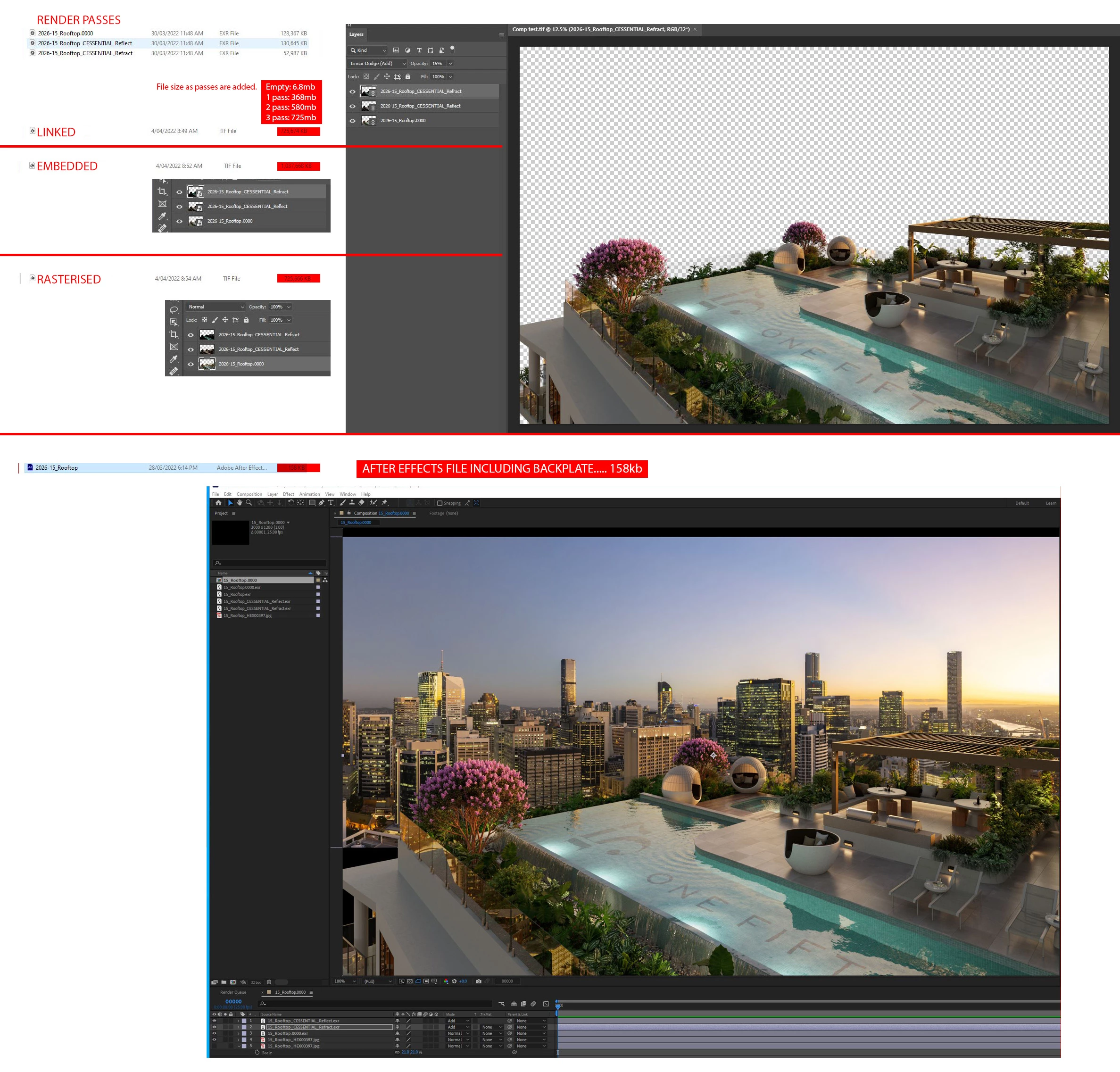
Attached shows a comparison of linked vs embedded vs rasterised.

Unfortunately the results have reinforced my thoughts about grading in photoshop.


You will notice that the linked file is now smaller than the embedded layers, (so resetting preferences loooks like it has fixed a few bugs).....  however if you consider that the empty file is 6.8mB and the file with LINKED layers has ballooned to 725mb, it is absurd when you consider that the layers are basically proxies?? 


Also note... the file with 'rasterised layers' is exactly the same file size as the linked??? no logic to me.


Anyway, for comparison, I have attached the after effects file showing th 3 passes INCLUDING the backplate. The file size is only 158kb!!!

Until photoshop make a determined effort to resolve and optimise this technique.... i will have to return to my old method of compositing in After effects. Its a shame, as it is much easier to refine a grade in photoshop. Very disappointing.


Unless someone can prove me wrong, i can only assume that this case is closed.... Big FAIL 

3 replies

Reimund Trost
Participant
January 23, 2024

This is so extremely silly of Photoshop. I really do not agree with this design decision. I hope the team comes around and adds a setting to disable this behavior and make it work like a true link without saving any additional garbage. My workaround is to shrink all linked assets to 1%. Unfortunately that's making us lose time. But this way we can actually commit the psd to the git repositories without adding hundreds of MB for every version.

Abambo
Community Expert
Community Expert
January 23, 2024
quote

My workaround is to shrink all linked assets to 1%. Unfortunately that's making us lose time. But this way we can actually commit the psd to the git repositories without adding hundreds of MB for every version.


By @Reimund Trost

I cannot see how shrinking the linked file can help?

ABAMBO | Hard- and Software Engineer | Photographer
Reimund Trost
Participant
January 23, 2024

Photoshop creates a copy of the layer so that it can be used when the linked file is not found. This image will take less disk space if the linked layer is shrunk (fewer pixels to store).

It's stupid since one of the main reasons to use linked files is to only have one external copy of the layer/image. I'd rather have it work as in After Effects/Premiere Pro where linked objects are shown as "offline" if it could not be found.

Bojan Živković11378569
Community Expert
Community Expert
April 1, 2022

Please try with reset preferences because this behavior is weird Preferences in Photoshop (adobe.com)


Here is result of my testing. I am placing huge file into small document.

4754simonAuthorCorrect answer
Inspiring
April 3, 2022

Hope has turned to despair.

Thanks for the suggestion Bojan. I hae reset my preferences (on reflection, i should have saved my preferences first :))

Attached shows a comparison of linked vs embedded vs rasterised.

Unfortunately the results have reinforced my thoughts about grading in photoshop.


You will notice that the linked file is now smaller than the embedded layers, (so resetting preferences loooks like it has fixed a few bugs).....  however if you consider that the empty file is 6.8mB and the file with LINKED layers has ballooned to 725mb, it is absurd when you consider that the layers are basically proxies?? 


Also note... the file with 'rasterised layers' is exactly the same file size as the linked??? no logic to me.


Anyway, for comparison, I have attached the after effects file showing th 3 passes INCLUDING the backplate. The file size is only 158kb!!!

Until photoshop make a determined effort to resolve and optimise this technique.... i will have to return to my old method of compositing in After effects. Its a shame, as it is much easier to refine a grade in photoshop. Very disappointing.


Unless someone can prove me wrong, i can only assume that this case is closed.... Big FAIL 

Bojan Živković11378569
Community Expert
Community Expert
April 4, 2022

"Also note... the file with 'rasterised layers' is exactly the same file size as the linked??? no logic to me."


It is logic and correct. When linking file, Ps will bring original and create raster layer from it so it is efectively like placing then rasterizing layer.


Have you seen this discussion which may offer solution to your problem Solved: Large file size even after I delete all layers? - Adobe Support Community - 9376577

Bojan Živković11378569
Community Expert
Community Expert
April 1, 2022

"Photoshop on the other hand, when i 'place-link' a file as a smart object, it seems to embed the image into the image rather than simply reference it??"


Place linked should work as desired: create layer from file but do not embed original file. Place Embedded is embeding original file.


I am testing on my machine and things work as expected. File with embeded image is larger then file with the same image placed as linked.


Which version of Photoshop you are using? Have you tested weight when saved embeded vs linked?

4754simonAuthor
Inspiring
April 1, 2022

Its definitely linked - not embedded. Currently using 23.2.2.

I will have to do some tests... embedded vs linked. I did hope that creating a 'grading file' in 32bit with linked images would be significantly lower.