
conanj82903238
Participant
May 11, 2023
Question

Vanishing Point Bug when moving object

  • May 11, 2023
  • 2 replies
  • 795 views

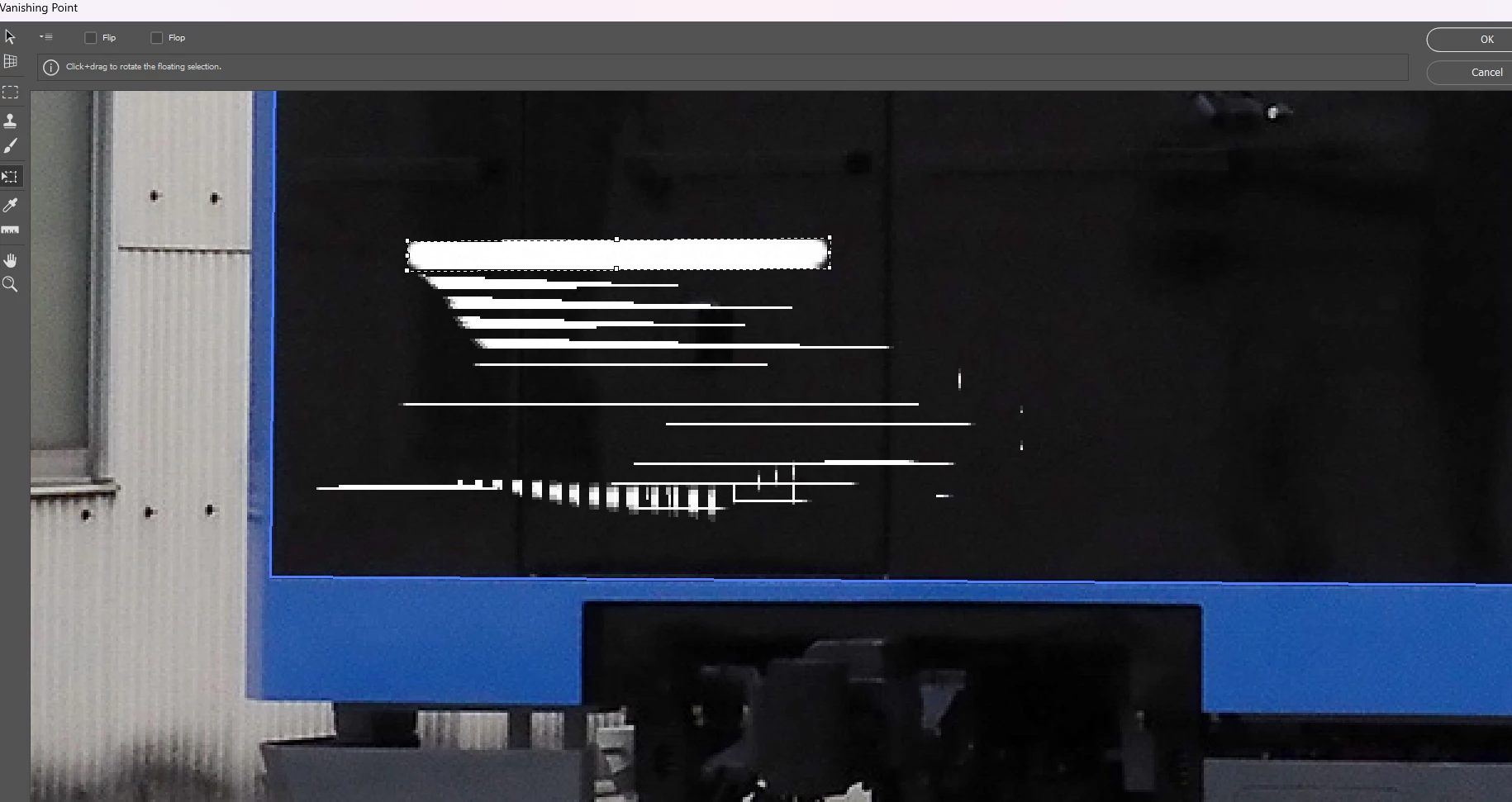
I have this weird issue whenever I move an object inside the box area at vanishing point. Whenever I'm moving the object, the object will leave messy marks/dots/lines like the picture below. What's with the issue I'm facing below? It's really frustrating the the messy marks remains there when I apply the vanishing point. Thank you.
 

2 replies

conanj82903238
Participant
March 15, 2024

This issue still persist and after 1 yearI still haven't receive a SINGLE response from anyone!

Bojan Živković11378569
Community Expert
Community Expert
March 15, 2024

I cannot replicate the issue on my machine, Photoshop 25.5.1 Release. Could you post the contents of Help > System Info? What steps have you taken so far to troubleshoot the problem? Have you tried resetting preferences, deactivating Native Canvas, or anything similar?

conanj82903238
Participant
March 15, 2024

From Preferences > Performance allow Photoshop to use 70% memory.


I tried to raise my memory, but it seems like it is related to my graphics. Actually I changed my hardware but the issue still persists

conanj82903238
Participant
May 15, 2023

Hello,

The issue still presist and I am looking for a solution