
Bomber33
Inspiring
March 22, 2024
Answered

Version 25.6 .Is it safe to upgrade?

  • March 22, 2024
  • 4 replies
  • 1880 views

Good afternoon

  I,m currwently being advised that there's an update available to Photoshop 25.6.Going by some of the problems that have been posted .Do folks think it's safe to download or to wait until things are sorted ok? 

Thankyou
This topic has been closed for replies.
Correct answer Ged_Traynor

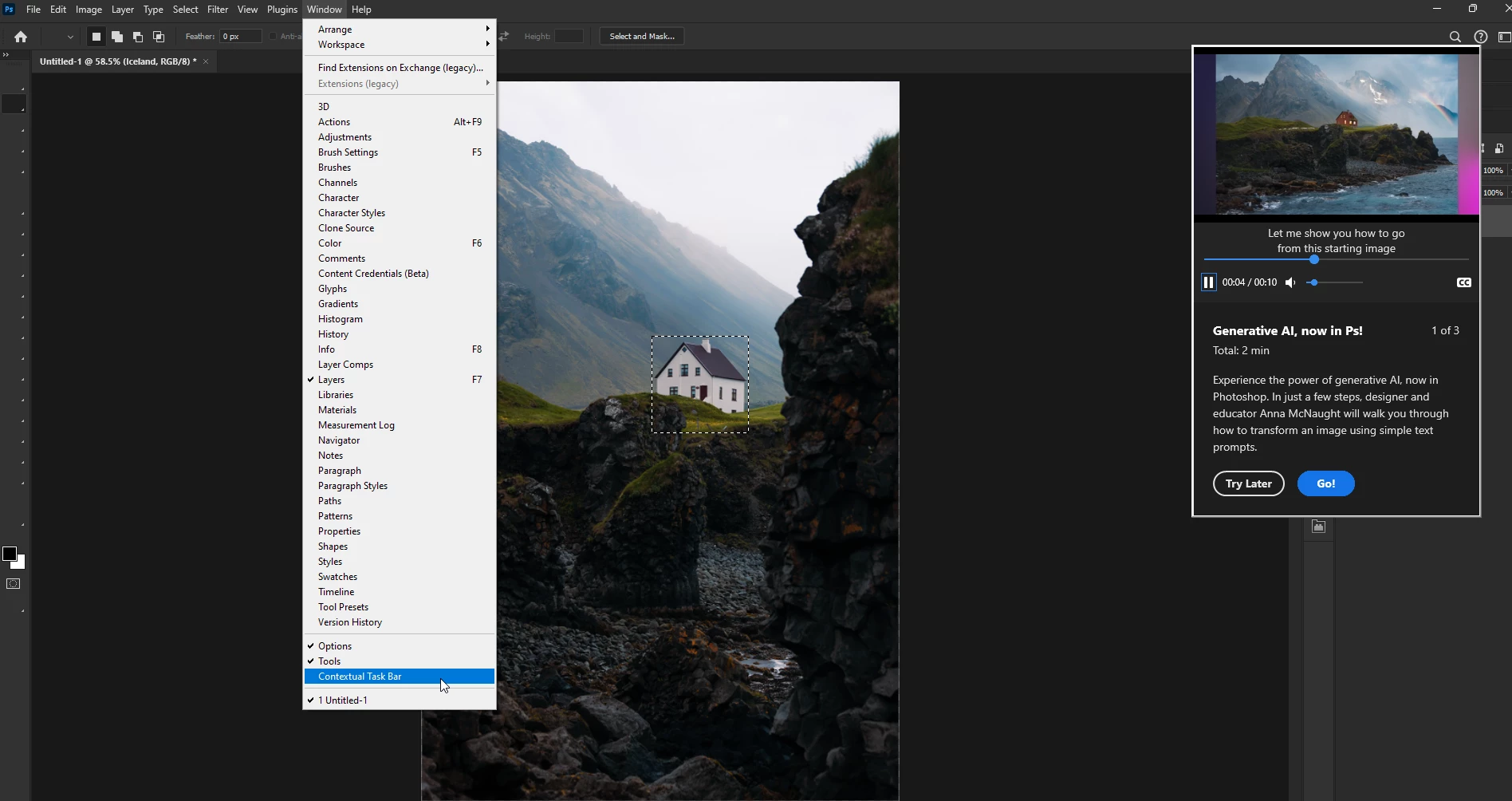
AI tutorial is back, but it seems to be triggered by the Contextual Task Bar been enabled, so don't enable it, I don't normally have it enabled but wanted to find out what is causing the issue, I was able to reproduce the issue by enabling it and just messing around in Photoshop, restarting, opening files etc, after a while the AI tutorial comes back to haunt you, and it just won't go away.

For some reason, even disabling it and reopening Photoshop, it enables itself again, I think we need an AI Tutorial exorcism 🤣

4 replies

Participating Frequently
March 22, 2024

25.6 is 100% bricked on my machine. 


windows 10, amd TR 2970wx, nvidia 2080ti, 64gigs ram. 


I installed 25.6 and it was a total joke. Nothing worked as it should, slow and gliticky. Sometimes it would load the file and you could see layers but no viewport window, then crash. I rolled back to 25 and its snappy again, works as it should.. My windows 11 work compter is running 25.1, works great. I think Adobe is trying to cram "new features" but I've noticed recently that it runs multiple instance of "windows edge view 2" in the background so I assume its doing a bunch of "AI" API junk in the background.  

Bomber33
Bomber33Author
Inspiring
March 23, 2024

Hi

Thanks for the replies folks.Won't need to wait for things to settle as it seems Photoshop has done the update itself without my intervention.!! Hmm! So far so good .Home screen showing ok.Not had a chance to use it any further at the moment.Thanks again

Ged_Traynor
Community Expert
Ged_TraynorCommunity ExpertCorrect answer
Community Expert
March 22, 2024

AI tutorial is back, but it seems to be triggered by the Contextual Task Bar been enabled, so don't enable it, I don't normally have it enabled but wanted to find out what is causing the issue, I was able to reproduce the issue by enabling it and just messing around in Photoshop, restarting, opening files etc, after a while the AI tutorial comes back to haunt you, and it just won't go away.

For some reason, even disabling it and reopening Photoshop, it enables itself again, I think we need an AI Tutorial exorcism 🤣

D Fosse
Community Expert
Community Expert
March 22, 2024

Haven't had a single issue on any of my two Windows 10 machines. But I've always had the Home screen disabled, so I wouldn't know anything about that.

Ged_Traynor
Community Expert
Community Expert
March 22, 2024

@Bomber33 some people had this issue, there's a fix for that mentioned in the thread

https://community.adobe.com/t5/photoshop-ecosystem-bugs/p-photoshop-v25-5-1-amp-v25-6-opening-with-black-blank-home-screen/idi-p/14497811

I had this issue when I updated, didn't have the issue with version 25.5.1, I uninstalled the update and reinstalled, so far it hasn't happened again, but only time will tell

https://community.adobe.com/t5/photoshop-ecosystem-bugs/p-i-d-like-to-know-how-to-disable-the-startup-tutorial-about-generative-ai/idc-p/14506751/page/9#M103289