


- Home
- Photoshop ecosystem
- Discussions
- Hi Stephen, Thank you so much, yes, I didn't reali...
- Hi Stephen, Thank you so much, yes, I didn't reali...

Copy link to clipboard
Copied
I have many folders that contain both TIFF and PDF files. I would like to run a process to save the TIFFs with LZW compression. However, I don't want to touch the PDFs. I have tried using a Batch process and the built-in Image Processor tool, but haven't been able to find a way to limit the process to TIFFs only. Does anyone have any tips? Thanks so much!


 1 Correct answer


Here is a new version of the script that I previously posted to batch save .TIF files with LZW compression. This version will additionally process .tif files found in all sub-folders under the top-level input folder.
#target photoshop

// USE AT YOUR OWN RISK! TESTED ON MAC PHOTOSHOP CC 2019 ONLY

// Batch save TIF files from top-level and sub-level folders with LZW compression

// community.adobe.com/t5/Photoshop/Want-to-run-batch-process-on-TIFFs-only/m-p/10659870#M268352
// Want to run ba

Explore related tutorials & articles
 24
Replies
24
24
Replies
24


Copy link to clipboard
Copied
Have you tried filtering to display only TIFFs in Bridge then Tools > PS > Image Processor on your selected images?
Jane


Copy link to clipboard
Copied
Copy link to clipboard
Copied
Hi ki.,
Are the images selected in Bridge? If you have filtered to TIFF, Cmd+A (Ctrl+A on Windows) should do it.
~ Jane
Copy link to clipboard
Copied
Copy link to clipboard
Copied
From within Bridge, running Image Processor should show the number of selected files by default:

Using the optional Image Processor Pro script, one can first select the files in Bridge, then go to Photoshop and run IPP and select the option for selected files in Bridge:

https://sourceforge.net/projects/ps-scripts/files/Image%20Processor%20Pro/v3_2%20betas/
Copy link to clipboard
Copied

Copy link to clipboard
Copied
Are your versions of Bridge and Photoshop in step e.g. both the latest versions?
Dave
Copy link to clipboard
Copied
Copy link to clipboard
Copied
Hi
If you have more than one version installed, an older version of Bridge may have opened. Can you look at the version number for both? It's in the Application menu > About on a Mac and Help > About on Windows. You might also open directly from the Creative Cloud app.
~ Jane
Copy link to clipboard
Copied
Copy link to clipboard
Copied
Here is a script that I have adapted to batch save an input folder of mixed files and only process .TIF files with LZW compression:
#target photoshop
//forums.adobe.com/message/10491208
//forums.adobe.com/message/10487873#10487873
var tifFolder = Folder.selectDialog("Select the folder containing TIFFs", "");
var myFiles = tifFolder.getFiles(/\.(tif)$/i);

//jongware.mit.edu/pscs5js_html/psjscs5/pc_TiffSaveOptions.html
//jongware.mit.edu/pscs5js_html/psjscs5/pe_TIFFEncoding.html
// TIFFEncoding.NONE
// TIFFEncoding.JPEG
// TIFFEncoding.TIFFLZW
// TIFFEncoding.TIFFZIP
var so = new TiffSaveOptions();
so.imageCompression = TIFFEncoding.TIFFLZW;

for (var a = 0; a < myFiles.length; a++){
    var d = open(myFiles[a]);
    d.saveAs(new File(d.fullName), so);
    d.close();
};
https://prepression.blogspot.com/2017/11/downloading-and-installing-adobe-scripts.html
Copy link to clipboard
Copied
Copy link to clipboard
Copied
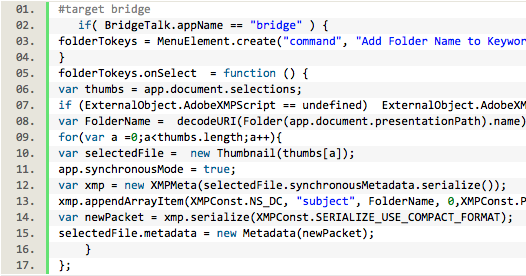
What program did you paste the copied code into? I'm guessing it was not saved as a plain text document as mentioned in my blog, perhaps saved as a rich text document. That is the error I get when running the code if I save as say RTF and not TXT before renaming to JSX.
Can you post a screenshot of the code in your text editor? Here is a screenshot:

Sorry, for not making it clear, this script is for Photoshop:
#target photoshop
Copy link to clipboard
Copied
Copy link to clipboard
Copied
Copy link to clipboard
Copied
"I filtered by file type in Bridge but when I go to Image Processor in Photoshop..."
Hi
I was reading through everything a second time and spotted the way this was worded. Don't go into Image Processor from PS (if you are). Do it from Bridge with Bridge > Tools > PS > Image Processor and PS will launch automatically and will process the files that are selected in Bridge. Can your confirm your steps?
Jane
Copy link to clipboard
Copied
Copy link to clipboard
Copied
Copy link to clipboard
Copied
"I'm not sure how to attach a screenshot on this messageboard"
Hi
Use the big blue Reply button on your first post.
Jane
Copy link to clipboard
Copied
Here is a new version of the script that I previously posted to batch save .TIF files with LZW compression. This version will additionally process .tif files found in all sub-folders under the top-level input folder.
#target photoshop

// USE AT YOUR OWN RISK! TESTED ON MAC PHOTOSHOP CC 2019 ONLY

// Batch save TIF files from top-level and sub-level folders with LZW compression

// community.adobe.com/t5/Photoshop/Want-to-run-batch-process-on-TIFFs-only/m-p/10659870#M268352
// Want to run batch process on TIFFs only

// Special thanks to Paul MR for the recursive folder processing code!
// photoshopgurus.com/forum/threads/batch-and-subfolders.22134/
// batch and subfolders

alert('This script will resave all TIFF files with LZW compression. All sub-folders under the selected input folder will be processed.');

var imageFolder = Folder.selectDialog('Select the top-level folder with TIFF files to process');

var origDialogs = app.displayDialogs;
app.displayDialogs = DialogModes.NO;

// Script Execution Timer - Function
var timeDiff = {
    setStartTime: function() {
        d = new Date();
        time = d.getTime();
    },
    getDiff: function() {
        d = new Date();
        t = d.getTime() - time;
        time = d.getTime();
        return t;
    }
};

// Script Execution Timer - Start
timeDiff.setStartTime();

if (imageFolder != null) processFolder(imageFolder);

function processFolder(folder) {
    var fileList = folder.getFiles()
    for (var i = 0; i < fileList.length; i++) {
        var file = fileList[i];
        if (file instanceof File && file.name.match(/\.tif/i)) {
            open(file);

// Start Main Code Block
            var saveOpt = new TiffSaveOptions();
            saveOpt.imageCompression = TIFFEncoding.TIFFLZW;
            var aDoc = app.activeDocument;
            aDoc.saveAs(new File(aDoc.fullName), saveOpt);
            aDoc.close(SaveOptions.SAVECHANGES);
// End Main Code Block

        } else
        if (file instanceof Folder) {
            processFolder(file);
        }
    }
}

app.displayDialogs = origDialogs;

// Script Execution Timer - Finish
alert('Batch LZW save completed! ' + '\r' + '(' + timeDiff.getDiff() / 1000 + ' seconds)');

// To Do: It would be nice to add a report on the number of files processed...

Copy link to clipboard
Copied
Copy link to clipboard
Copied
Thanks Chuck, yes, my test files had the same profile as my working space and did not throw a warning that messed up the batch. I have updated the code to turn off dialogs. The source ICC profile is retained when resaving with LZW in my tests.
Copy link to clipboard
Copied
Thank you so much- this works great for me! And sorry for the delay in my response, I was out of the office last week.

Copy link to clipboard
Copied
Thank you, thank you, thank you
I was getting so despondent to find a solution to this exact problem.
You are a legend!!!!!!!!!!!!!!!


Find more inspiration, events, and resources on the new Adobe Community
Explore Now
 AdChoices