


Ken Nielsen
Legend
February 19, 2023
해결됨

What is the best way for outlining a subject with fine hair to copy and drop into a new background

  • February 19, 2023
  • 3 답변들
  • 3105 조회

I know I can draw paths with the pen tool which is fine for many subjects but not easy for fine hair and where I don't want to spend months doing an outline. I also know selecting a subject in Lightroom or Photoshop is also only a start and not for more detailded and intricate subjects. Should I do it all by hand with the pen tool? Or, I thought I would ask amongst the experts here just to be sure there is not a better way. Thanks for help with this. 
이 주제는 답변이 닫혔습니다.
최고의 답변: c.pfaffenbichler

Hi Ken,

My sister kept Wolfhounds for many years.  She especially loves Borzois.


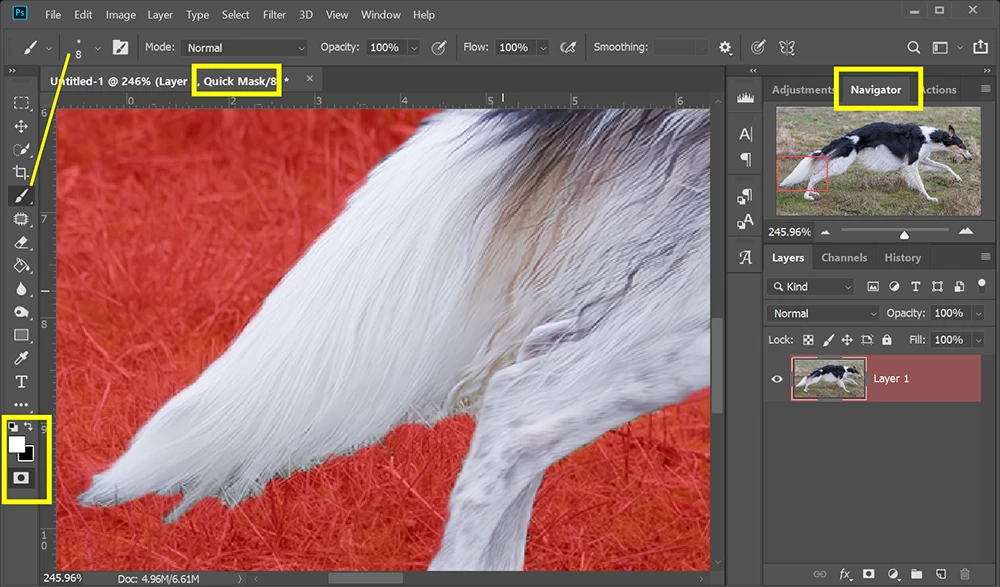
Separating hair from grass can be challenging. I would start with the Quick Selection Tool to make a rough marching ant outline and then refine it in Quick Mask mode using a small soft round brush (white reveals, black conceals).  


Use the Navigator panel to zoom in/out and move to other image areas. 

Change brush size with square bracket keys.  [ = smaller,  ] = bigger.  

Take your time. Masking work like this takes patience but it's doable.


Hope that helps.


The pads of the paws that are partially covered pose an additional problem and, depending on the new background, they may need painting/clone stamping/…

3 답변

jane-e
Community Expert
Community Expert
February 19, 2023

@Ken Nielsen wrote:

I thought I would ask amongst the experts here just to be sure there is not a better way.


Yes, there is a better way. Watch this tutorial from Jesús Ramirez on how to paint the fine hair back in. 

https://www.youtube.com/watch?v=sYt23sAPP50


Jane

c.pfaffenbichler
Community Expert
Community Expert
February 19, 2023

Please post (the pertinent section of) one of the images in question. 

Depending on the image one could use one of the channels as the basis for a Layer Mask. 

Ken Nielsen
Ken Nielsen작성자
Legend
February 20, 2023

Just an example of 'show dogs' I would be outlining and placing on different backgrounds.

Nancy OShea
Community Expert
Community Expert
February 20, 2023

Hi Ken,

My sister kept Wolfhounds for many years.  She especially loves Borzois.


Separating hair from grass can be challenging. I would start with the Quick Selection Tool to make a rough marching ant outline and then refine it in Quick Mask mode using a small soft round brush (white reveals, black conceals).  


Use the Navigator panel to zoom in/out and move to other image areas. 

Change brush size with square bracket keys.  [ = smaller,  ] = bigger.  

Take your time. Masking work like this takes patience but it's doable.


Hope that helps.


Nancy O'Shea— Product User & Community Expert
Simmer1
Community Expert
Community Expert
February 19, 2023

Hi,


Yes, there are a number of ways you could approach this task. If you have good contrast between your foreground character and the background you could try a colour range slection: https://www.youtube.com/watch?v=8nk1KkLn3CM