Inspiring
April 13, 2022
Answered

What's the best size/resolution for images in a web setting like Wordpress

  • April 13, 2022
  • 3 replies
  • 7237 views

I'm selling digital images in a setting where I'll be posting low-res, watermarked images in the galleries, but offering the high-res jpg version after purchase as the download. Basich though he question may be, what's the best size to select for conversion/res-sizing the high-res image to the low-res display version. I've looked in both Photoshop and Bridge, but neither seem to offer a resolution setting for conversion - only "image size". I recognize that they are related, but what is the best app to use for a batch conversion and what settings should I input for optimal loading and display in the Wordpress environment/WooComerce Gallery/Store? What by what?
This topic has been closed for replies.
Correct answer Leslie Moak Murray

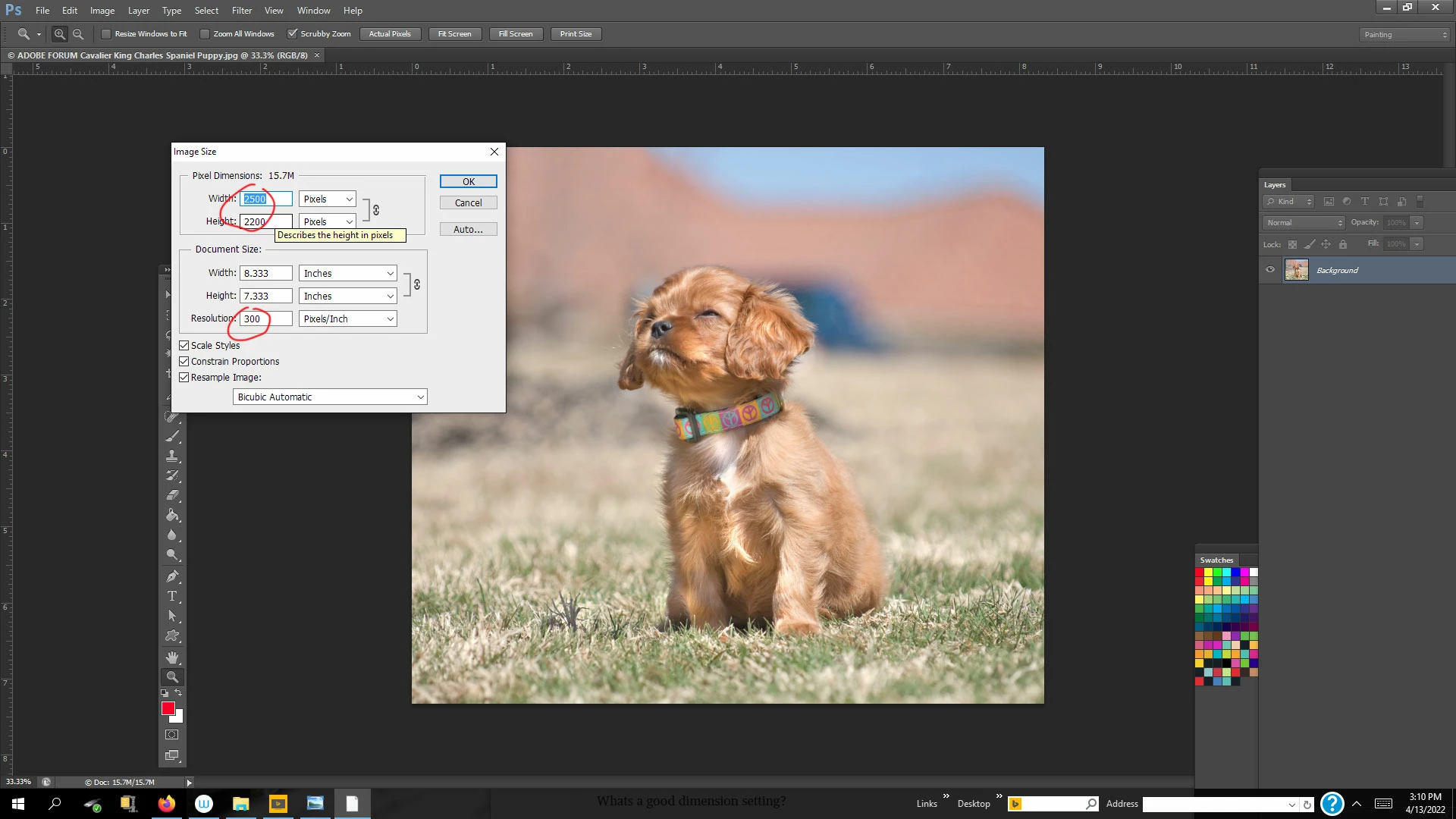
@Per Berntsen is correct that the dpi or ppi is irrelevant for web viewing. But "Save" or "Export For Web" can automatically reduce the size dimensions of the image. Before saving for web, I often go Image Size>and change the 300dpi to 150 dpi if the file is large (edit- this isn't a large file- just using it as an example to show how the size dimensions were reduced):


3 replies

Participant
August 16, 2022

About the batch conversion application. For similar tasks, I like to use the free image viewer XnView. I like the large number of settings it provides for batch conversion.

Per Berntsen
Community Expert
Community Expert
April 13, 2022

PPI (Pixels Per Inch) is only needed for printing, and is irrelevant for screen viewing.

On screen, images will display according to their pixel dimensions, and it makes no difference whether the PPI value is 72 or 900, or any other value.

The only numbers that matter are the pixel dimensions.

Inspiring
April 13, 2022

Interesting. I've read a number of articles about resolution vs image size etc. I set the resolution at 72 ppi and wasn't quite sure about the best size setting. I simply want to be able to upload optimal images that work in my galleries without overburdening the site and loss of quality. Your point is well taken. Whats a good dimension setting?


Inspiring
April 13, 2022

@Per Berntsen is correct that the dpi or ppi is irrelevant for web viewing. But "Save" or "Export For Web" can automatically reduce the size dimensions of the image. Before saving for web, I often go Image Size>and change the 300dpi to 150 dpi if the file is large (edit- this isn't a large file- just using it as an example to show how the size dimensions were reduced):


Wow. I bit off a lot in trying to build a website and edit my images with near zero experience in either undertaking. I can't say how much I appreciate the generousity of you and others in sharing your hard-earned knowledge and skill in helping me to get there.


Best..and thanks again!


Ken

Leslie Moak Murray
Community Expert
Community Expert
April 13, 2022

Save For Web (or it might be "Export" for web now) will give you 72ppi or 96 ppi, which are suitable for display on the internet.

Inspiring
April 13, 2022

As easy as that? I'll get over it! Is this for batch processing and in which app? I'm assuming you mean Bridge or Lightroom - but maybe Photoshop as well?