

silk-m
Community Expert
Community Expert
November 10, 2023
Question

Where is PSAutoRecover?

  • November 10, 2023
  • 1 reply
  • 3269 views

https://community.adobe.com/t5/photoshop-ecosystem-discussions/how-to-recover-unsaved-photoshop-file/td-p/7586044/page/2

is locked, so I'll start a new discussion, although it has nothing to do with recovering from user errors.

There are some surprisingly unknown facts about the location of PSAutoRecover.
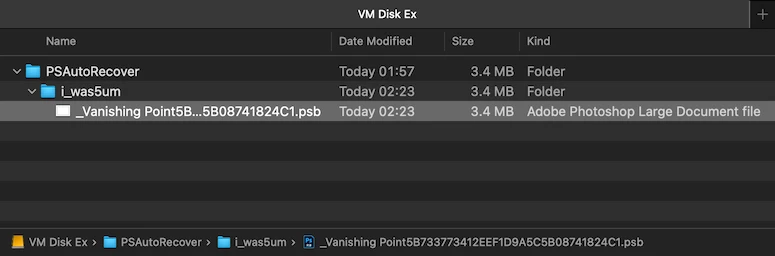
If the top of the scratch disk settings is not the startup disk, a PSAutoRecover folder will be created on the top scratch disk.


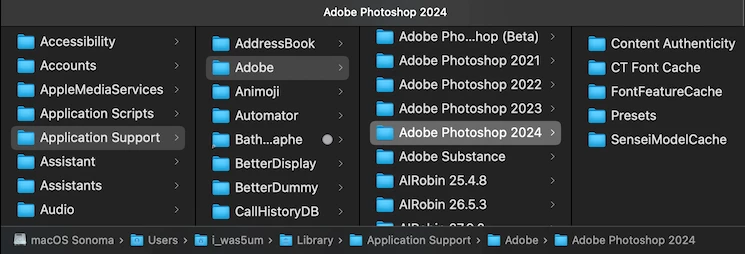
As you can see, the user's Application Support does not have PSAutoRecover.
 

The PSAutoRecover Folder is located on VM Disk EX and is updated every 10 minutes as set by me.


This topic has been closed for replies.

1 reply

D Fosse
Community Expert
Community Expert
November 10, 2023

Yes - but mainly, it's not a folder the user ever needs to open. In a normal shutdown it will be emptied. If Photoshop crashes, the contents will be opened automatically on next launch.


So it doesn't matter much where it is - except that it can be slightly in the way if it's on a non-system primary scratch disk. Then it will be right at the root of the drive as you say..


If the primary scratch is on the system drive, then Autorecovery will be in the system TEMP directory.


Inspiring
February 20, 2024

Assuming that it DOES automatically open it.  IT DIDN'T so maybe a regular file that can be opened makes more sense than some obscure unreachable (by ordinary mortals) shadow destination.