


thelastgen
Participant
May 18, 2023
해결됨

Why is it that when I try to great a new brush, I can't click on "noise" to adjust?

  • May 18, 2023
  • 2 답변들
  • 957 조회

I've adjusted noise in the past, but now when I try to create a new brush, it only lets me 'check' it. I'm trying to create a spray paint brush. Thank you!

이 주제는 답변이 닫혔습니다.
최고의 답변: Trevor.Dennis

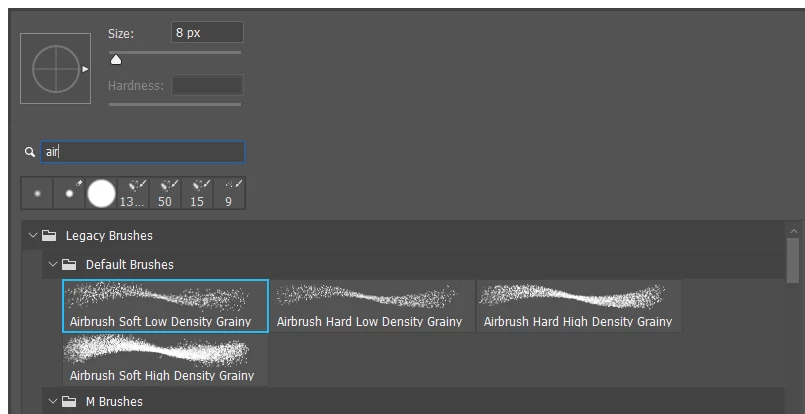
You might like to look at existing airbrush presets in the Legacy presets, and see what settings they use.  Use the search tool in the right click brush panel to find them.  Note: search only looks in brush groups that are in the main window of the panel.
2 답변

Trevor.Dennis
Community Expert
Community Expert
May 18, 2023

You might like to look at existing airbrush presets in the Legacy presets, and see what settings they use.  Use the search tool in the right click brush panel to find them.  Note: search only looks in brush groups that are in the main window of the panel.

thelastgen
thelastgen작성자
Participant
May 20, 2023

this is perfect!!! thank you so much

davescm
Community Expert
Community Expert
May 20, 2023

Just to add - the behaviour you see with Noise, in brush settings, is normal. It is clickable but no further settings are accessible.

Dave

Participant
May 18, 2023

If you are having trouble clicking on the "Noise" option to adjust it when creating a new brush, there could be a few possible reasons for this issue. Here are a few troubleshooting steps you can try:

  1. Software Compatibility: Ensure that you are using a graphics editing software or painting application that supports the "Noise" option for brush creation. Not all software may have this feature, so double-check the documentation or settings of your specific application.

  2. Brush Settings: Make sure that you have selected the appropriate brush type or preset that supports the "Noise" option. Some brush settings may not have the noise parameter available, so try selecting a different brush type or variant.

  3. Interface Issue: Check if there are any interface-related problems that may be preventing you from clicking on the "Noise" option. For example, the option might be hidden, minimized, or disabled. Look for any tabs, panels, or dropdown menus that could reveal additional settings or options related to brush customization.

  4. Software Update: Ensure that your graphics editing software is up to date. Sometimes, new features or bug fixes are introduced in software updates, so updating to the latest version may resolve any issues you are experiencing.

thelastgen
thelastgen작성자
Participant
May 20, 2023

thank you! My software is all up to date and I'm not having any interface issues. A few on reddit told me you cannot click on noise, but only check the box. I could have sworn I adjusted it before. Regardless, the answer below shared some brushes that will work just fine. Thank you!!