

Ivan Zajats
Inspiring
June 10, 2024
Open for Voting

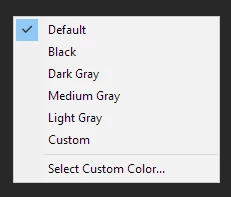
Background color change option in Liquify window

  • June 10, 2024
  • 4 replies
  • 760 views

I often change the bg color to make sure the image looks well, including the edges. Recently I was editing this one and realized that I miss the feature in the Liquify window (default gray doesn't allow to see the issue at all).




So I suggest adding the option to change the background color in Liquify window 🙂
4 replies

Ivan Zajats
Inspiring
June 10, 2024

additional layers, extended canvas, smart objects, omg.....

I just need what I asked for, no more than 1 click

Trevor.Dennis
Community Expert
Community Expert
June 10, 2024

By using a contrasting colour.  If the object already extends to the dovument boundary, then add canvas before using Liquify.  The easiest way to do that is to use the Crop tool, and Opt drag a corner handle.  


It is almost always a good idea to make the layer a Smart Object if you are going to use Liquify.  This way you can double click to reopen Liquify, and carry on where you left off.  That include using reconstruction if you so wish.  Note that I have made a temporary layer filled with black, and set that as being behind the SO I am editing.  This works despite the layer being turned off.

Smart Objects are useful in so many ways.  I use them so often I begrudge having to right click to create them, so I use a short Action triggered by F12, and I wouldn't mind a dollar for every time I have hit that key. 🙂

Ivan Zajats
Inspiring
June 10, 2024

@Trevor.Dennis, yep, but how will it help to see the edges better?)

you could suggest extending the canvas and then cropping it back 🙂 which is irrational


I just liquified it by feel, it took two passes (didn't want to move the pixels too much).

Trevor.Dennis
Community Expert
Community Expert
June 10, 2024

Hi Ivan.   Do you know that you can chose to use any of the document layers as a background in Liquify, and also control opacity?  You could create a temporary layer filled with a suitable colour before going into Liquify.