



Yamonov
Legend
September 25, 2025
Released

P: Photoshop 26.11 Curves UI issues and feedback

  • September 25, 2025
  • 23 답변들
  • 2032 조회

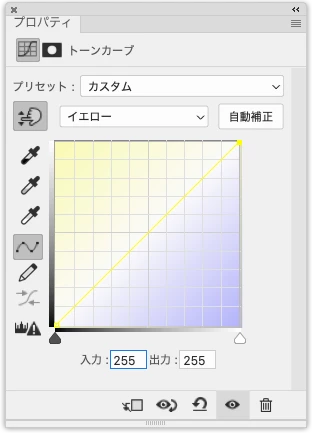
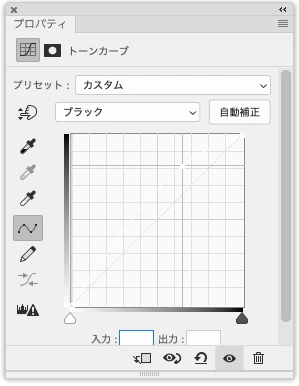
In the 26.11 release, the Tone Curve UI has become a mess. Inside the curve graph, there is an unnecessary gradient background that professionals don’t need, and there is no option to turn it off. More critically, in CMYK mode the Yellow and Black curves are almost completely invisible, yet this was released publicly. This really needs to be fixed.


Yellow channel curve in CMYK mode.
 

Black channel curve in CMYK mode (drawn in white, completely invisible)
  

23 답변

Legend
September 29, 2025

Honestly this is a change that makes the dialog worse and does nothing helpful.

alexanderl16240166
Inspiring
September 29, 2025

Thanks Sameer. Basically it's just extremely visually distracting. For the time being I've turned off the histogram in the Curves Display Options which also hides the gradient, but as the histogram is useful sometimes I'd like to have those be separate checkboxes. Hopefully not a heavy lift since the option is already there. Thanks!

Yamonov
Yamonov작성자
Legend
September 26, 2025

Hi Srishti,


Thank you for your reply. Could you clarify what exactly you weren’t able to reproduce?
Was it regarding the curve colors in CMYK mode on the Light UI, or something else?


I have already tried the following steps:
• Uninstalled Photoshop 2025 via CC Desktop with “Remove Preferences” enabled, then reinstalled with “Keep Preferences” disabled.
• Turned off GPU Performance and restarted Photoshop.


The behavior did not change. The curve colors remain the same.


For reference, here is my environment:
• macOS Sequoia 15.7 / M1 Ultra
• Photoshop 26.11


Until version 2024, the curve colors in both RGB and CMYK modes were adjusted for visibility. For example, Yellow and Green curves had slightly reduced brightness, which made them distinguishable. In 26.11, however, both RGB and CMY curves are now rendered at maximum brightness (e.g. G255, R255+G255 for Yellow), with no consideration for visibility.

Additionally, in Light UI, the Black channel curve becomes completely invisible because it is drawn in white and does not adapt to the background.


On top of this, each channel now has unnecessary color gradients drawn in the background, which only makes the Tone Curve panel harder to use.


This is clearly an issue with the UI color settings. It is hard to understand why this was released in this state—surely someone must have noticed during development. Please do not rely on end-users as beta testers.


Disabling the histogram or GPU Performance is not a solution, as those options reduce usability and place unnecessary burdens on actual work.


Please fix this issue properly.


Regards,

--Yamonov
Semaphoric
Community Expert
Community Expert
September 25, 2025

This is horrible. Did anyone try this before they shipped it? I'm thinking of downgrading back to .10 if I can keep my file associations straight in Bridge.

alexanderl16240166
Inspiring
September 25, 2025

Agreed, and all the added colors in the Hue Sat dialog. Anything that adds bright colors should be able to be disabled (those who've been around a while may remember the uproar over the blue Share button..)
If you're working on color sensitive things they can be really distracting.

davescm
Community Expert
Community Expert
September 25, 2025

I agree with this. I want to see the histogram, I don't need distracting colours added to my UI. A simple option to turn it on/off should keep all users happy (and whilst about it add the same for the coloured gradients in Selective Color sliders).

Dave


alexanderl16240166
Inspiring
September 25, 2025

Just want to add another voice that this is extremely distracting. Good to know it's possible to turn it off, but while the color gradient is not useful, the histogram is, so I'd really rather not have to turn it off to get rid of the gradient. Please make two separate checkboxes!

Legend
September 25, 2025

Yessir I think the OP is talking about the color gradient that shows for individual channels in Curves dialog (either the adjustment layer or standalone filter.)

alexanderl16240166
Inspiring
September 25, 2025

Updated to 26.11 yesterday and a bit floored by the changes and lack of options. Is there really no way to hide this? The "Curves Display Options" let you turn off the histogram, channel lines, all kinds of things, but not the distracting colorful background.

Legend
September 25, 2025
alexanderl16240166
Inspiring
September 25, 2025

Thanks, weighed in there too


Srishti Bali
Community Manager
Community Manager
September 25, 2025

Hi @Yamonov


Sorry to hear about this experience. I tried to reproduce the issue on my end but wasn’t able to. Could you please share a short video of your workflow so we can better understand what’s happening?


Also, let us know if the behavior appears across multiple files. In the meantime, you can try the following steps:

  • Turn off GPU Performance (Preferences > Performance).

  • Reset Photoshop preferences after creating a backup.


Thanks, @ExUSA, for sharing a quick workaround here. Were you able to replicate this behavior on your setup as well?


Regards,

Srishti