
Inspiring
September 26, 2012
Released

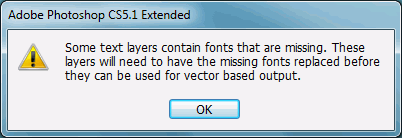
P: Annoyed by missing fonts warning

  • September 26, 2012
  • 28 replies
  • 1290 views

This is about Photoshop 12.1 x64 under Windows 7.

Our designers use MacOS. Our developers use Windows 7. Every time our developers open any single file sent from our designers, Photoshop throws up a modal dialog stating "Some text layers contain fonts that are missing. These layers will need to have the missing fonts replaced before they can be used for vector based output".

This doesn't just appear the first time you open any file like this. This doesn't just appear once per session. This doesn't just appear once per file. This doesn't just appear once when you open several files at once. This appears every time the user opens every file. There is no option to turn it off or never see it again, under Preferences or on the Dialog itself. The dialog does not appear briefly and go away after a set period of time. The notice does not appear in a status bar. This dialog has persisted for months and shows no signs of disappearing from the program by itself.

The following should be noted: Photoshop does not immediately change the file in any way. The file can be edited and re-saved with the same font layer intact, and Photoshop will warn you again when you try to open that file. There is another related, and arguably more useful, dialog that appears when a line with a missing font is selected. The developers will not normally need to change any font layers. In this author's opinion, this dialog serves no real purpose and should be changed in one or more of the many ways listed above or removed from the program entirely.
28 replies

David Mohr
Participating Frequently
October 22, 2014
Howdy Steve,

I'm happy to let you know that with the latest version of Photoshop CC, your concern has been addressed and there is an Do Not Show button on the dialog that warns of missing fonts. In fact, this solution has been available since June of 2014 (CC 2014).

Thanks,
David
Inspiring
October 22, 2014
Meanwhile Premier Pro will NOT warn you when a font used in a sequence you're opening uses a font not installed on your system.

I personally would rather be warned if a font is missing. HOWEVER photoshop at the very least will retain the raster info which neither After Effects or Premier will.

In any event it's probably more effective to get your point across by logging a feature request (unless you enjoy debating over a web forum :)
https://www.adobe.com/cfusion/mmform/...
Inspiring
March 13, 2014
I would love to turn this alert off. I feel like I click alerts more than I actually get any work done. I have been putting an emphasis on time saving photoshop techniques lately (like using actions to their true potential) and all of the alerts (the one that the OP posted in particular) are very annoying.

I would much rather have a "Check file for errors" button that you could click manually to give you a list of possible errors.
Known Participant
February 19, 2014
In my work the graphical designer exports the layouts to .png (if we are doing webpage) Now everyone can open it with any software.

And if needed I'll also create additional .txt -file to include more info for programmers. The file would look like this:

Navigation font: Oswald
Navigation text-color: White
Navig bg color: #b5b5b5;
Font family in other texts: Open Sans, Arial, Helvetica
Text-color: #222222;
Margin between product images: 20px
Footer Color: #ff0000;

...

etc..
Inspiring
February 18, 2014
Actually, I'd like it if every single warning dialog had a "do not nag again" checkbox option. I'd also like a screen in the preferences where I can see all possible nag popups and check / uncheck them at will.

You guys use OOP, right? Just add the checkbox to the warning dialog object.
Participating Frequently
September 16, 2013
I work in Web Design...I often don't have the same fonts as the in-house design teams my company frequently works with at bigger companies, but I also frequently have the same font that was for some reason installed differently on my machine / is a slightly different version which causes this dialog. Some way of optionally disabling it would be helpful for firms like mine (and frankly many many firms) who don't always get 100% of the assets used by a company's in-house design team. When we have to open 5-10 ads that a client wants us to update or tweak in some way, having to click "ok" as each loads takes valuable time that I could be using prepping images / downloading assets / working on another project in the background. Don't be so quick to judge.
Inspiring
July 17, 2013
Thanks, David!
David Mohr
Participating Frequently
July 17, 2013
Howdy folks,

I've gone ahead and logged a feature request for this issue. If I'm understanding you correctly, you want a Do Not Show checkbox for this dialog, right?

I can't comment when it will get in cuz we're sorta backlogged, but the Type team hears your complaint.

Thanks,
David
Inspiring
May 27, 2013
Chris Cox;
"why have you not made sure that all of your designers have the same fonts installed to prevent these problems?"

Because the font files are Client Specific.
We get a new client every few days.
Every client wants a different font.
We can't have every font file on the internet installed!
We can't know what fonts are needed by clients that we don't have yet.
We're not psychic!
Inspiring
December 10, 2012
An Adobe representative has admitted that Bad Design Solutions are the way of the future. I suggest a boycott.

At least GIMP programmers know enough not to give two error messages about the same problem, and their modal/error dialogs never bother you at an inappropriate time. Also, their tech support community is MUCH more helpful, and their bug reporting form is MUCH more efficient. Also, GIMP is free.

I can't believe how much money Adobe has wasted on defending this problem, and not on fixing it.