Participant
February 7, 2017
Answered

Edit text in PS - inserts new layer

  • February 7, 2017
  • 1 reply
  • 3288 views

How do I edit text in my psd file?  when I click on the area I want to change with the T tool, it creates a new layer.  I want to change what's there.  When I search on edit text, those instructions do not work.  How do I get the layers to show?
    This topic has been closed for replies.
    Correct answer davescm

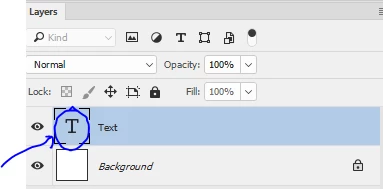
    Double click on the text layer in the layers panel, then place the cursor on the text to edit

    Note : Your text must be on a text layer to do this. If it is part of an image then you cannot directly edit it. You would need then to clone it out and replace with a similar font.

    Dave

    1 reply

    davescm
    Community Expert
    davescmCommunity ExpertCorrect answer
    Community Expert
    February 7, 2017

    Double click on the text layer in the layers panel, then place the cursor on the text to edit

    Note : Your text must be on a text layer to do this. If it is part of an image then you cannot directly edit it. You would need then to clone it out and replace with a similar font.

    Dave