


Participant
Apr 23, 2020 10:28 AM UTC
Question

Error when opening the file, file turned to all black with red line
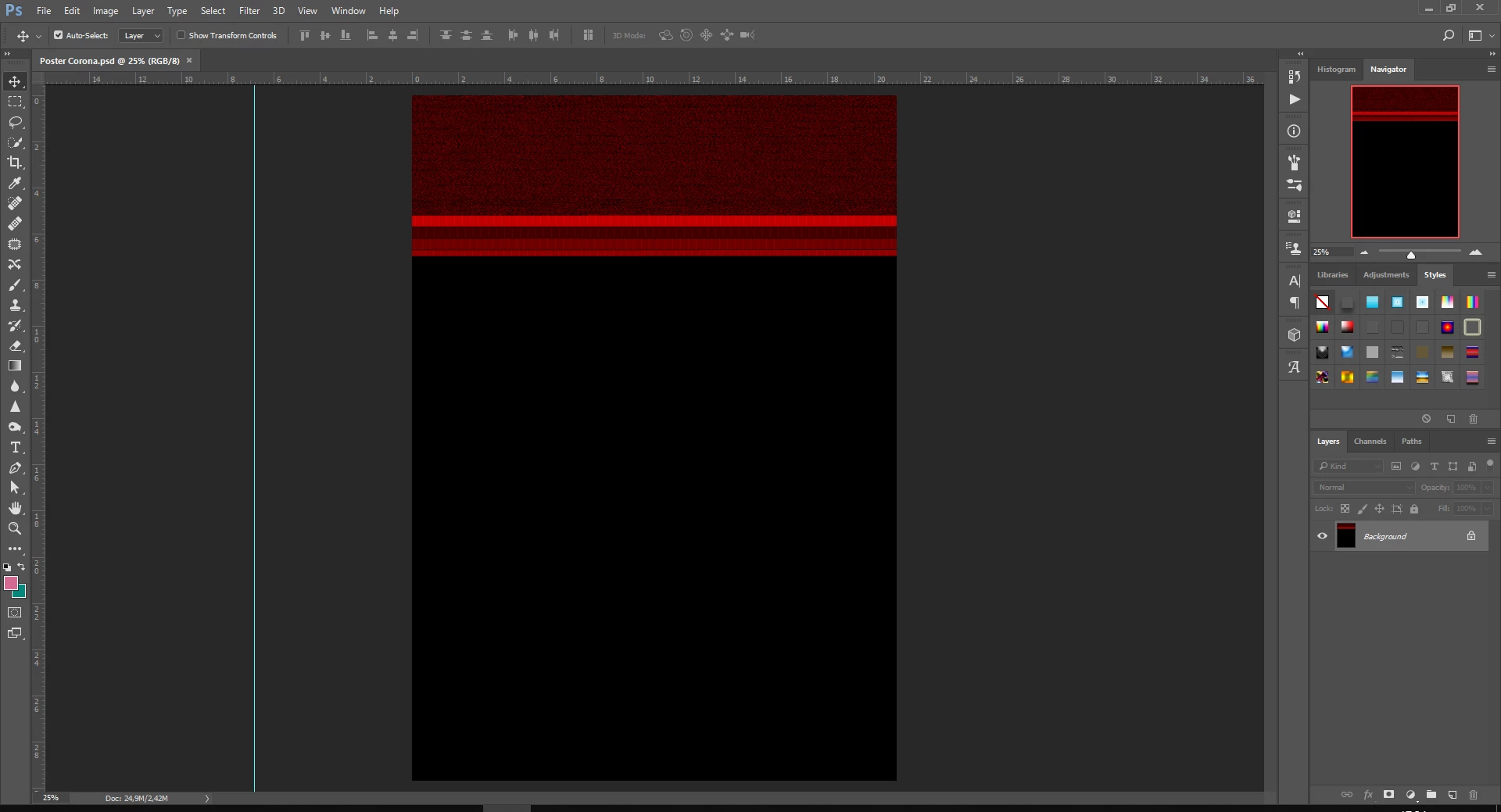
I try to open my Photoshop file after my Windows got suddenly shut down unexpectly and this is what appears, all of the layer and picture turned into black with some red line. Can someone help me please? I need to fix it asap, thanks before !

10 replies

Participant
Jun 7, 2023 6:31 PM UTC

Photoshop file is open but red and black file is open

please solve

Translate
D Fosse
Community Expert
Community Expert
Jun 7, 2023 6:51 PM UTC

If disabling the GPU in preferences doesn't bring back the image, then the file is corrupt.


File corruption is always caused by failing hardware, power loss during save, worn and loose cables and connectors, etc..

Translate
Syed25979576eajf
Participant
Sep 6, 2022 9:17 AM UTC

same problem here,
I saved the file and after a few days when I reopen it, I got the same error as the above picture.


Translate
c.pfaffenbichler
Community Expert
Community Expert
Sep 6, 2022 9:30 AM UTC

Does turning off »Use Graphics Processor« in the Performance Preferences (Photoshop > Preferences > Performance > Graphic Processor Settings) and restarting Photoshop have any bearing on the issue? 

Does turning on »Deactivate Native Canvas« (Photoshop > Preferences > Technology Previews) and restarting Photoshop have any bearing on the issue? 

Translate
Participant
Aug 14, 2020 12:14 PM UTC
  • I just have the same problem,  did you to fix it? 
Translate
c.pfaffenbichler
Community Expert
Community Expert
Aug 14, 2020 1:21 PM UTC

Please read this (in particular the section titled "Supply pertinent information for quicker answers"):

https://community.adobe.com/t5/Community-Help/Guidelines-Tips-for-the-Adobe-Forums/td-p/4788157

Translate
Dec 26, 2020 11:27 PM UTC

Hi! I have a same problem, what do you do for fix it?

Translate
c.pfaffenbichler
Community Expert
Community Expert
Apr 23, 2020 10:34 AM UTC

Does turning off »Use Graphics Processor« in the Performance Preferences (Photoshop > Preferences > Performance > Graphic Processor Settings) and restarting Photoshop have any bearing on the issue? 

Translate
boykerenAuthor
Participant
Apr 23, 2020 10:38 AM UTC

yeah, i already did that but it doesn't work either, is there any another way for me to fix it ?

Translate