


- Home
- Photoshop ecosystem
- Discussions
- Re: Photoshop CC 2018 I Can't Render Video
- Re: Photoshop CC 2018 I Can't Render Video
Photoshop CC 2018 I Can't Render Video
Copy link to clipboard
Copied
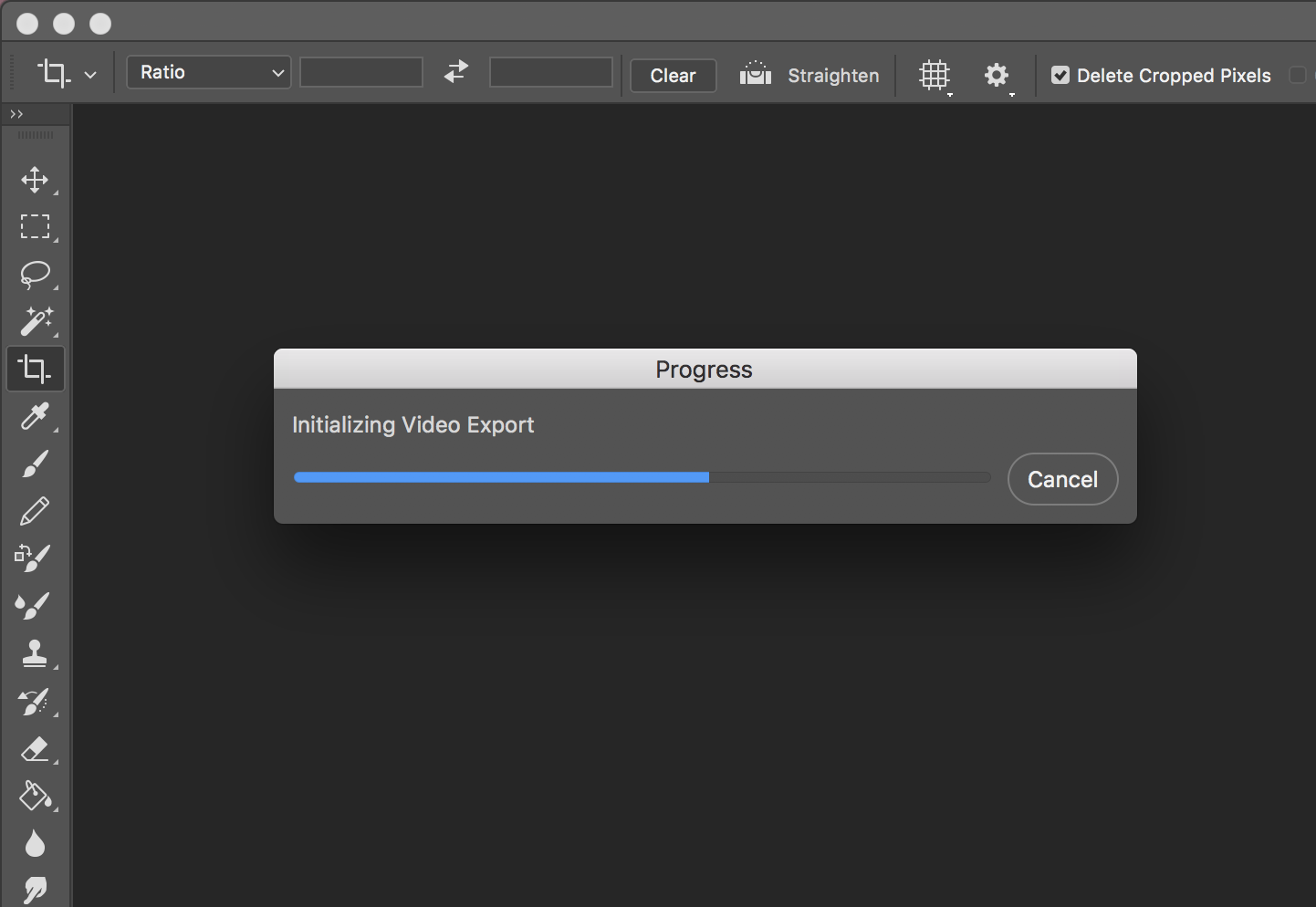
I wait so long but progress not working .
help me please



Explore related tutorials & articles
 90
Replies
90
90
Replies
90


Copy link to clipboard
Copied
so i just had the same problem. i called ADOBE and what they did was update and install the Media encoder cc app from ADOBE cloud. now it works..


Copy link to clipboard
Copied
I go to render a video made from clips and its shows a crash report and then it shuts down.
It's been going on for over a week.

Copy link to clipboard
Copied
Ok, I'm done. Photoshop freezes while rendering video. Even just a tiny clip. I have a monster computer, latest video card and driver, enough space on my machine. Even uninstalled my antivirus. And it keeps freezing. I have now wasted two days of my time and lost a $400 contract because of this. My sub runs out at the end of the month. I will not be renewing. Fix your *&it Adobe.

Copy link to clipboard
Copied
You have to follow this thread. Had the same problems but there was one solution that involved ditching some files in the preference library. I did this and it finally worked.

Copy link to clipboard
Copied
Came here out of massive frustration. Read through the thread, and tried many things along the way.
I'm rendering a video now, and it's working, but none of the above methods worked (this is an attempt
to render a video from a .mov file).
Re-installing PS 2017 didn't work as rendering the video in question caused PS 2017 to crash.
What has seemed to work (and I can connect the dots to when this became a problem) is deleting all
the smart filters. That means that I am unable to use ACR to apply some much needed correction, but
the video has completely rendered during the time I have written this Reply.
Might be worth a try, but eliminates the powerful adjustments available in ACR.
Comments?

Copy link to clipboard
Copied
Driving me nuts, also! Can't render video with Photoshop CC 2019. I did install PS CC 2017 and can now render video. So, maybe there is an issue with 2019 and MacOS Mojave v. 10.14.1?

Copy link to clipboard
Copied
Ok,
now my aim was too build a 3D object or objects in shaper 3D on my iPad Pro ,and then too import the obj file into photoshop 3D,
so then I could animate this Whithin ,photoshop 3D ,and render it out as a video ,then use it wherever ,
I would have been exporting the video with a view to further animate whitin after effects,
however ,just as you ,
I could not get the the rendered video to save ,anything other than a complete frame length video ,of one still frame, annoying!,I think so!
so.... this is how you do it , and first you must realise that as soon as you export a 3D image to video it obviously becomes 2d as I am sure you understand,
so to get past all this nonsense
what you do is
and this I know will seem painfully obvious,
you just make your animation inside photoshop , let it play out in the timeline ,get rid of all the grids and guides views ,choose a background layer that will suit your project your intending importing it too ,then when your happy with The result and it’s playing a nice animated loop
all you do is go to QuickTime and record the screen ,ta da.
exported with no render time.
you can then import this mp4 wherever you like as its a video of a 3D motion.
i know ,painful isnt it


Copy link to clipboard
Copied
Recording the screen captured video is just a poor quality GPU preview render, not a ray traced final file.
If you are having trouble with 3D rendering only one frame:
Keyframe your 3D animation then save the file as psd and close it.
Reopen the file.
Check the keyframes are still in place and enabled, if not enable them.
Render video.
Dave
Copy link to clipboard
Copied
make your animation in photoshop 3D ,
disable grids and views,
‘play the timeline video make sure your mouse pointer is off the preview screen,
open quicktime,
record screen video
ta da
mp4 motion video saved with no rendering
you can now edit this motion video in what ever program you like with masks or effects ,
donations payed to sea shepherd
thanks

Copy link to clipboard
Copied
With respect designer dan,
Why should Adobe customers need to undergo lengthy workarounds, for technical issues that are this vendor's responsibility? Today I contacted Adobe Australia's Technical Assistance over this issue. I was forwarded to a South Asian staffer, who in the first instance did not acknowledge he worked for Adobe. Rather, he began with, 'I help you with your computers'. During the conversation I sought clarification that he worked for Adobe, whereupon he became irritated and said he had lots of customers waiting, and that, 'If you want to waste my time you should go'.
The staffer then indicated that I would need to pay a fee to Adobe for a technician to contact me and fix the problem. I replied the problem was not of my making, but his employer. And in any case, if I were to pay Adobe a support fee beyond my yearly Cloud subscription, then I would need his employer's assurance that if the assigned technician could not fix the problem, than someone who can fix it would be assigned to the task. The staffer did not agree to my condition.
My exerience of Adobe's "technical assistance" may slightly be off the main topic. However, I do not see why I should give my credit card details to a stranger who would not forward an email, acknowledging that he worked for Adobe. Where is Adobe's voice in this forum, assuring us all will soon be well with Photoshop's Motion Render Video function? And for that matter, where is the PS update to to correct this on-going error?
Copy link to clipboard
Copied
This matter is quite beyond the pale. As I write, since 2017 (three years!) Adobe Photoshop in Motion mode has had difficulty completing initialising video export. I have a few suggestions for the Mandarins of Adobe, who are paid handsomely to see their employer profits from us, your customers, even when we're forced to work around problems of your making. Fix this bug for once and for all. Alternatively, forget about Photoshop Motion, and transfer ALL Photoshop's paint and repair tools to After Effects.
Whatever the case, I think it's about time Adobe customers demanded a penalty system. I imagine it would work roughly this way. Every time an on-going Adobe error has not been corrected by the vendor, customers are given a refund that is proportional to the professional inconvenience they have endured.

Copy link to clipboard
Copied
I have the same problem here for almost one year.... everytime i see an update for photoshop i wish they fixed it.... but nothing till now.... i'm a photographer, and i use photoshop to create fashion GIFs, that i like to export in video format, since it's better for social media...
it's REALLY annoying and time consuming having to save it in PSD, and using another software just to export it.
I already contacted costumer service, but they had no idea what to do...
Copy link to clipboard
Copied
arturm97102490,
It's appaling, this error has been present for three years. By all accounts Adobe haven't even paid Manantachai Prisin (post 22nd October 2017) the courtesay of offereing a solution to his problem. Truly, I find it obscene that Adobe continue to profit at the personal and professional inconvenience of their customers.
Moreover, it's extraordinary that Adobe Customer Service have no idea how to correct the Render Video bug in Photoshop's Motion workspace. If Adobe's technical staff cannot fix this problem, then they should be replaced by technicians who can.
Again, I suggest that when Adobe errors are not corrected by the vendor in a reasonable time, its custumers have good reason to expect a refund on their subscription, proportional to the delay work productivity has been affected.

Copy link to clipboard
Copied
Here's a solution that worked for me and others: From Adobe Photoshop Family
System Preferences> Security & Privacy > Privacy tab > Full Disk Access.
Click the lock icon in the lower left, enter your admin username & password.
Click the + icon and add Photoshop to grant access to your hard disk.
Then restarting my computer.

Copy link to clipboard
Copied
Amazing! I only get this error when the Bridge program is running. Once the Bridge is not running, the Render Video command works fine.
I've tried the "Skip loading optional plug-ins and third-party plug-ins?" Sometimes it helps, sometimes it doesn't.
It seems to me the problem is not fixed. Photoshop 2020, Photoshop 2021, Mac Os Mojave 10.14.6, MacBook Pro (Retina, 15-inch, Mid 2015), external monitor 27"

Copy link to clipboard
Copied
After months of trying to figure this out, it was really just as simple as closing Bridge. Thank you so much for your comment. I was so frustrated. I can't believe it was so simple. They do still need to fix this issue though. I appreciate you sharing.


Get ready! An upgraded Adobe Community experience is coming in January.
Learn more
 AdChoices