Pqtrths
Known Participant
July 10, 2017
Answered

Adjust Sharpness does not show More Refined option

  • July 10, 2017
  • 3 replies
  • 833 views

Problem with Adjust Sharpness.

I use PSE 15 (from PSE 😎 loaded from a disc I bought from B&H Photo.  When using Adjust Sharpness, the "More Refined" command does not appear in the drop down panel.  Scott Kelby's book mentions "More Refined" as a reason why he prefers Adjust Sharpness to Unsharp Mask, but YouTube videos that show the drop down do not show or mention "More Refined."  Was "More Refined" deleted from PSE 15 or is it in a different location?  If that is the case, how do I access it?

Comments or suggestions are appreciated.

Pqtrths
    This topic has been closed for replies.
    Correct answer Jeff Arola

    If you haven't already read the directions you linked too under Precisely sharpen an image

    they are unfortunately out of date.

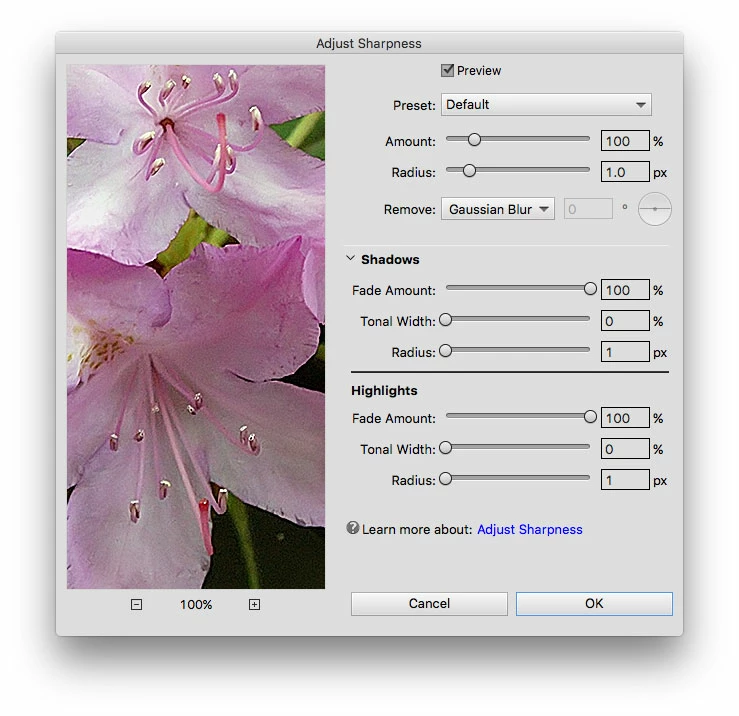
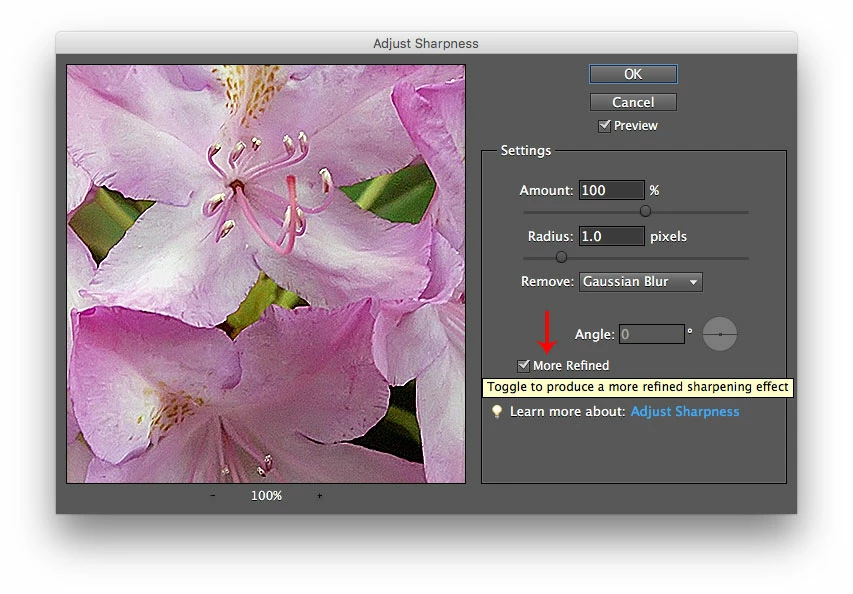
    It describes the older Enhance>Adjust Sharpness before photoshop elements 13, which from pse 13 thru elements 15 has a different dialog with more options, but is missing the More Refined option even though both versions use the same sharpening methods (algorithms/math).

    Legacy in the case of photoshop elements 15.

    Enhance>Adjust Sharpness before pse 13

    Enhance>Adjust Sharpness 13 thru 15 photoshop elements

    screenshot from pse 15 on a mac

    Adobe has a new improved Smart Sharpen (Adjust Sharpness) in photoshop cc, but instead of using that improved version which does not require the More Accurate (More Refined) setting, pse 15 uses the Legacy version and should have the More Refined option to get the most accurate or best quality sharpening from Adjust Sharpness.

    3 replies

    Participant
    January 1, 2021

    FWIW, I'll assume that in your first post, Geoff, you meant 'If you have already read the directions you linked too under Precisely sharpen an image [comma]...'.

    In other words, 'If you've read that information, it's wrong'. Unless your were intending to be confrontational - '..haven't you read your own link' - then your phrasing stands.

    The answer, updated, is 'Adobe removed the More Refined option starting with Photoshop Elements 13, and it continues through to and including Photoshop Elements 2018, and may well continue forever'.

    1st January, 2021.

    Jeff Arola
    Community Expert
    Community Expert
    July 11, 2017

    I guess the answer to your question, so far, is adobe removed the More Refined option starting with photoshop elements 13.

    Adobe Employee
    July 11, 2017

    Hi,

    Please see the official help link for Adjusting sharpness in Photoshop Elements 15:

    Sharpen photos

    Thanks,

    Arshla

    Jeff Arola
    Community Expert
    Jeff ArolaCommunity ExpertCorrect answer
    Community Expert
    July 11, 2017

    If you haven't already read the directions you linked too under Precisely sharpen an image

    they are unfortunately out of date.

    It describes the older Enhance>Adjust Sharpness before photoshop elements 13, which from pse 13 thru elements 15 has a different dialog with more options, but is missing the More Refined option even though both versions use the same sharpening methods (algorithms/math).

    Legacy in the case of photoshop elements 15.

    Enhance>Adjust Sharpness before pse 13

    Enhance>Adjust Sharpness 13 thru 15 photoshop elements

    screenshot from pse 15 on a mac

    Adobe has a new improved Smart Sharpen (Adjust Sharpness) in photoshop cc, but instead of using that improved version which does not require the More Accurate (More Refined) setting, pse 15 uses the Legacy version and should have the More Refined option to get the most accurate or best quality sharpening from Adjust Sharpness.