
Participant
February 3, 2017
Answered

Adobe DNG Converter für Photoshop Elements 14

  • February 3, 2017
  • 1 reply
  • 882 views

Sehr geehrte Damen und Herren,

Ich arbeite mit Photoshop Elements 14 und habe jetzt eine neue Kamera, die Panasonic Lumix DMC LX 25. Jetzt habe ich mir den DNG Converter für dieses Kamera heruntergeladen, die ich auf dem Desktop habe. Ich möchte aber den DNG Converter im Programme haben, nämlich im Editor untr Raw Dateien. Wenn ich dies anklicke, kommt immer im die Meldung "Ich solle mir entweder Aktualisierungen herunterladen oder auf http:.... Adobe gehen, wo dann eine ganze Liste von DNG Convertern ist. Dies habe ich schon alles getan, bei den Aktualisierungen kommt immer die Meldung "ist auf dem neuesten Stand". Ich bin schon total verzweifelt und weiß mir keinen Rat mehr, denn bei der vorherigen Kamera, die Panasonic Lumix TZ 61 hat es problemlos funktioniert. Vielleicht blockiert das alte Modell die Raw.Dateien? ist das möglich? gibt es ein update von dem 14er programm, das ich nicht habe?

Vielleicht können Sie mir weiterhelfen . ich wäre Ihnen sehr dankbar.

Liebe Grüße aus Wien

Gertrude Rotter
    This topic has been closed for replies.
    Correct answer 99jon

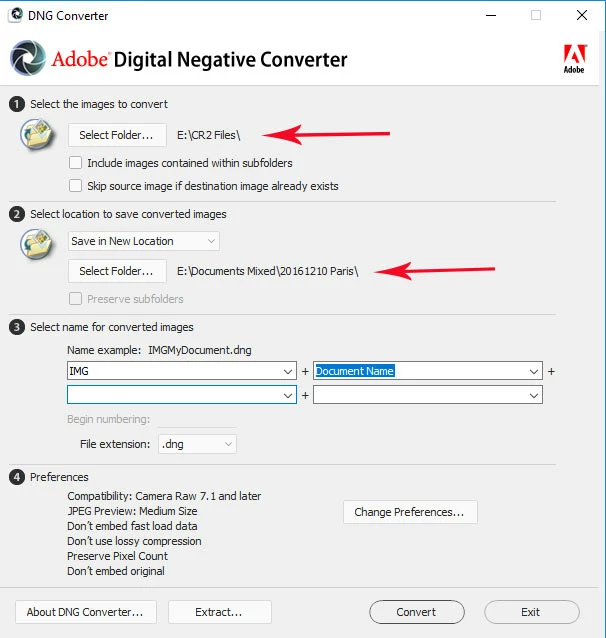
    You don’t use DNG converter as a  plug-in. You simply batch convert a folder of raw images.

    See my image below for my December trip to Paris.

    I first created a new folder named 20161210 Paris

    I double-clicked the DNG icon on the desktop to Launch DNG Converter

    I clicked ”Select Folder” to choose the source folder or camera card.

    I clicked “Select Folder” to choose the new folder as the destination

    Then I clicked the convert button

    The new DNG files could be imported in to Elements from the folder 20161210 Paris

    1 reply

    Jeff Arola
    Community Expert
    Community Expert
    February 3, 2017

    The dng converter is a separate program/application from photoshop elements.

    One uses the dng converter to convert the Panasonic Lumix DMC LX 25 files to dng copies and then open those dngs into photoshop elements.

    Here's a video on how to use the dng converter.

    Camera Raw: How to use Adobe DNG Converter - YouTube

    Participant
    February 4, 2017

    Dear Mr./Mrs. R. Kelly,

    Thanks for the prompt reply. I have watched the tutorials - my problem is the following: I have already installed the Adobe DNG Converter 9.7 (which is for Panasomic Lumix DMC LX 15) and this is now on my desktop.

    What I wanted is to have it in the Photoshop Elements 14 Programme. Whenever I go to "Actualize" I get the answer "the programme was actualized a few minutes ago".

    This does not help me. When I watch the tutorial I realized that I have under "file" (I have it in German Datei), I do not"Plugins" to klick on as it was shown in the tutorial. Maybe the German version of Photoshop Elements 14 is different from the English Version - . When I go under "Help" - Camera Raw, then appears a photo from Adobe with the person who invented this modul, but there is nothing to click on. I am really desperate now. Would you have an idea how I can get this plugin into my programme? I would be so happy.

    Thanks for your efforts and kind regards from Vienna.

    Gertrude Rotter

    Gertrude Rotter[http://graphics.hotmail.com/emvamp.gif]

    99jon
    99jonCorrect answer
    Legend
    February 4, 2017

    You don’t use DNG converter as a  plug-in. You simply batch convert a folder of raw images.

    See my image below for my December trip to Paris.

    I first created a new folder named 20161210 Paris

    I double-clicked the DNG icon on the desktop to Launch DNG Converter

    I clicked ”Select Folder” to choose the source folder or camera card.

    I clicked “Select Folder” to choose the new folder as the destination

    Then I clicked the convert button

    The new DNG files could be imported in to Elements from the folder 20161210 Paris