
Known Participant
February 8, 2017
Answered

Adobe Photoshop Elements could not be launched

  • February 8, 2017
  • 4 replies
  • 2672 views

In Lightroom 6 I have clicked on “open as layers in Photoshop”. Photoshop Elements 14 opens OK, however without the files. Then after a few moments a message appears in Lightroom “The files could not be edited because Adobe Photoshop Elements could not be launched” It clearly launches but without the files. Can anyone help with this please?
    This topic has been closed for replies.
    Correct answer Jeff Arola

    Thanks, I think the problem was that Elemental was in the wrong directory. However, this is now OK and it now appears in the Lightroom Plug-in Manager.

    I have once again tried to “Open as Layers in Photoshop” and I am still getting the same message.  “The files could not be edited because Adobe Photoshop Elements could not be launched”.  IT LAUNCHES ELEMENTS OK BUT WITHOUT THE FILES! Should I just give up?


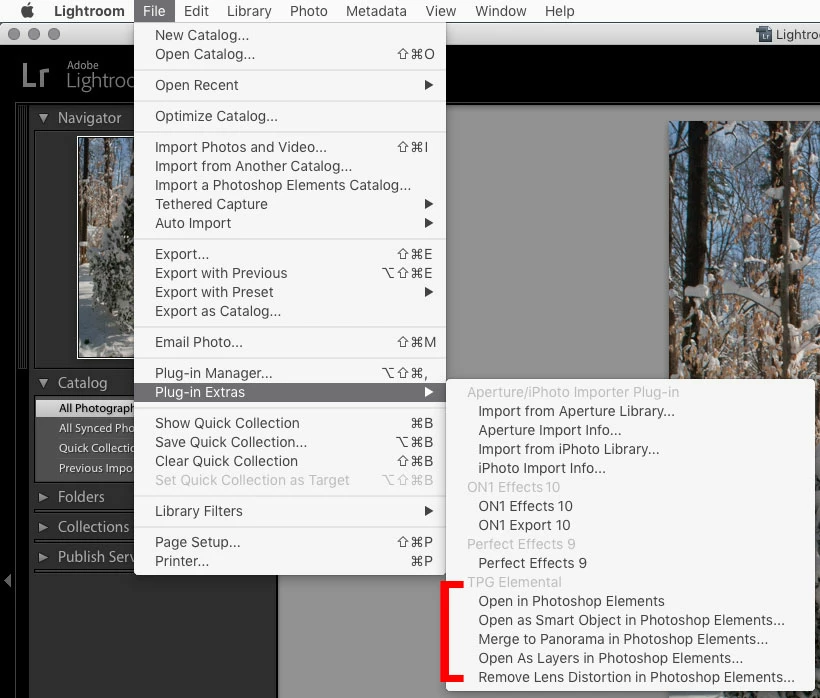
    Elemental menu items are under File>Plug-In Extras in Lightroom.

    https://www.photographers-toolbox.com/products/mdawson/tpgelemental/index.php?sec=quickguide

    4 replies

    Jeff Arola
    Community Expert
    Community Expert
    February 10, 2017

    As far as i can tell or know, the only function on the Lightroom Photo>Edit In menu that actually works with any consistency with photoshop elements is the Edit in Adobe Photoshop Elements Editor. Meaning one can only open single images, more than one yes, but not as layers, photomerge, hdr or smart objects.

    Most of the menu items on the Photo>Edit In menu are meant for photoshop, not photoshop elements.

    In order to open images as layers in photoshop elements from Lightroom, one needs a third party plugin for Lightroom called Elemental.

    https://www.photographers-toolbox.com/products/mdawson/tpgelemental/

    tony427Author
    Known Participant
    February 17, 2017

    Thanks, I have just got around to attempting to install the plug-in Elemental that R_Kelly provided the link for. Unfortunately I am now encountering difficulties getting Lightroom to recognise this plug-in. Having unzipped this file and then adding the folder in Lightroom Plug-in Manager, I get an error message “An error occurred while attempting to load this plug-in”

    Can anyone offer any assistance please?

    tony427Author
    Known Participant
    February 18, 2017

    You don't add the folder, but the plugin itself to the Lightroom Plug-in Manager.


    Thanks, I think the problem was that Elemental was in the wrong directory. However, this is now OK and it now appears in the Lightroom Plug-in Manager.

    I have once again tried to “Open as Layers in Photoshop” and I am still getting the same message.  “The files could not be edited because Adobe Photoshop Elements could not be launched”.  IT LAUNCHES ELEMENTS OK BUT WITHOUT THE FILES! Should I just give up?

    99jon
    Legend
    February 10, 2017

    Adding to what Michel said. Ensure during your set-up, to select the application and not an alias (shortcut) especially if using Mac OS. The Editor App is in Support Files. Go to this link.

    PSE14 As External Editor

    tony427Author
    Known Participant
    February 10, 2017

    Thanks guys

    Have changed the bit mode to 8 in Lr as suggested by Michel and checked that it is defaulting to open in Elements as per 99jon’s link. However, as before Elements launches without any problem at all, but as before there are no files.

    Any further help would be really appreciated, as I am climbing up the walls with this one!

    MichelBParis
    Legend
    February 9, 2017

    tony427 wrote:

    In Lightroom 6 I have clicked on “open as layers in Photoshop”. Photoshop Elements 14 opens OK, however without the files. Then after a few moments a message appears in Lightroom “The files could not be edited because Adobe Photoshop Elements could not be launched” It clearly launches but without the files. Can anyone help with this please?

    Remember that Elements does not support layers in 16 bits mode.

    Are you sure your Lightroom parameters are set to open in 8-bits?

    tony427Author
    Known Participant
    February 10, 2017

    Thanks guys

    Have changed the bit mode to 8 in Lr as suggested by Michel and checked that it is defaulting to open in Elements as per 99jon’s link. However, as before Elements launches without any problem at all, but as before there are no files.

    Any further help would be really appreciated, as I am climbing up the walls with this one!

    99jon
    Legend
    February 10, 2017

    I think the problem is “Open As Layers” as mentioned by R Kelly.

    It’s designed really for Photoshop not Elements

    Select thumbnails in LR Library and press Ctrl+E (windows) or  Cmd+E (mac)

    Then choose Edit with Lightroom Adjustments and click OK

    You can drag and drop each file from the photo bin onto the main image showing in the Editor window and that will create separate layers.

    Sahil.Chawla
    Adobe Employee
    Adobe Employee
    February 9, 2017

    Moved to Photoshop Elements