
adriann98341547
Inspiring
December 19, 2018
Question

Camera Raw Elements 11.1 Update

  • December 19, 2018
  • 4 replies
  • 2736 views

Guten Abend Zusammen,

ich will die Raw Elements Update durchführen aber es bricht immer bei 5% ab.

Ich bekomme die Fehler Meldung es besteht kein Kontakt zur Server und ich

soll die Internet Verbindung kontrollieren... da ist aber alles ok.
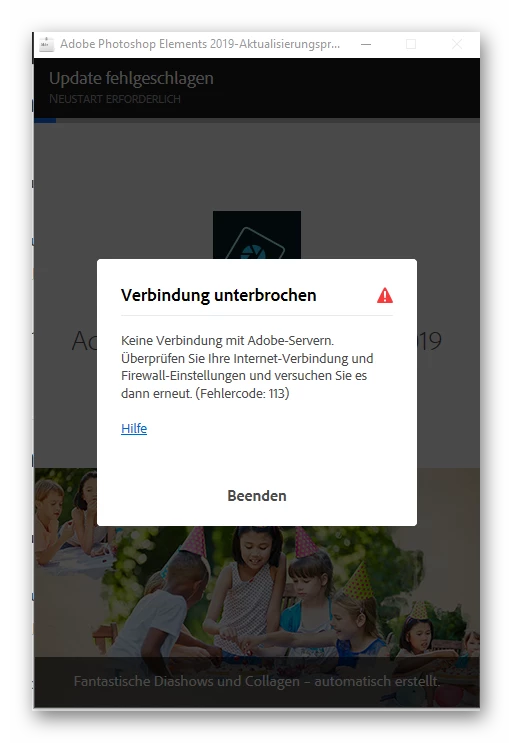
Gibt es irgendwelche Vorschläge?

Viele Grüße aus Bayern,

Adrian

    This topic has been closed for replies.

    4 replies

    adriann98341547
    Inspiring
    December 20, 2018

    Hi 99jon,

    thank you for your suggestions.

    I turned my firewall off, still the same result.

    Regards,

    Adrian

    99jon
    Legend
    December 21, 2018

    Adrian, I would first suggest uninstalling from the Windows Control panel. Then use the Adobe CC Cleaner tool to remove all aspects of Photoshop Elements (select the application from the list) which may have been left behind on your computer.

    Then use the ESD link provided by Vipin to install again. After installation go to the menu:

    Help >> Updates

    https://helpx.adobe.com/creative-cloud/kb/cc-cleaner-tool-installation-problems.html

    adriann98341547
    Inspiring
    December 21, 2018

    With the new HD installer, we have the capability to check for existing files and only install the new files on your machine.

    And since you have been getting this error on 5%, and have issues with Adobe servers, I doubt if there is any file had must have been downloaded and installed on your machine.

    You can directly download and install the Software using the link provided.

    Also Please note, that CC cleaner tool is more compatible and designed for CC products, although it has the capability to operate on Elements as well, but it is recommended to use the CC Cleaner as the last resort.

    Thanks,

    Vipin


    Thank you both for your suggestions.

    I uninstalled PSE from my computer and the ran the clearing tool.

    I then reinstalled from the software that I still had on my drive, the

    problem remains the same.

    I ran the log tool and a files was uploaded to the adobe server, i

    did not get an email confirmation. Do you need me to run the

    logger again?

    Thanka a lot for your help,

    Adrian

    adriann98341547
    Inspiring
    December 20, 2018

    Hi Vipin,

    thank you for your answer.

    I can log onto the adobe web page with my browser (Chrome) and enter

    my ID without any problems.

    I can ping adobe.com

    There are no entries from Adobe in the Host file.

    Once again thank you for your help!

    Adrian

    99jon
    Legend
    December 20, 2018

    Other things to check:

    -check firewall settings

    -check global certificate

    See this link:

    Resolve connection errors with Adobe Creative Cloud and Creative Suite applications

    VipinGupta
    Adobe Employee
    Adobe Employee
    December 20, 2018

    Hi Adrian,

    Could you please check that you are able to reach Adobe.com on your browser, also please check if you have configured any proxy settings on your machine, that is preventing the updater to reach adobe servers?

    Also you can use the command prompt and try the following command to check if your machine is able to successfully reach Adobe servers:

    Ping www.adobe.com

    If you get a response, please let me know, otheriwse if you fail to get a response, you can also check your host file and remove any entries related to Adobe.com

    Host file can be found here: C:\Windows\System32\drivers\etc\hosts

    Thanks

    Vipin

    Peru Bob
    Community Expert
    Community Expert
    December 19, 2018

    Try a different browser.