irenel19472057
Participating Frequently
March 22, 2017
Answered

Camera Raw PlugIn in Element 12

  • March 22, 2017
  • 1 reply
  • 1259 views

I recently purchased the new Canon 5D Mark IV but my images will not open in Elements 12 from Lightroom 6 when I export them to Elements 12 on my MAC OS X Yosemite 10.10.5 .  I am currently on version 8.5 for Camera Raw but I cannot seem to open my images in Elements 12.  Can you tell me if what version of ACR I need and if Elements 12 will support it. 

Appreciate your prompt response.

Many thanks,

Irene
    This topic has been closed for replies.
    Correct answer Jeff Arola

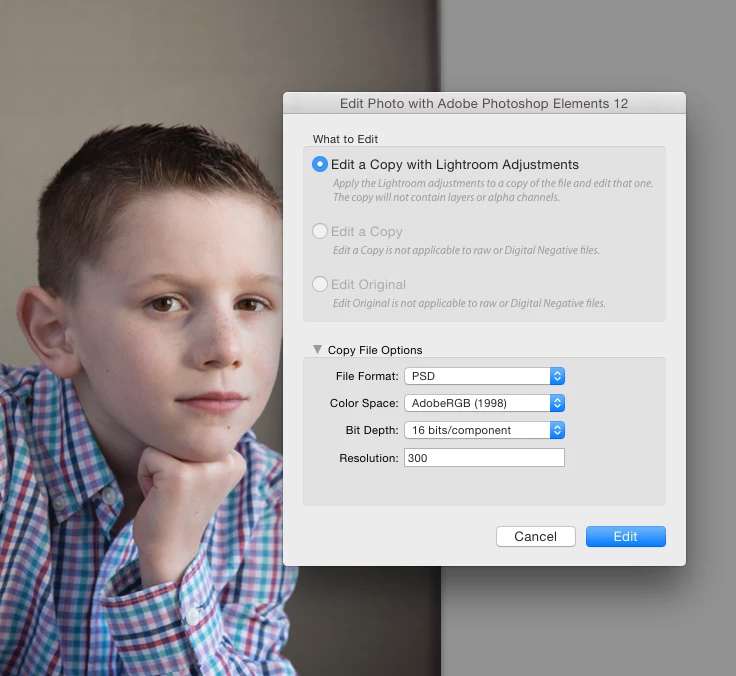
    Yes, I set that up to edit in Elements 12 as you can see in the screenshot image below.  And it shows in LR that the image has been exported as a PSD file.  AND it will open my Elements 12 but the screen will be BLANK.

    I'm downloading my images in Lightroom 6 but would like to finish up the image in Elements 12.  So the image is already functional and stored on my hard drive.


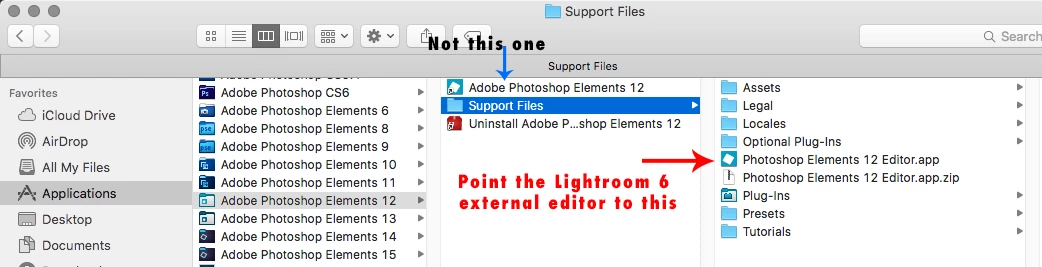
    Most likely you pointed to the Adobe Photoshop Elements 12 shortcut in

    /Applications/Adobe Photoshop Elements 12

    you need to point to the

    Photoshop Elements 12 Editor.app in the Support Files folder

    1 reply

    Jeff Arola
    Community Expert
    Community Expert
    March 22, 2017

    It doesn't work if in Lightroom 6 you go to Photo>Edit In>Photoshop elements 12?

    irenel19472057
    Participating Frequently
    March 22, 2017

    No. It won't open the image in Elements. And I follow the the steps as you've listed. In LR it shows as the duplicate but it does not open the image.

    I even tried to go to the CR file on my hard drive and go to Elements and "Open in CR". But it won't open either.

    Any help would be very much appreciated.

    Many thanks

    Irene

    Sent from my iPhone

    irenel19472057
    Participating Frequently
    March 23, 2017

    Most likely you pointed to the Adobe Photoshop Elements 12 shortcut in

    /Applications/Adobe Photoshop Elements 12

    you need to point to the

    Photoshop Elements 12 Editor.app in the Support Files folder


    THANK YOU R_Kelly!!! <3  It worked!  I appreciate your prompt responses and support!

    I'm grateful we have people like you!

    Again, thank you so much!

    Hugz!

    Irene