
Participating Frequently
April 19, 2019
Answered

Can new Photoshop Elements rasterize vector files?

  • April 19, 2019
  • 3 replies
  • 1408 views

I often take an image with a camera, crop it in Adobe Elements, import it into Adobe Illustrator to add arrows and text labels and then put it back into Adobe Elements to convert it back into a jpeg for inclusion in emails, Power Point etc.  I have just purchased Adobe Elements 2019 and have found that it  does not accept my  old Illustrator images .  Is there any way ( e.g. by means of a stand-alone program) to rasterize files from Illustrator so that my new Adobe Elements can import them? Adding text and arrows with Adobe Elements is too crude and cumbersome, and I sometimes want to place a complete drawing next to a photo. If I went to the huge expense of buying a modern Adobe Illustrator would its files be importable into my new Adobe Elements? I have used Illustrator for years, since version 8.0 but may be compelled by the price to abandon it if it is not compatible with Elements any more.
    This topic has been closed for replies.
    Correct answer Jeff Arola

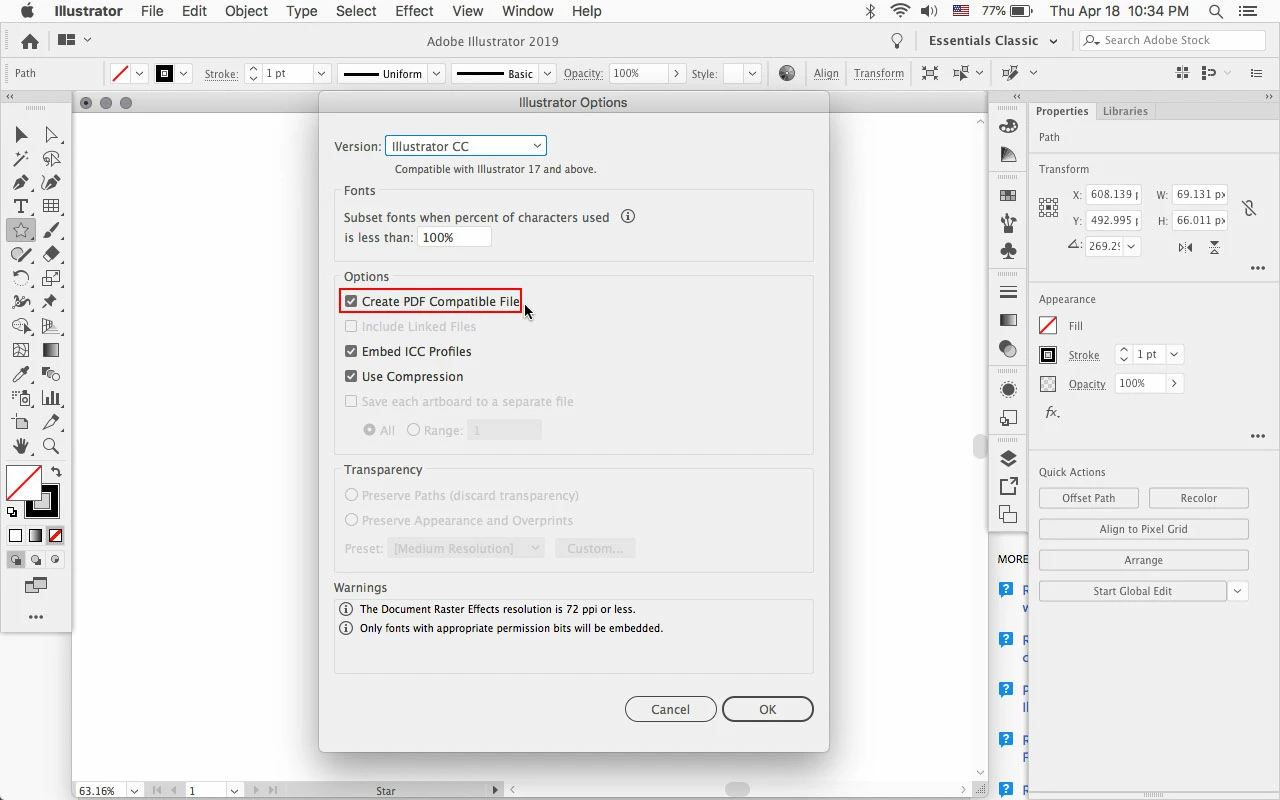
    In Illustrator when saving the ai file check Create PDF Compatible File which photoshop elements 2019 should open.

    Starting in photoshop elements 11 adobe removed the generic eps parser that let photoshop elements

    open older vector ai files and eps files that weren't saved with a pdf compatible file.

    3 replies

    Legend
    April 19, 2019

    No, you have to use Export to make a JPEG, rather than SAVE. (Complicated reasons, but basically if you SAVE it you might be able to open it again and edit in Illustrator, but if you Export you can't). If you've added text, PNG seems a better choice. You don't need to use Elements, I feel sure...

    Brad AmosAuthor
    Participating Frequently
    April 19, 2019

    Thank you. I have just tried the EXPORT to JPEG route and find that the

    number of pixels in the rasterized version is quite small. I will try PNG

    also, but, so far, SAVE AS pdf and transferring to Elements seems to give

    the best result.

    Anyhow, thanks for helping me with this. I am sure that this problem

    affects many people, e.g. those who make diagrams for scientific purposes

    and then wish to label them before showing them in PowerPoint.

    On Fri, 19 Apr 2019 at 17:22, Test Screen Name <forums_noreply@adobe.com>

    Legend
    April 19, 2019

    Why not make your JPEG from Illustrator?

    Brad AmosAuthor
    Participating Frequently
    April 19, 2019

    Although I have the latest Illustrator version (2019), it does not offer JPEG in the 'Save As' options, but saving as a PDF as suggested here does work. Photoshop Elements 15 does not see the colours in the resullting PDF, but Elements 19 does.  Elements 8 ( which I have on disk but which is not loadable into modern computers) can rasterize the Illustrator file directly without any fuss. The ability to transfer Adobe Illlustrator Files directly to  Photoshop elements seems to have been disabled. Perhaps it will come back someday.......

    Jeff Arola
    Community Expert
    Jeff ArolaCommunity ExpertCorrect answer
    Community Expert
    April 19, 2019

    In Illustrator when saving the ai file check Create PDF Compatible File which photoshop elements 2019 should open.

    Starting in photoshop elements 11 adobe removed the generic eps parser that let photoshop elements

    open older vector ai files and eps files that weren't saved with a pdf compatible file.

    Brad AmosAuthor
    Participating Frequently
    April 19, 2019

    Thank you! I tried this using Adobe Illustrator v 2017.1.0. simply saving

    as pdf and my new Photoshop elements opened it fine. You have solved my

    problem!

    Brad Amos