Participating Frequently
March 13, 2021
Answered

Can't install Photoshop Elements 2021

  • March 13, 2021
  • 2 replies
  • 1415 views

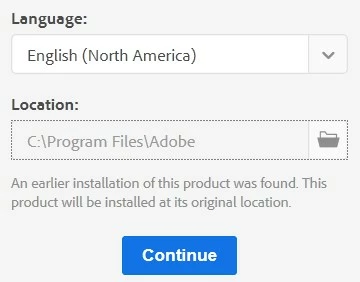
When starting my PE 2021 dvd, I get a small window that shows Language and Place to put the program. I can't enlarge that window, and I can't continue.


I tried to use the setup.exe method, same problem. Tried a different browser, didn't work. Tried to download & enter the serial number to unlock, but same problem.


Please help.

This topic has been closed for replies.
Correct answer Phil Pickering

Tried that, yes, nothing happens.


Are you sure nothing happened?


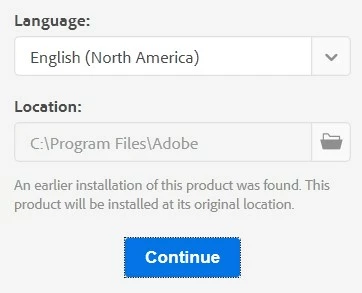
Each time you press the tab key the focus will change to the next user interface element. There's quite a subtle visual hint as to where the focus currently lies (a dotted border around the element in focus). You'll need to press the tab key a number of times:


1st tab - no change


2nd tab


3rd tab


4th tab


Now, obviously by the time you get past the Language and Location boxes you won't be able to see the Continue button, but if you've pressed the Tab key only once after the Location box was in focus, you should be able to hit the Enter key to activate it.

2 replies

Participant
August 17, 2021

I had a hard time and had to contact Adobe to have someone there to fix and it finally downloaded. GREAT that they had the free service to fix but used up many hours of my time and exhausted now. They should not sell THIS APP if it doesn't download easily. Miserable day.

Phil Pickering
Legend
March 13, 2021
PVR2Author
Participating Frequently
March 13, 2021

I tried, just made the letters bigger, the small screen did not budge, it still maintained to show the language and the place where to put the software. Thanks though.

Phil Pickering
Phil PickeringCorrect answer
Legend
March 13, 2021

Tried that, yes, nothing happens.


Are you sure nothing happened?


Each time you press the tab key the focus will change to the next user interface element. There's quite a subtle visual hint as to where the focus currently lies (a dotted border around the element in focus). You'll need to press the tab key a number of times:


1st tab - no change


2nd tab


3rd tab


4th tab


Now, obviously by the time you get past the Language and Location boxes you won't be able to see the Continue button, but if you've pressed the Tab key only once after the Location box was in focus, you should be able to hit the Enter key to activate it.