
Inspiring
May 5, 2020
Question

Can't scan photos using HP 5200

  • May 5, 2020
  • 3 replies
  • 894 views

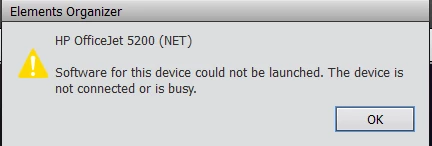
Just installed PE 13 on Win 10 computer to scan in photos form HP Officejet 5255. HP scan software willl scan OK and downloaded ScanSpeeder and it worked. But when I go to Organizer and select Import from scanner it hangs then after a while I get the below popup.
 

Thanks for any help.

This topic has been closed for replies.

3 replies

99jon
Legend
May 6, 2020

It depends if you have the correct driver/plug-in for the scanner. Older versions mainly 32bit required TWAIN support. Newer products use WIA support. See this link.

dd1947Author
Inspiring
May 6, 2020

Yes, but wanted to elimenate that step since Photoshop should be able to connect to the scanner. But also had hoped Photoshop would auto seperate a group of photos as they are scanned which it evidently does not do. I know it can be done in a seperate step.

99jon
Legend
May 6, 2020

Can you use the scanner to save photos into a folder ? Then import into Organizer from the folder.