
JacB.Nimble
Inspiring
November 8, 2016
Answered

Cannot see Elements metadata for Nikon D810 in Windows 7 explorer

  • November 8, 2016
  • 1 reply
  • 632 views

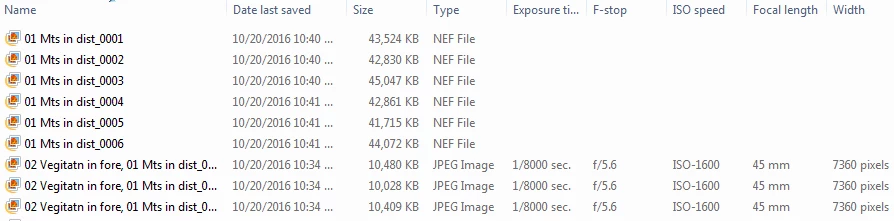
I'm using Elements 13 to import pics from a Nikon D810 (36 mp) dslr on a Windows 7 OS. In Windows Explorer, I can see the metadata that I requested in WE for Jpeg files, but not for the raw files (NEF). I can see the WE metadata for my Nikon D700 (12 mp), but not the newer D810's raw data. See attachment below.

Also, when I import the raw files into my Windows 10 laptop, I can see all requested data columns for both raw and Jpeg files.

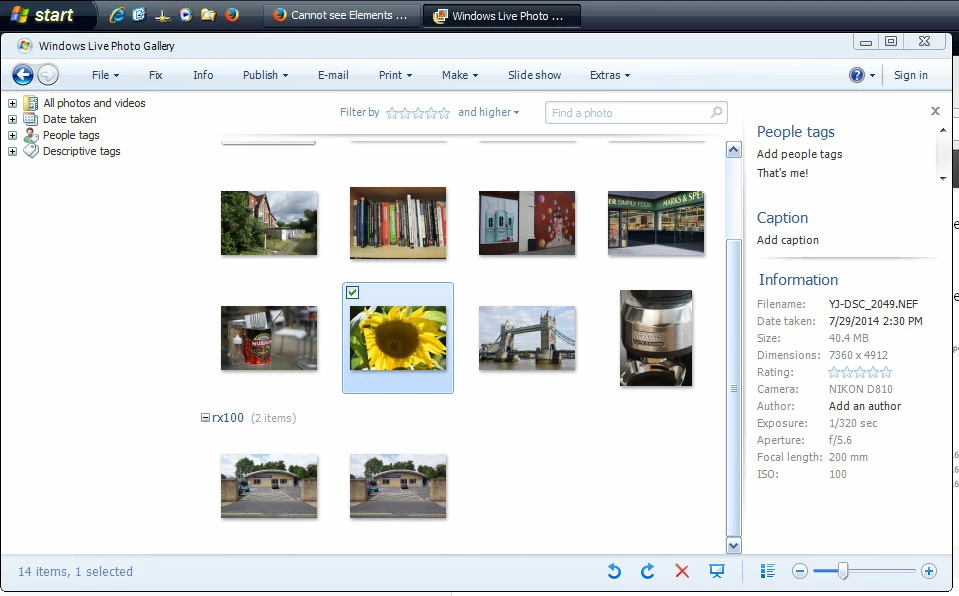
Both computers are running Win Photo Gallery 12 that I use for viewing these files. Has anyone else encountered this?
This topic has been closed for replies.
Correct answer Jeff Arola

I'm thinking the reason is that the microsoft camera codec pack for windows 7 doesn't cover that camera, while windows 10 has a more updated camera codec pack to cover that camera.

You could download this FastPictureViewer Codec Pack, which should then enable the display of camera data in windows explorer and windows live photo gallery for the nikon D810

FastPictureViewer Codec Pack: PSD, CR2, NEF, DNG RAW codecs (and more) for Windows 8.x Desktop, Windows 7, Windows Vista…

I have it installed on a windows xp machine and even it shows the D810 info in the windows live photo gallery.

sample image used from here

Nikon D810 Review - Gallery

Though the photoshop elements organizer should show a lot more camera data and such than windows explorer does without the need for any extra codecs.

1 reply

Jeff Arola
Community Expert
Jeff ArolaCommunity ExpertCorrect answer
Community Expert
November 9, 2016

I'm thinking the reason is that the microsoft camera codec pack for windows 7 doesn't cover that camera, while windows 10 has a more updated camera codec pack to cover that camera.

You could download this FastPictureViewer Codec Pack, which should then enable the display of camera data in windows explorer and windows live photo gallery for the nikon D810

FastPictureViewer Codec Pack: PSD, CR2, NEF, DNG RAW codecs (and more) for Windows 8.x Desktop, Windows 7, Windows Vista…

I have it installed on a windows xp machine and even it shows the D810 info in the windows live photo gallery.

sample image used from here

Nikon D810 Review - Gallery

Though the photoshop elements organizer should show a lot more camera data and such than windows explorer does without the need for any extra codecs.

JacB.Nimble
Inspiring
November 9, 2016

I forgot to mention that I am unable to view these large D810 raw files in Windows Photo Gallery 12 or windows Photo Viewer in my Windows 7 PC.