
Catalog Restore Is Redefining The Directory Structure
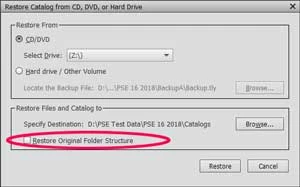
My initial goal was to move my entire photo library from one computer (Win 7) to another (Win 10). After a few hours copying and restoring the catalog and images the mew computer had a mess on it. The fundamental problem is that the directory structure on the old computer was not transferred to the new computer. As far as I can tell all the files are there but the organization on the old computer is gone. Initially I had folders three and four deep. After the restore (move) only sub-directories with images in them were present. Example: "MyPictures->Dad->Hawaii_Vacation" is now just "Hawaii_Vacation". Furthermore it has merged what were initially separate directories with the same name all into a single directory. Example: everything from "MyPictures->Dad->Hawaii_Vacation->Reference" and everything from "MyPictures->Dad->GrandCanyon->Reference" are all now in "Reference".
Is there some setting in the backup or the restore that I am missing? The restore is not going to the same disk or directory where it was on the backup computer. The two computers are not (and can't be) organized with the same physical structure.
I am using Photoshop Elements Organizer 2018 at the current release level.
 AdChoices