Participant
June 23, 2023
Answered

Changing drop down font size

  • June 23, 2023
  • 4 replies
  • 1192 views

Hi. Have just installed Elements 23 onto a new laptop (Win 11 64bit), and when going to any part of the drop down menu, the fonts are huge, with each drop down window taking up a massive portion of the workplace window.

How can I reduce the size of the fonts, please??

This topic has been closed for replies.
Correct answer Greg_S.

Hi @delticman.  You have a very high resolution monitor and users often have a problem with the size of the UI (User Interface).  There are a few things to try:


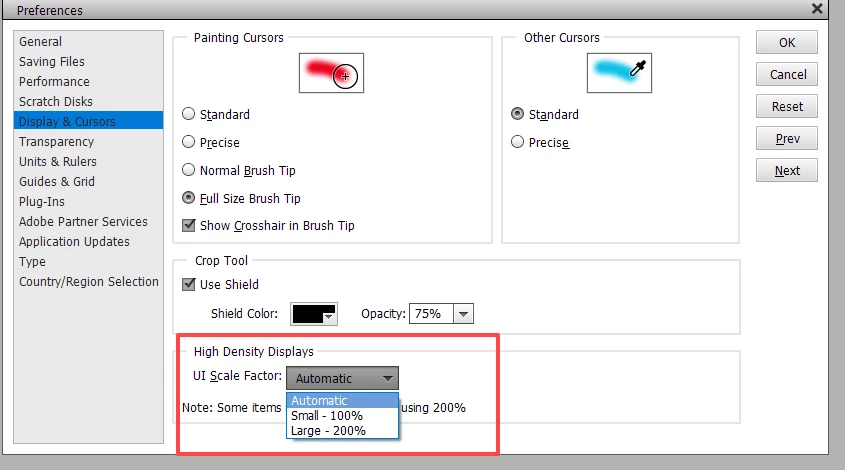
First, go to the Edit>Preferences>Display & Cursors dialog box.  You will find a dropdown menu under High Resolution Displays.  Try changing the UI Scale Settings

- probably to Small would be best.
 

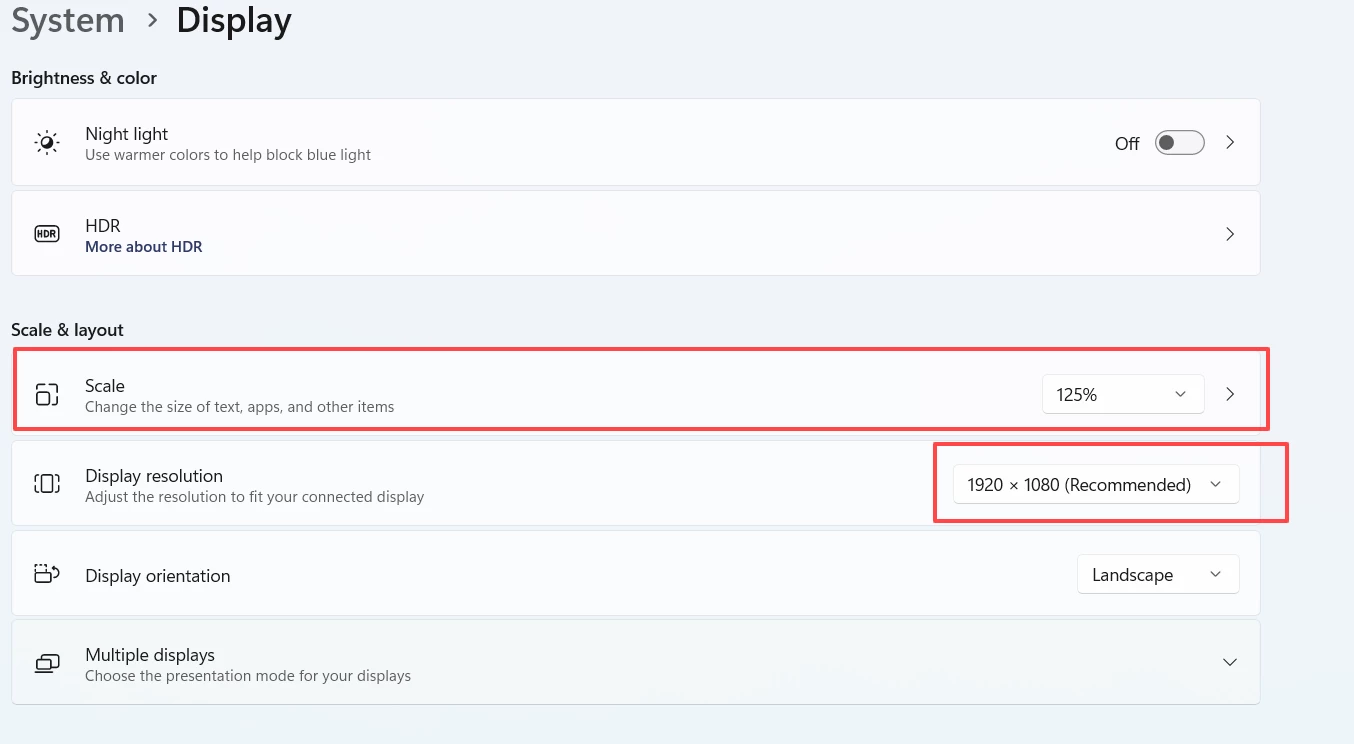
If that doesn't help, right-click on your desktop and select Display Settings from the dropdown menu.  Under the Scale and Settings box, make sure that your monitor is set to the recommended resolution.   Then play around with the Scale settings.  In the screenshot below, mine is set to 125%.  If yours is anything more than 100%, set it back to that level.
 

4 replies

Greg_S.
Community Expert
Greg_S.Community ExpertCorrect answer
Community Expert
June 26, 2023

Hi @delticman.  You have a very high resolution monitor and users often have a problem with the size of the UI (User Interface).  There are a few things to try:


First, go to the Edit>Preferences>Display & Cursors dialog box.  You will find a dropdown menu under High Resolution Displays.  Try changing the UI Scale Settings

- probably to Small would be best.


If that doesn't help, right-click on your desktop and select Display Settings from the dropdown menu.  Under the Scale and Settings box, make sure that your monitor is set to the recommended resolution.   Then play around with the Scale settings.  In the screenshot below, mine is set to 125%.  If yours is anything more than 100%, set it back to that level.

 

delticmanAuthor
Participant
June 27, 2023

Many, many thanks, Greg S!!

Changing the UI scale to small made everything too small, and in auto, and large, things were still too large.

So, I then first changed the scale to 100%, which again made everything far too small. So, I tried at different percentages, and have finally opted to remain at 150%  MUCH better than the 225% it was set at!

Thank you, once again!

Cheers


delticman

jane-e
Community Expert
Community Expert
June 25, 2023

@delticman 


Moved from Photoshop to Photoshop Elements


Jane

c.pfaffenbichler
Community Expert
Community Expert
June 25, 2023

I am not saying that Photoshop Elements is bad or that the naming doesn’t encourage confusion, but please post Photoshop Elements related queries on the correct Forum, this one is dedicated to Photoshop.

Photoshop Elements

delticmanAuthor
Participant
June 26, 2023

So very sorry!  Am new to the forum,  no need to be so abrupt, thank you! 

delticmanAuthor
Participant
June 24, 2023

Hi. Have just installed Elements 23 onto a new laptop (Win 11 64bit), and when going to any of the drop down menus, the fonts are huge, with each drop down window taking up a massive portion of the workspace window, covering up a good proportion of any photo that is open, and on show in it.

How can I reduce the size of the fonts, please?? I had this problem quite a while ago, with a previous new install, but cannot for the life of me, remember how I overcame the issue.

Greg_S.
Community Expert
Community Expert
June 24, 2023

What is the size and resolution of your monitor?

Here are a couple of suggestions:

Do you have the taskbar set to auto-hide?  If so, disable that setting. 
Go to Windows Display Settings and reduce the UI Scale percentage. 

delticmanAuthor
Participant
June 25, 2023

Machine is a new HP 16 inch screen 2 in 1 laptop. Resolution is the recommended 3840 x 2400

I do not know how to find the auto hide setting on the taskbar. Nor do I know how to change the UI Scale percentage, nor where to find it. Any help on this would be most grateful, thanks.