
Answered
Clone tool stopped working properly
Hi! I'm having issues with my Photoshop. It's acting goofy.
My clone stamp tool isn't working properly, and there used to be a "preview" after making a sample selection.
Now, the preview is gone, and even if I take a sample, it will only clone a small portion of the selected area, and many times, it will reset the sample to an area right next to where I'm trying to clone. Does any of that make sense?
Does anyone know how to fix it?
Move already tried the "reset tool" and "reset all tools" option, but they did nothing.
I have a LOT of photos to finish editing by the end of May. HELP!!!!!
 to open the menu in Tool Options.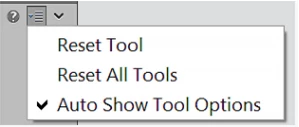
 AdChoices