Participant
December 10, 2017
Answered

cloning tool

  • December 10, 2017
  • 2 replies
  • 1096 views

Can I clone from photo to another photo in Adobe Photoshop Elements 15, if so please advise.  Many thanks

    This topic has been closed for replies.
    Correct answer hatstead

    https://forums.adobe.com/people/Jeff+Arola  wrote

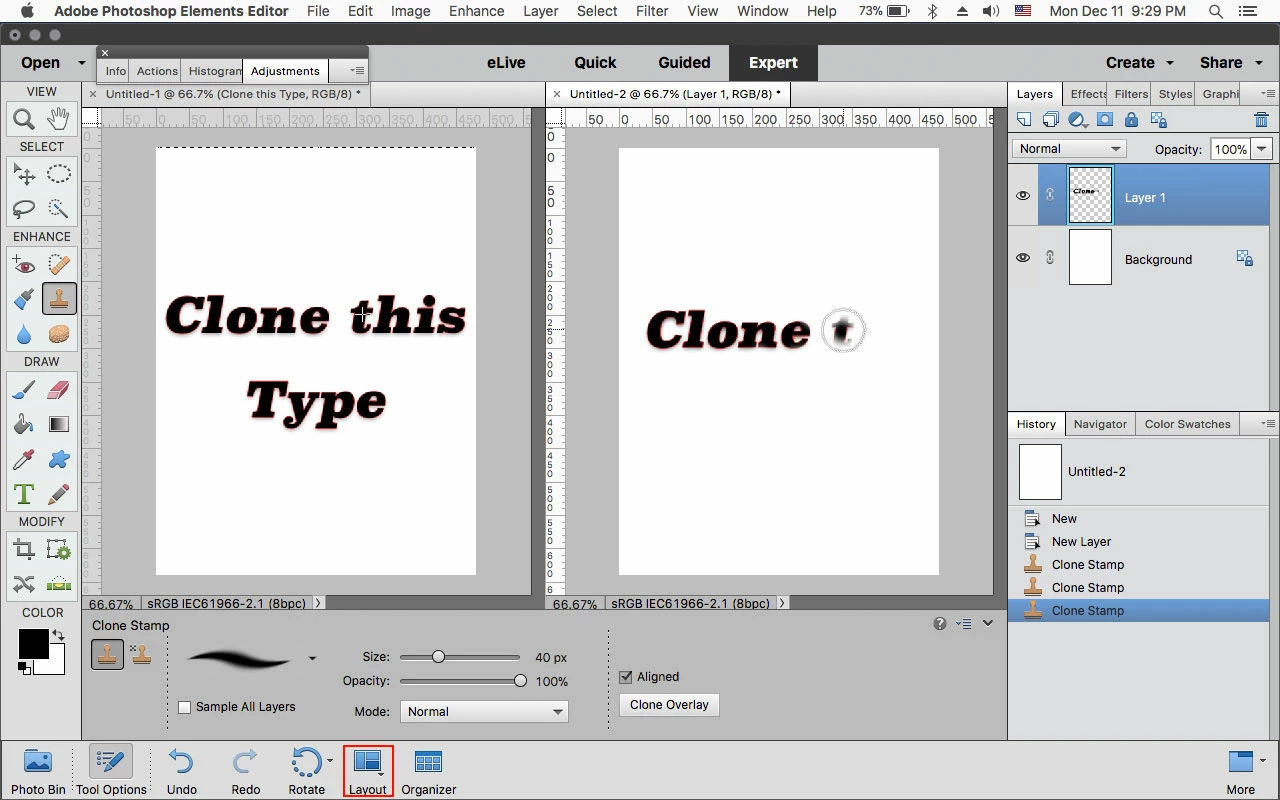
    Actually the Clone Stamp Tool will clone from one document to another.

    Just arrange the two documents side by side using the Layout menu, set your Clone Source on one document (Option/Ctrl click)

    then move over to the other document and paint in what you wish to clone.

    The directions are not correct. One has to press ALT+Left click to define the source point.

    2 replies

    Jeff Arola
    Community Expert
    Community Expert
    December 12, 2017

    Actually the Clone Stamp Tool will clone from one document to another.

    Just arrange the two documents side by side using the Layout menu, set your Clone Source on one document (Option/Ctrl click)

    then move over to the other document and paint in what you wish to clone.

    Inspiring
    December 12, 2017

    Don't know if this applies to all versions of PSE, but in my PSE2 I don't even have to have the 2 files open together.

    I can set the clone source in one file, the open the destination file and paint the clone.

    Jeff Arola
    Community Expert
    Community Expert
    December 12, 2017

    That's true of all pse versions, i just had them side by side so it's easier to see.

    MichelBParis
    Legend
    December 11, 2017

    barbarad2373649  wrote

    Can I clone from photo to another photo in Adobe Photoshop Elements 15, if so please advise.  Many thanks

    Cloning from a different file is not available, but you can 'place' the source image for the cloning as a new layer above the image to edit (drag from photo bin, resize and move...)

    Cloning from another layer only requires to select the spot for cloning on the (active) source layer and painting over the layer of the image to edit in the layer palette.

    Inspiring
    December 11, 2017

    If you are looking to clone an object to another picture you can use this method:

    Here I selected the cardinal using a combination of the selection tools:

    Copied the selection to the clipboard (Edit > Copy, or Ctrl-C)

    Opened the destination picture and pasted from the clipboard (Edit > Paste, or Ctrl-V).

    This placed the cardinal on a new layer with transparent background.

    Then resized and re-positioned the cardinal:

    If this is not what you are looking to do, you might post both your pictures into another reply so we can advise.