Inspiring
January 31, 2020
Question

convert images to pdf in PE5
  • January 31, 2020
  • 3 replies
  • 1151 views

we need to save a bunch of jpg images to pdf.

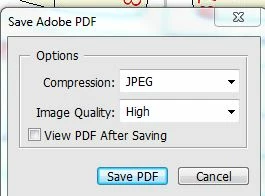
process multiple files leads to it asking us every image what to save as!

yes we did choose pdf at the bottom of the form.

any ideas?

thanjs

 

This topic has been closed for replies.

3 replies

MichelBParis
Legend
February 8, 2020

"the next task is to start with a psd file with pics on several layers and convert them to jpgs as individual pics"

Where is the problem?  You can either export as new files from the organizer (recommended) or use the 'process multiple files' feature of the editor.

What I don't understand is how you managed to batch process psd files to pdf without confirming each save.

anon125Author
Inspiring
February 8, 2020

thanks

as the images are not in organizer, that wont work

the adjusted images are only in pse5


anon125Author
Inspiring
February 9, 2020

will any of the elements versisions convert layers to jpg separate images like photoshop does?

does elements have to to be on the internet?

thanks all

Legend
February 8, 2020

That is the normal prompt. Don’t be confused by the word JPEG, it’s saving a PDF. You need to understand the choices, and if happy click OK or press Return. 

anon125Author
Inspiring
February 8, 2020

thanks

the next task is to start with a psd file with pics on several layers and convert them to jpgs as individual pics

hatstead
Inspiring
January 31, 2020

If it does not work for you in PSE, there are other ways:

https://www.wikihow.com/Convert-JPG-to-PDF

anon125Author
Inspiring
January 31, 2020

Thanks

doubt windows 7 has that that feature and we will have 250 images so we need a multiple image thing.


Found a windows 10 and it works great. as it happens we have 25 sets of 12 pics each.

thanks very much

anon125Author
Inspiring
January 31, 2020

Elements is not the tool for that batch conversion.

The Adobe tool is Acrobat.

https://documentcloud.adobe.com/acrobat/us/en/online/jpg-to-pdf

There are a lot of softwares and online tools to do the job. I would be prudent with free ones to avoid spam or worse. I just checked that two excellent free conversion tools can do that: Irfanview and Faststone Resizer.


The Elements editor can save as Photoshop pdf, which is a combination of a psd (with layers including text and shapes) with an Acrobat PDF. Very flexible but huge size, probably not what you want.


I routinely use the virtual pdf printer driver from Microsoft (Print to pdf) to do fast conversions to standard pdf in Elements. You "print" instead of saving. Not exactly a batch conversion, but you can 'print' 250 jpegs as a 250 pages pdf.


thanks

they are too personal for use online. who knows where they might endup!