sailfreeee
Participating Frequently
October 27, 2017
Answered

Copy and paste

  • October 27, 2017
  • 1 reply
  • 2218 views

I used to use and old version of Photoshop but I had to download the 2018 version.

I am trying to do some simple copy and pasting and I can't do any.

First I tried using the selection tool to select what I wanted to copy and then went to edit--copy but the copy function was not hilited and did not copy.

I also tried to use the selection tab at the top.  I clicked on select all and then tried edit--copy but once again copy was not hilited and it did not copy.

I am new to this version so I don't know if I am doing something wrong or if it is a problem with the program

Thanks
    This topic has been closed for replies.
    Correct answer Peru Bob

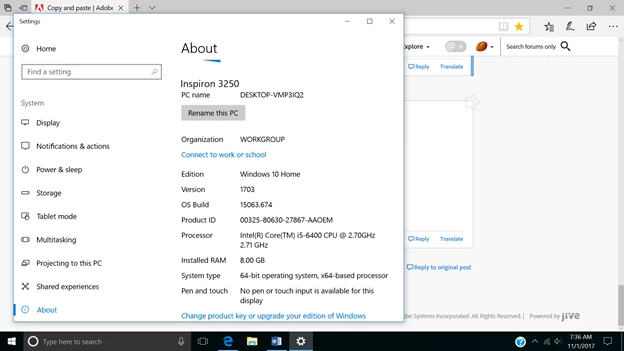
    first screen shot is the computer info

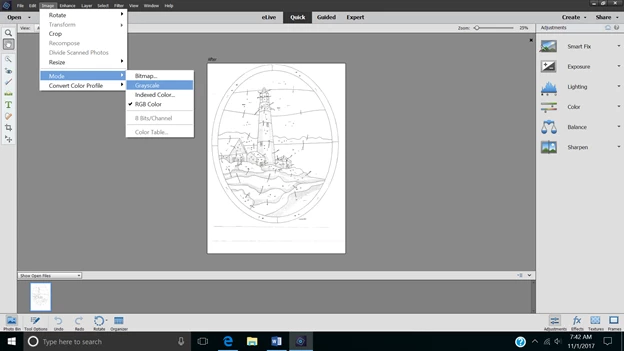
    The next screenshot is the mode info you asked for

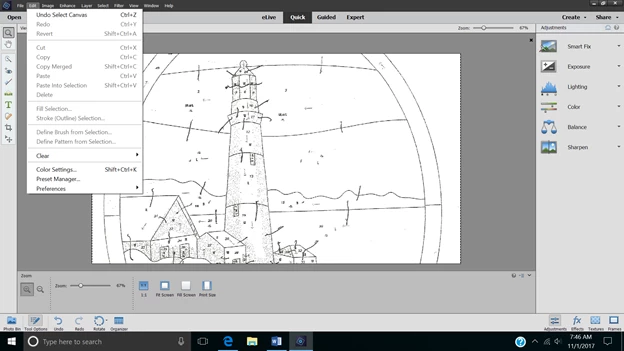
    The next shot is an example of my efforts.  I went to the selection tab and clicked on select all.  I opened the edit tab.  Please notice that only the first and last 4 items are darkened (for use)


    Choose the Expert tab instead of the quick tab.

    1 reply

    Peru Bob
    Community Expert
    Community Expert
    October 27, 2017

    Do you have the correct layer selected in the layers panel?

    sailfreeee
    Participating Frequently
    October 30, 2017

    I am using only one layer--the original picture.  I can see the dotted lines indicating what has been selected

    hatstead
    Inspiring
    October 31, 2017

    That is what I am trying to do.  I use the lasso tool, and I have also tried to use the selection tab--select all.  Each time I do this I see the "marching ants".  I then go to the Edit Tab and click on Copy (the copy button is not darkened which to me means it is not activated).  BTW when I click on copy nothing happens--the edit tab box does not disappear).  When I try to paste what I selected, nothing happens. 

    As I said before, I used an older version of Photoshop (#8 I think) and had no problem selecting, copying and pasting. 


    I would deactivate PSE2018, uninstall the software, and re-install. It may be prudent to temporarily disable your antivirus software during the re-installation session.