JuppHO
Inspiring
August 20, 2020
Answered

Dia show aus mehreren Alben

  • August 20, 2020
  • 2 replies
  • 318 views

Hallo, ich mache meine ersten Versuche mit Dia Shows. Eine Dia Show mit Bildern aus einem Album klappt sehr gut.


Wie kann ich eine Dia Show machen mit Bildern aus mehreren Alben?


Ich habe PSE 2019 und Win 10


Viele Grüße

JuppHO

This topic has been closed for replies.
Correct answer Greg_S.

Try the following:

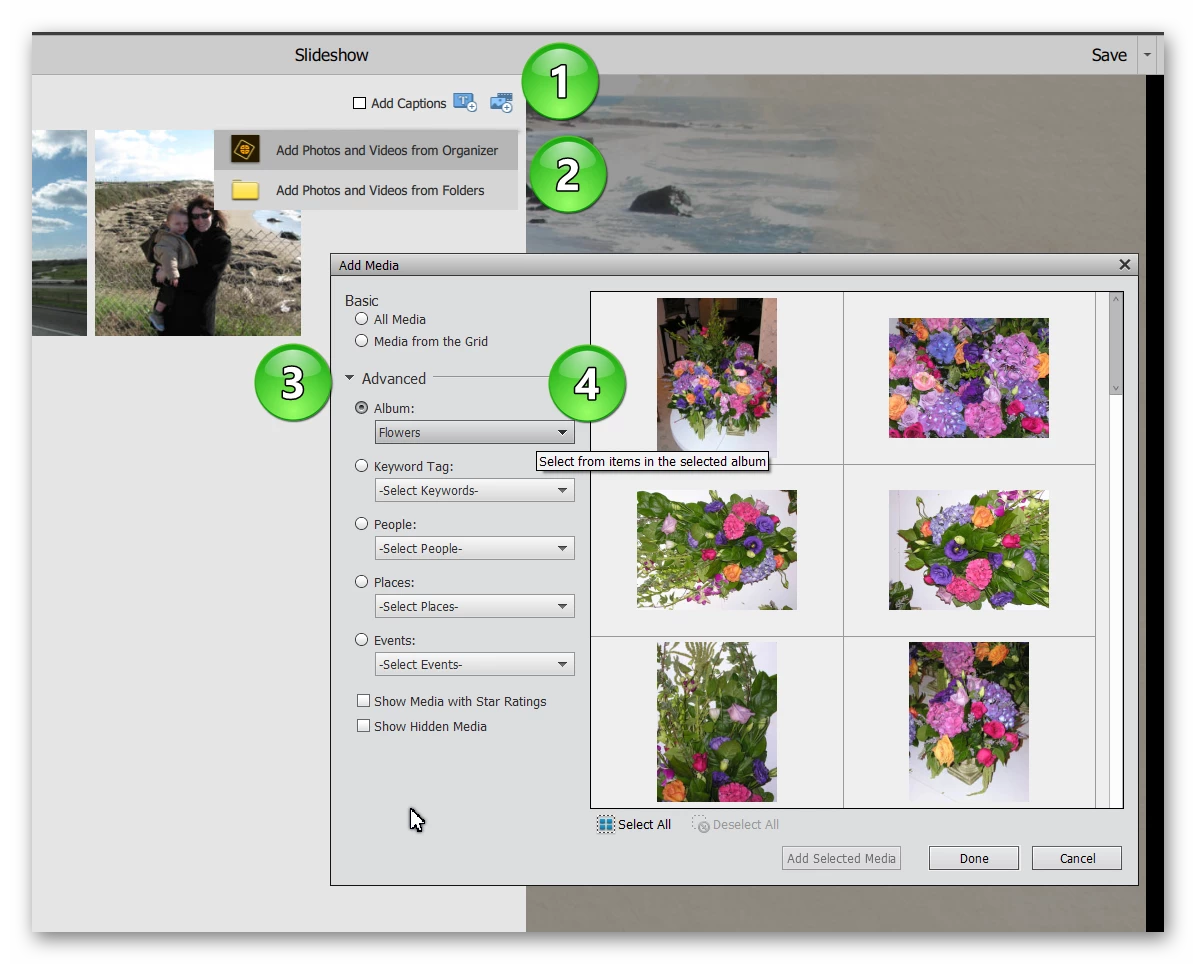
1.  Click on the Add Media icon in the top right corner of the Slideshow Editor

2. Choose Add Photos and Videos from Organizer

3.  Click the Advanced drop down arrow

4.  Select Albums.  This has a dropdown menu of the Albums in the Organizer catalog.  You can then select which photos to add to the slideshow.
 

Alternatively, create a new Keyword Tag called Slideshow.  Tag all of the photos from your Albums with the keyword tag Slideshow.  Filter the catalog by checking the keyword tag Slideshow.  Select all the tagged images (Ctrl+A). Click on the Slideshow button.  (I think there is a maximum of 250 files that can be used for a single slideshow.)  Once you have created your slideshow, remove the keyword tag from the images.

2 replies

JuppHO
JuppHOAuthor
Inspiring
August 31, 2020

Danke, die Antwort hat mir sehr geholfen.

Greg_S.
Community Expert
Greg_S.Community ExpertCorrect answer
Community Expert
August 20, 2020

Try the following:

1.  Click on the Add Media icon in the top right corner of the Slideshow Editor

2. Choose Add Photos and Videos from Organizer

3.  Click the Advanced drop down arrow

4.  Select Albums.  This has a dropdown menu of the Albums in the Organizer catalog.  You can then select which photos to add to the slideshow.


Alternatively, create a new Keyword Tag called Slideshow.  Tag all of the photos from your Albums with the keyword tag Slideshow.  Filter the catalog by checking the keyword tag Slideshow.  Select all the tagged images (Ctrl+A). Click on the Slideshow button.  (I think there is a maximum of 250 files that can be used for a single slideshow.)  Once you have created your slideshow, remove the keyword tag from the images.