
johnb24760763
Participant
November 26, 2018
Answered

Elements 11 does not support all .Nef files?

  • November 26, 2018
  • 1 reply
  • 1124 views

Hello,

I have photoshop elements 11, which I am quite happy with apart from it does not appear to support raw files from a Nikon D610 with the NEF function.

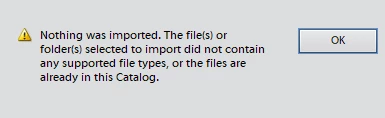
When importing the files it shows the error below.

The software supported .nef files produced by my Nikon D5300 perfectly.

The camera can produce 12 bit or 14 bit files, I am not sure if this will effect it?

I have checked the updates within the software and it states that all is up to date and fine.
    This topic has been closed for replies.
    Correct answer Jeff Arola

    Unfortunately, adobe dng converters 11.0 and newer are 64 bits only, so no more windows 32 bit support for dng converters.

    You can use 10.5 if you want the latest dng converter.

    Adobe - Adobe Camera Raw and DNG Converter : For Windows : Adobe DNG Converter 10.5

    1 reply

    John Waller
    Community Expert
    Community Expert
    November 26, 2018

    NEF files are unique to every Nikon camera model. D5300 NEF files are different to D610 NEF files.

    Adobe has to update the Camera Raw plugin with new camera support for each new camera model. Different versions of Camera Raw are compatible with different version of Elements.

    Cameras supported by Camera Raw

    Both the D5300 and D610 were first supported in Camera Raw 8.3.

    Elements 11 is only compatible with Camera Raw up to version 7.4.

    Camera Raw plug-in and Adobe application compatibility

    so I don't see how you can open Raw D5300 files in Elements 11. Can you confirm that camera model?

    Since your version of Elements does not support your cameras, you have a couple of options:

    johnb24760763
    Participant
    November 27, 2018

    Hello,

    Yes I meant 5100 rather than 5300.

    Thanks, I couldn't get DNG 11 to install? it extracts the files etc but I am not sure where to, so I have found an older version of DNG convertor.

    Its a pity you cant just update the software to read all files.

    I would have upgraded to elements 2019 but I only have a 32 bit operating system.

    Jeff Arola
    Community Expert
    Jeff ArolaCommunity ExpertCorrect answer
    Community Expert
    November 27, 2018

    Unfortunately, adobe dng converters 11.0 and newer are 64 bits only, so no more windows 32 bit support for dng converters.

    You can use 10.5 if you want the latest dng converter.

    Adobe - Adobe Camera Raw and DNG Converter : For Windows : Adobe DNG Converter 10.5