

Walter_H
Legend
August 6, 2019
Answered

Elements 14 Editor Application Manager Message

  • August 6, 2019
  • 1 reply
  • 895 views

Hello,

I have Elements 14 installed on my Windows 7 Pro 64-bit PC. I use the Editor infrequently and it has always worked fine for what I needed. This morning I wanted to try editing a RAW photo from my Pixel 3 XL camera and when I started the Editor from the Welcome screen I got the following message:
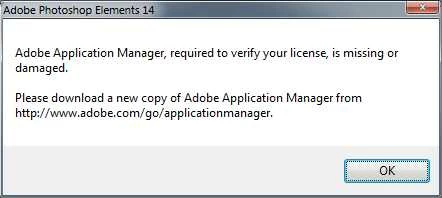
The URL referenced in the message to download the Application Manager took me to a Creative Cloud website with NO mention of the Application Manager. The editor seems to work OK - so far.

What do I need to do to fix the Application Manager problem?

Thanks!

This topic has been closed for replies.
Correct answer 99jon

I would just ignore the message if the Editor is working OK. It’s only really needed for updates and there won’t be any more updates for PSE14. Are the DNG files from your Pixel 3 XL opening OK in the camera raw interface?

1 reply

99jon
99jonCorrect answer
Legend
August 6, 2019

I would just ignore the message if the Editor is working OK. It’s only really needed for updates and there won’t be any more updates for PSE14. Are the DNG files from your Pixel 3 XL opening OK in the camera raw interface?

Walter_H
Walter_HAuthor
Legend
August 6, 2019

Hi 99jon,

Thanks for your quick reply!

Yes, the DNG files from my Pixel do open, but that message is kind of annoying. It pops up every time I open the Elements Editor and then I have to click OK to make it go away.

FYI, I just installed Elements 14 on my Windows 10 Pro 64-bit laptop and I do NOT get that Application Manager message on it. But, I prefer to use my Windows 7 Pro desktop PC with it's 24" monitor for editing photos.

--Walter in Davie, FL
99jon
Legend
August 7, 2019

Hi 99jon,

Thanks for taking the time to read all the way to the end of my reply. I think a lot of support Techs do not do that.

I found a solution to starting E2019 in the Editor mode. I looked in the program folder and found the PhotoshopElementsEditor.exe file. I then right-clicked on it and sent it to the desktop as a shortcut. It's working great! When in the Editor, if I want to use the Organizer, I use the Organizer button on the bottom toolbar.

An added benefit to having a shortcut to the Elements Editor on the desktop is that I can open a folder where photos are stored and drag a photo onto the Editor desktop shortcut and the Editor will open with that photo! Works very well - it's just like dragging a photo onto an open Editor window!

Thanks again for your help. Can you go and pick which ever you think is the Correct Answer to my original question.


Yes a desktop icon is also useful I have both including task bar icon. I've re-named the desktop icon to Editor 2019 to distinguish it from the (hub) Home Screen.