
Exit
  • Global community
    • Language:
      • Deutsch
      • English
      • Español
      • Français
      • Português
  • 日本語コミュニティ
  • 한국 커뮤니티
0

Elements Web banner blocking layers view

Participant ,
Sep 30, 2024 Sep 30, 2024

I suddenly have this blue banner (attached) overlaying my open layers images at the bottom of the PSE screen so I can't see or move #4. How can I get rid of it so I can work normally?

TOPICS
Bug , Mac , Problem or error
587
Translate
Report
Community guidelines
Be kind and respectful, give credit to the original source of content, and search for duplicates before posting. Learn more
community guidelines

correct answers 1 Correct answer

Community Expert , Sep 30, 2024 Sep 30, 2024

Doesn't it disappear if you click somewhere else on the screen?  I just tried it and it disappears immediately.

If you are still having problems, please show us a screenshot of your entire monitor.


You can also try unchecking the box for Enable Soft Notifications in the Edit>Preferences>General tab.  (I'm not sure if that box controls it.)  And if that doesn't work, uncheck all the boxes in the Adobe Partner Services tab.
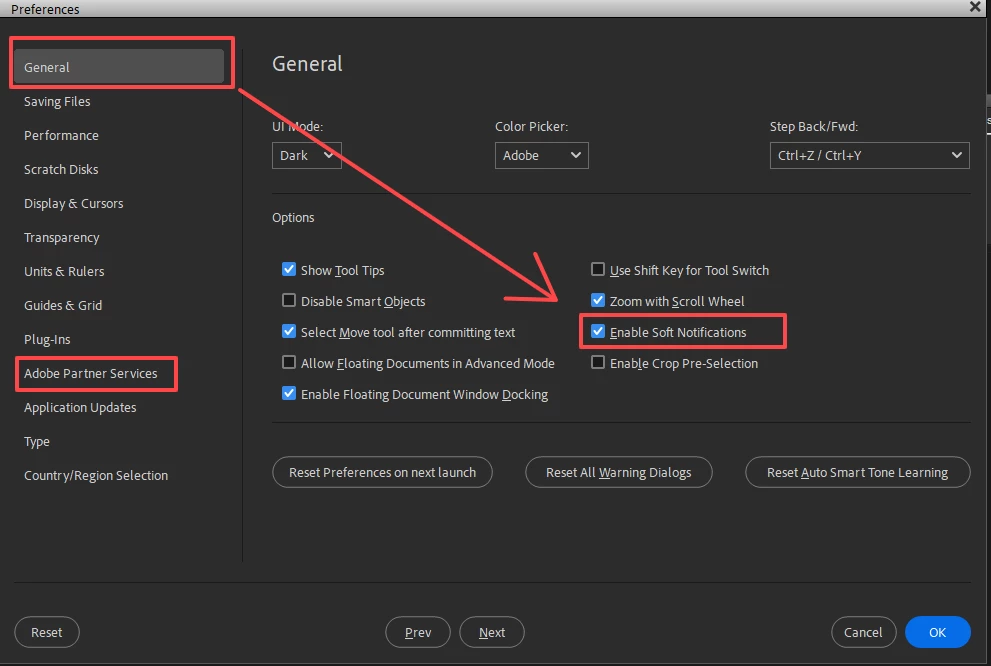
 

Ashampoo_Snap_Monday, September 30, 2024_11h34m11s.png


Translate
Community Expert ,
Sep 30, 2024 Sep 30, 2024

Doesn't it disappear if you click somewhere else on the screen?  I just tried it and it disappears immediately.

If you are still having problems, please show us a screenshot of your entire monitor.


You can also try unchecking the box for Enable Soft Notifications in the Edit>Preferences>General tab.  (I'm not sure if that box controls it.)  And if that doesn't work, uncheck all the boxes in the Adobe Partner Services tab.


Ashampoo_Snap_Monday, September 30, 2024_11h34m11s.png


Translate
Report
Community guidelines
Be kind and respectful, give credit to the original source of content, and search for duplicates before posting. Learn more
community guidelines
Participant ,
Sep 30, 2024 Sep 30, 2024

An additional comment, Greg: if I click somewhere else on the screen before I've done anything, it disappears as you say. But, if I've loaded images and then click elsewhere, it stays put 😟

Translate
Report
Community guidelines
Be kind and respectful, give credit to the original source of content, and search for duplicates before posting. Learn more
community guidelines
New Here ,
Oct 04, 2024 Oct 04, 2024

This does NOT work.  Actually, it this option does not exist in PSE2022.  

Translate
Report
Community guidelines
Be kind and respectful, give credit to the original source of content, and search for duplicates before posting. Learn more
community guidelines
Community Expert ,
Oct 04, 2024 Oct 04, 2024

@amyf43802373 what does not work?  I just opened the  Elements 2022 Editor and received the following message:

Ashampoo_Snap_Friday, October 4, 2024_12h45m48s.png


Clicking somewhere else on the screen removed the message. 


Elements 2022 also has the same General preferences soft notification checkbox as later versions.


Ashampoo_Snap_Friday, October 4, 2024_12h46m29s.png


If you are still having problems getting rid of it, simply click on the blue message and allow it to take you to the Elements Web. I'm pretty sure that once you have tried it, the message will no longer appear.

Translate
Report
Community guidelines
Be kind and respectful, give credit to the original source of content, and search for duplicates before posting. Learn more
community guidelines
New Here ,
Oct 04, 2024 Oct 04, 2024

Sorry, meant that disabling that feature does not work. That banner is still there. Is there a way to get rid of the web app/


Translate
Report
Community guidelines
Be kind and respectful, give credit to the original source of content, and search for duplicates before posting. Learn more
community guidelines
New Here ,
Oct 04, 2024 Oct 04, 2024

Opening the app does not close that banner. 

Translate
Report
Community guidelines
Be kind and respectful, give credit to the original source of content, and search for duplicates before posting. Learn more
community guidelines
Community Expert ,
Oct 04, 2024 Oct 04, 2024

I don't know of any way to get rid of the Elements Web feature.  Have you tried clicking on the Open Elements Web button, as I suggested?  Once you have explored the feature, there would be no reason for the blue messages to keep popping up.

Translate
Report
Community guidelines
Be kind and respectful, give credit to the original source of content, and search for duplicates before posting. Learn more
community guidelines
Community Expert ,
Oct 04, 2024 Oct 04, 2024

Are you saying that the message is constantly present?  Please give us a screen shot of your entire monitor.

Translate
Report
Community guidelines
Be kind and respectful, give credit to the original source of content, and search for duplicates before posting. Learn more
community guidelines
Community Expert ,
Oct 04, 2024 Oct 04, 2024
LATEST

. . . and have you tried doing as @johnsankey  suggested which is to click anywhere else on the screen before loading any images?

Translate
Report
Community guidelines
Be kind and respectful, give credit to the original source of content, and search for duplicates before posting. Learn more
community guidelines