
carolb4852293
Known Participant
April 28, 2018
Answered

Fill Selection Not Working

  • April 28, 2018
  • 1 reply
  • 2794 views

Hi...I am trying to create an oval border but the "Fill Selection" isn't working. I am not doing anything different and have used this option for many years without problems. I am using Adobe Elements V.14 that I have had for the past year having previously used Elements V.5 and Elements V.9. so, whilst not an expert, I am not a novice either and can usually find a solution through trial and error,:

The method that i have always used sucessfully:

Photo into Editor

Colour pick from photo

Create new layer

Marquee applied

In Edit: Fill selection

Nothing happens...the marching ants stay there, and, the Foreground/Background colours appear white.

Any suggestions please.

Thanks for looking...

Carol
    This topic has been closed for replies.
    Correct answer hatstead

    Thanks for that, unfortunately this process doesn't work, neither does it work with the rectangular marquee tool. Thanks for your input, it's very much appreciated. It appears that there is no interaction between the Background/Foreground colour and the "New Fill layer" as  when the colour of the new layer is selected, the foreground/Background colour change to white.

    Carol


    I gather now that your foreground/background color chips are unresponsive to change.

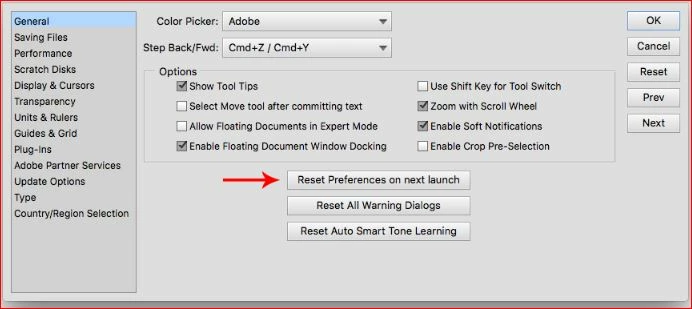
    Suggest that you reset preferences to default. Look for this via Edit>Preferences>General

    1 reply

    hatstead
    Inspiring
    April 28, 2018

    carolb4852293  wrote

    The method that i have always used successfully:

    Photo into Editor

    Colour pick from photo

    Create new layer

    Marquee applied

    In Edit: Fill selection

    Nothing happens...the marching ants stay there, and, the Foreground/Background colours appear white.

    l

    Go to Image menu>Mode.

    Is RGB color checked?

    carolb4852293
    Known Participant
    April 28, 2018

    Hi...Yes it is...thank you for your response.

    Carol

    hatstead
    hatsteadCorrect answer
    Inspiring
    April 28, 2018

    Thanks for that, unfortunately this process doesn't work, neither does it work with the rectangular marquee tool. Thanks for your input, it's very much appreciated. It appears that there is no interaction between the Background/Foreground colour and the "New Fill layer" as  when the colour of the new layer is selected, the foreground/Background colour change to white.

    Carol


    I gather now that your foreground/background color chips are unresponsive to change.

    Suggest that you reset preferences to default. Look for this via Edit>Preferences>General