Known Participant
November 25, 2017
Answered

Guided edit in Photoshop elements 2018 not responding

  • November 25, 2017
  • 1 reply
  • 1747 views

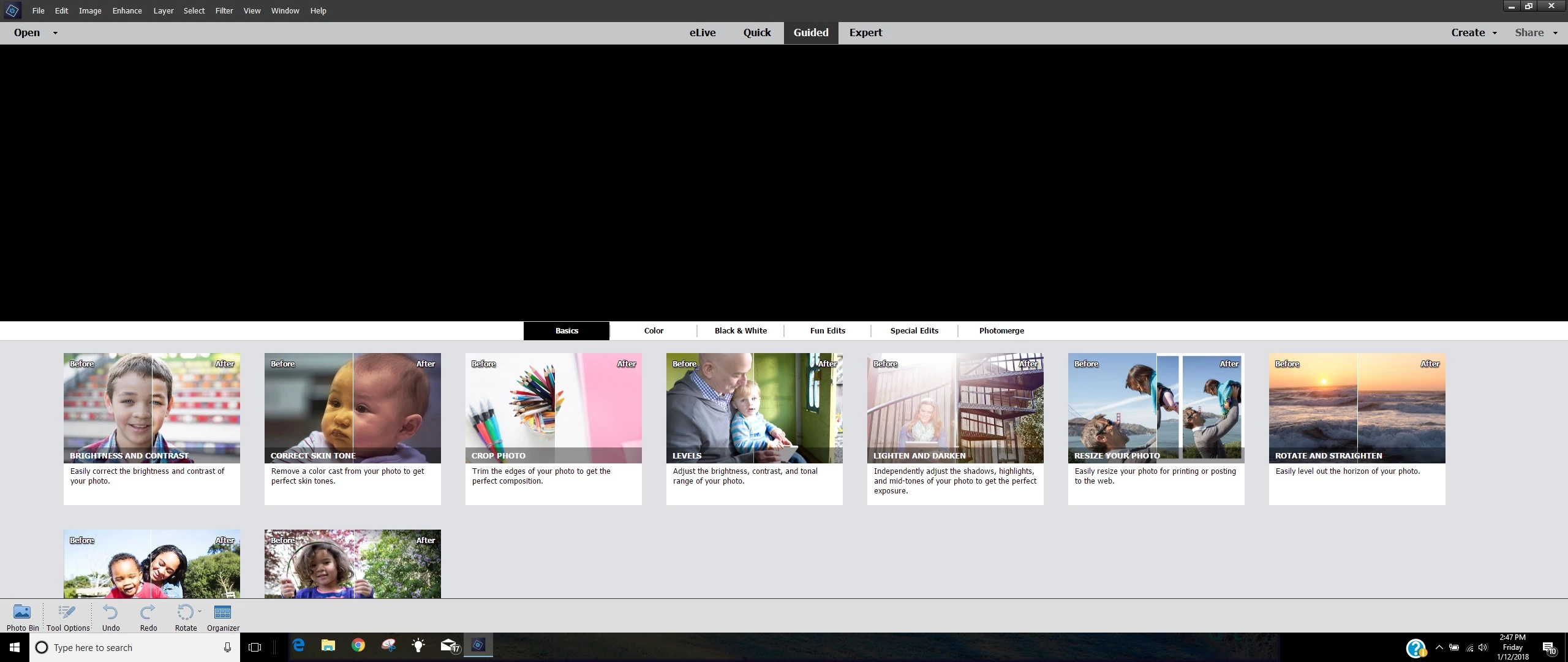
The guided edits are stuck on" Basic" and am not able to choose any other --also there is not a slide bar on the right to be able to scroll ---also the arrow will not activate any other guided edit--I have Photoshop elements 14 and it works perfect--whats up with 2018?

    This topic has been closed for replies.
    Correct answer Little_Pale_Face

    Ok, Photoshop elements 18 is not responding again only in guided mode. It worked for a week or so and now not responding only in guided edit.  I would probably be satisfied with a full refund as this program is aggravating as hell and I think may not be worth the time invested to resolve the issue only for it to reappear again.  So here I am proposing this problem to someone that might have an answer--what the heck is wrong with the guided mode in photoshop 18 . Here is a screen shot in paint-notice how it is cut off--and I can't hover my arrow over the pic

    Hi,

    The black band above the selections suggest that there is a problem with the programs display. The height has been squashed. It maybe that the program can't cope with the width/height combination.

    Could you try to shrink the editor window to half the screen width, close the editor and re-open it to see if it makes any difference.

    We may have to raise this as a bug.

    Brian

    1 reply

    Little_Pale_Face
    Inspiring
    November 26, 2017

    Hi,

    Which system are you running on (MAC/PC)?

    It seems to work correctly on my Windows 10 system. If you are a MAC user, then I'm afraid I can't help.

    Brian

    NewtobeAuthor
    Known Participant
    November 26, 2017

    I am using Windows 10 and a computer that is only a yr. old--I have 9 13 14

    and Photoshop Elements 2018 that all work just fine--I just purchased

    Photoshop Elements 2018 a couple days ago--Hope you can help

    On Sun, Nov 26, 2017 at 9:03 AM, Little_Pale_Face <forums_noreply@adobe.com>

    Little_Pale_Face
    Inspiring
    November 26, 2017

    Sorry, I did not realize that I would get such a fast reply--1.I load

    directly from the editor file 2. Yes, it looks like this on PSE 14 But

    PSE 2018 guided is cut off at bottom and not able to use slider bar to

    position it in center 3. on PSE 14 it is on the right of screen 4. I just

    discover that in PSE 2018 That Adjustments in Quick mode is also locked up

    or unresponsive--I will stand by for a while to see if you reply

    On Sun, Nov 26, 2017 at 9:38 AM, Little_Pale_Face <forums_noreply@adobe.com>


    Hi,

    Have you tried maximizing the window? (double left click on the title bar to the right of Help)

    A screenshot of your screen might help me see something. My screens look the same in PSE 14 & 2018.

    Brian