
Lady79
Participant
July 26, 2018
Question

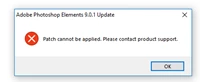
Help?!! Error installing Photoshop Elements

  • July 26, 2018
  • 1 reply
  • 356 views

Hi, I am trying to install an update (9.0.1) for Photoshop Elements 9 but it keeps giving me this error and there doesn't seem to be a way to contact Adobe. Does anyone know how to get the update to install? I am basically trying to get my raw files to open in Photoshop. Your help is much appreciated

.
    This topic has been closed for replies.

    1 reply

    MichelBParis
    Legend
    July 27, 2018

    Raw files from which camera?

    PSE 9 can't be updated to more recent than 6.5 instead of the original 6.1 ACR version.

    Camera Raw plug-in and Adobe application compatibility

    An update for PSE9 may not be necessary.

    FAQ: Will Photoshop Elements work with my camera, or Why won't my raw files open?

    Lady79
    Lady79Author
    Participant
    July 29, 2018

    Thanks, my camera is a Canon EOS T6

    MichelBParis
    Legend
    July 30, 2018

    Lady79  wrote

    Thanks, my camera is a Canon EOS T6

    Cameras supported by Camera Raw

    You would need ACR 9.5 (only available in PSE15 or PSE 2018.)

    You can download the free Adobe DNGconverter mentined in the following faq:

    FAQ: Will Photoshop Elements work with my camera, or Why won't my raw files open?

    That standalone app is used to batch convert a whole folder of your raw files to the DNG raw format that your old PSE9 can read and edit. An additional step, but free and with the same quality.