
Inspiring
March 20, 2019
Answered

how can I make text look more organic on a book cover?

  • March 20, 2019
  • 4 replies
  • 1847 views

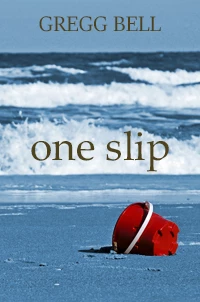
Hi. I'm still working on this cover, and someone told me that the text over the image looked slapped on, that it didn't look organic to the rest of the cover. I agree. He said other literary fiction novels, which this is, have kind of a matte finish to them. I searched online and found some stuff about applying a matte finish to photographs but nothing about text. Any suggestions on what I might do? Thanks. Here's the cover.
    This topic has been closed for replies.
    Correct answer 99jon

    Select the text layer (highlight in blue) and go to the menu

    Layer >> Layer Style >> Style Settings

    You could experiment with a drop shadow or one of the other options

    You can also adjust the layer opacity

    4 replies

    hatstead
    Inspiring
    March 20, 2019

    Consider scalloped bevel effect

    BadStarAuthor
    Inspiring
    March 21, 2019

    Thanks Hatstead. Now that looks like a hardcover book. Very nice. I'll experiment with it.

    rayek.elfin
    Legend
    March 21, 2019

    Thanks for the play.

    Inspiring
    March 20, 2019

    Perhaps this look?

    Add drop shadow, lower Opacity.

    BadStarAuthor
    Inspiring
    March 21, 2019

    Thanks Mark. Yes, I think the dropshadow is going to be what does the trick.

    Legend
    March 20, 2019

    If you see a special finish in text it’s done as an extra ink or varnish, on very special print machinery. Some covers are embossed too: more special machinery. You’ll pay handsomely for this stuff. Then you’ll need to use the right software to make it, probably Illustrator. Non professional software like Photoshop Elements can’t be used to specify special inks. Talk to the printer or publisher about what will work, there is no way anyone, no matter how experienced, could do this without that discussion.

    BadStarAuthor
    Inspiring
    March 21, 2019

    Thanks Test. Good to know. I'm not shooting for quite that level of sophistication, though. (Fortunately.)

    99jon
    99jonCorrect answer
    Legend
    March 20, 2019

    Select the text layer (highlight in blue) and go to the menu

    Layer >> Layer Style >> Style Settings

    You could experiment with a drop shadow or one of the other options

    You can also adjust the layer opacity

    BadStarAuthor
    Inspiring
    March 21, 2019

    Thanks a lot, Jon. That was a very helpful suggestion. Using a dropshadow with a wide size but relatively low opacity made the title blend into the waves more. I think it definitely looks more organic.