Exit
  • Global community
    • Language:
      • Deutsch
      • English
      • Español
      • Français
      • Português
  • 日本語コミュニティ
  • 한국 커뮤니티
1

How do I download and install Photoshop Elements 8 on my Mac OS X High Sierra?

Community Beginner ,
Jan 26, 2018 Jan 26, 2018

I have tried downloading from  Download Photoshop Elements 13, 12, and earlier versions.  When I try downloading, there does not appear to be any installation software. There are some read me files and the only .dmg file is a Bootstrapper.dmg file with an uninstaller (that's not helpful).  I would be very grateful of  any guidance. Thanks.
6.3K
Translate
Report
Community guidelines
Be kind and respectful, give credit to the original source of content, and search for duplicates before posting. Learn more
community guidelines

correct answers 1 Correct answer

Community Expert , Jan 26, 2018 Jan 26, 2018

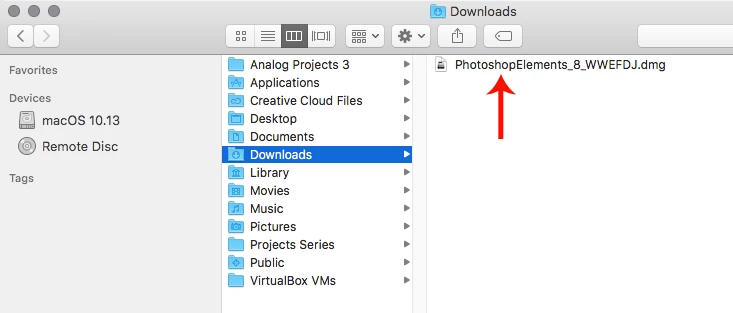
You downloaded the PhotoshopElements_8_WWEFDJ.dmg

pse8.png

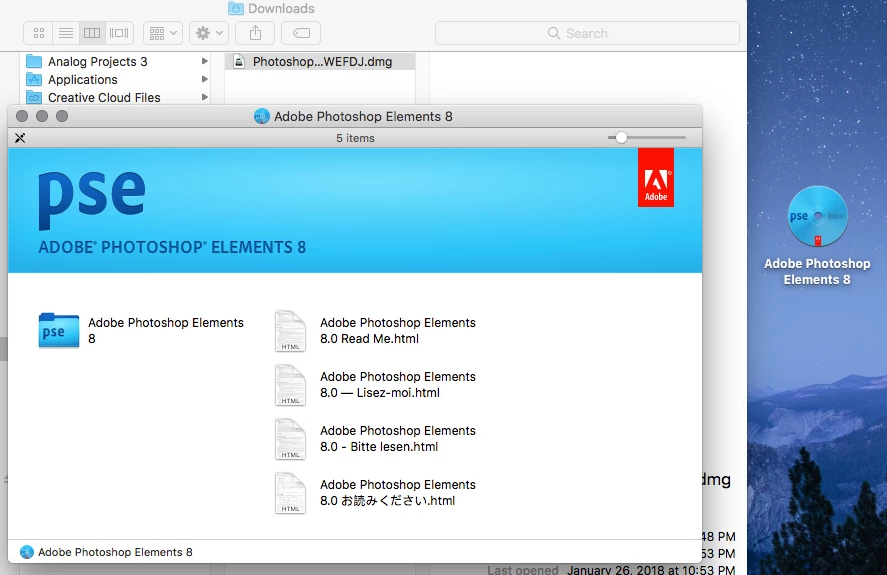
Then you should see this after double clicking on the PhotoshopElements_8_WWEFDJ.dmg

pse81.png

Then double click on Adobe Photoshop Elements 8 and you should see this, which has Setup.app that starts the pse 8 install.

pse82.png

Translate
Community Expert ,
Jan 26, 2018 Jan 26, 2018
Translate
Report
Community guidelines
Be kind and respectful, give credit to the original source of content, and search for duplicates before posting. Learn more
community guidelines
New Here ,
Jan 26, 2018 Jan 26, 2018

That appears to be the exact same as where Job19:25 was trying to download

Translate
Report
Community guidelines
Be kind and respectful, give credit to the original source of content, and search for duplicates before posting. Learn more
community guidelines
Community Expert ,
Jan 26, 2018 Jan 26, 2018

  wrote

That appears to be the exact same as where Job19:25 was trying to download

His link and my link bring me to two different web pages.

Translate
Report
Community guidelines
Be kind and respectful, give credit to the original source of content, and search for duplicates before posting. Learn more
community guidelines
Community Expert ,
Jan 26, 2018 Jan 26, 2018

You downloaded the PhotoshopElements_8_WWEFDJ.dmg

pse8.png

Then you should see this after double clicking on the PhotoshopElements_8_WWEFDJ.dmg

pse81.png

Then double click on Adobe Photoshop Elements 8 and you should see this, which has Setup.app that starts the pse 8 install.

pse82.png

Translate
Report
Community guidelines
Be kind and respectful, give credit to the original source of content, and search for duplicates before posting. Learn more
community guidelines
Community Beginner ,
Jan 26, 2018 Jan 26, 2018

Thank you! This helps me understan. I’ll give it another try tomorrow.

Translate
Report
Community guidelines
Be kind and respectful, give credit to the original source of content, and search for duplicates before posting. Learn more
community guidelines
Community Beginner ,
Jan 27, 2018 Jan 27, 2018
LATEST

Jeff Arola, that was the answer that I was looking for. Now that I see it, I’m not sure how I missed it before. Thanks again

Translate
Report
Community guidelines
Be kind and respectful, give credit to the original source of content, and search for duplicates before posting. Learn more
community guidelines