Inspiring
March 1, 2019
Answered

How do I get rid of lines when cropping?

  • March 1, 2019
  • 1 reply
  • 2169 views

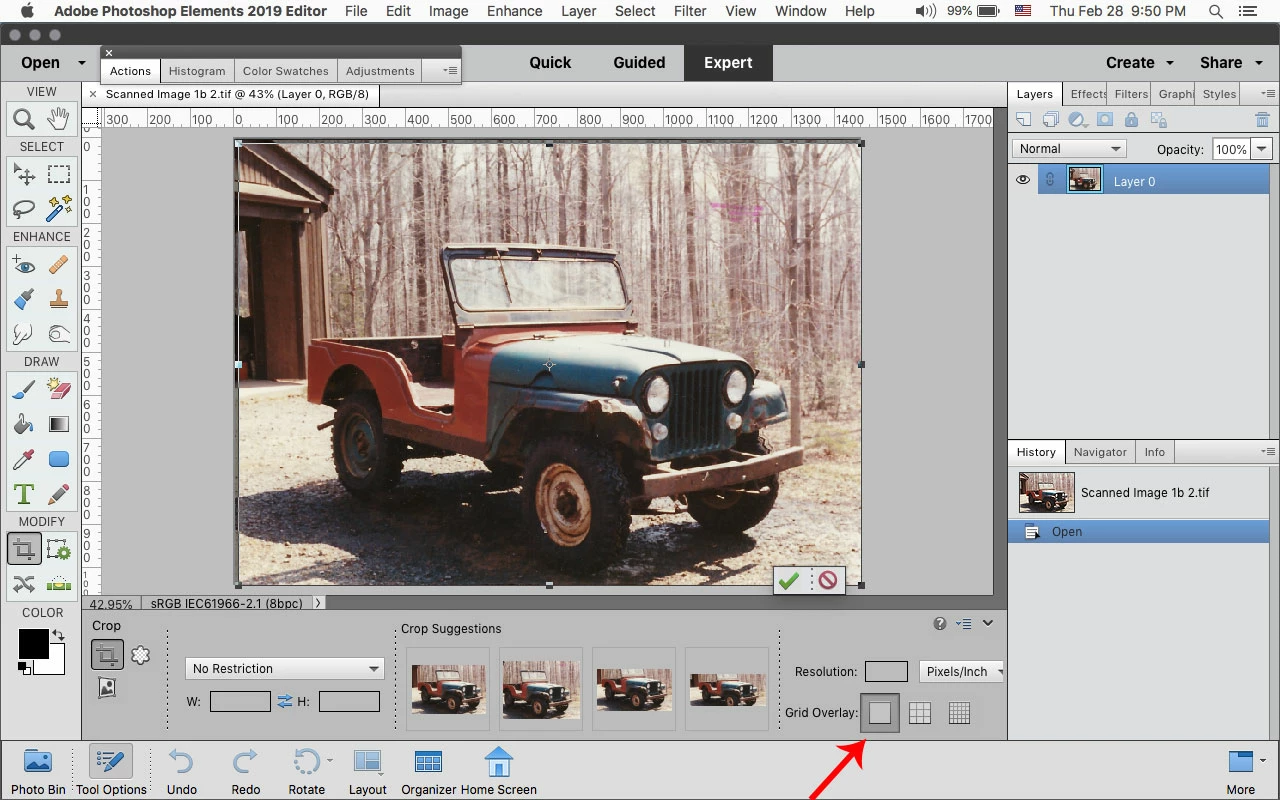
I have PE 2019 and I'd like to get rid of the lines inside the image I'm trying to crop. I find them very distracting. Is there any way to do this? Thanks.

    This topic has been closed for replies.
    Correct answer Jeff Arola

    You can turn off the Grid Overlay in the Crop Tool options.
    1 reply

    Jeff Arola
    Community Expert
    Jeff ArolaCommunity ExpertCorrect answer
    Community Expert
    March 1, 2019

    You can turn off the Grid Overlay in the Crop Tool options.

    Participant
    March 11, 2021

    Can you switch off the very small gridlines when you rotate using this Crop Tool? I have tried, by removing the grid overlay, but they still appear - these are distracting as very close together. Note - it only displays the tight grid, shown attached, when performing the rotate.

    PSE 2020 on Mac Catalina 10.15.7 

    Thanks.

    richard.

    Jeff Arola
    Community Expert
    Community Expert
    March 11, 2021

    As far as i know, the Grid Lines that appear while rotating the Crop Tool cannot be removed.


    That would, however, make for good feature request which you can post over here:


    https://feedback.photoshop.com/