Participant
June 1, 2023
Answered

How do I turn of notifications

  • June 1, 2023
  • 3 replies
  • 3329 views

MacOS, 2023 Elements


Pops up notifications in the lower left corner every time I run it. How do I turn this off?

Correct answer Greg_S.

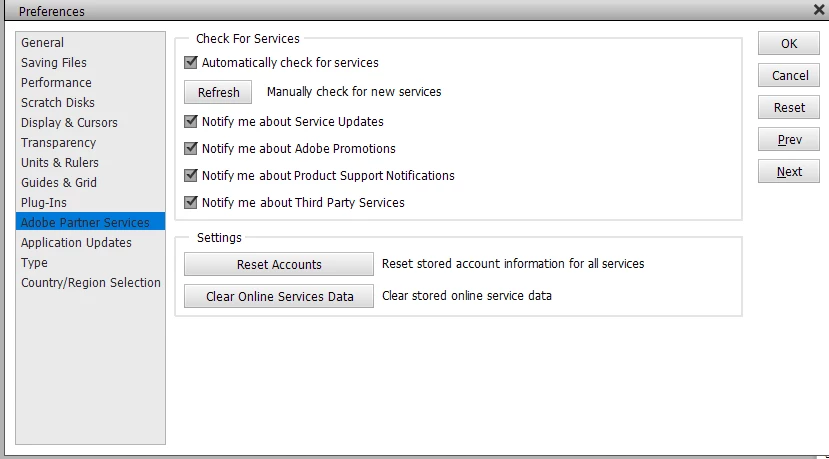
Go to Edit>Preferences>Adobe Partner Services and uncheck all the boxes.  Please let us know if that works for you.
3 replies

Greg_S.
Community Expert
Greg_S.Community ExpertCorrect answer
Community Expert
June 10, 2023

Go to Edit>Preferences>Adobe Partner Services and uncheck all the boxes.  Please let us know if that works for you.

Participant
December 16, 2023

I can't find the screen you're talking about to Edit Preferences. I have Photoshop elements 2023 which I purchased through Amazon. I get pop ups asking me to update to the 2024 version every 15 minutes or so. I close the dialog box but it pops right back up. I can't find any way to edit my notifications.


Participant
October 12, 2024

Don't even bother trying to find it. Because I have found the settings, have disabled everything related to notifications, but CC still fire popups onto my screen like a virus.

bjbarouchAuthor
Participant
June 9, 2023

Nothing stops thesse demonic fiends. I can dismiss each one of course, but why do they show up in the first place? They always say something stupid like, "Would you like to learn about <this topic I chose at random that has nothign to do with what you are currently doing>?"

Greg_S.
Community Expert
Community Expert
June 2, 2023

What kind of pop-up?  If you haven't already done so, try clicking on it once and it should disappear after that.

Participant
December 16, 2023

I found Edit and Preferences and Adobe Parter Services and unchecked all the boxes, but I still get the pop-ups. Moslty it is "Buy Adobe Photoshop Elements 24."